

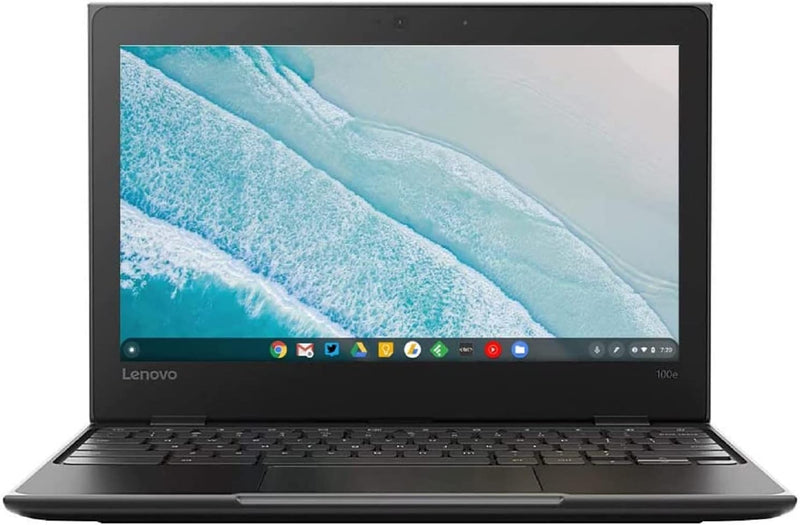


Lenovo
Lenovo 100E Chromebook G2 Mtk 11.6" HD ChromeOS Laptop
★★★★★
MediaTek MT8173C and Chrome OS deliver a locked-down, fast-booting learning platform that survives the classroom floor for under $200.
$48.99*$161.96Save 69%
View on Amazon
✓ In Stock on Amazon.com
Price history
*Price sourced from Amazon.com. Last updated:Jul 17, 2026.Price and availability are subject to change.
Affiliate Disclosure: Studio Supplies may earn a commission from qualifying purchases made through links on this page, at no additional cost to you. This helps support our editorial team.
Notice a mistake? Let Us Know
Overview
Key Features
Works almost as hard as a teacher does
System ram type, ddr4_sdram
Operating system, Chrome OS
Memory storage capacity, 4.0
Specifications
Processor
MediaTek MT8173C (quad-core, up to 2.1 GHz)
Operating System
Chrome OS
Memory
4GB DDR4 SDRAM
Storage
16GB eMMC TLC SSD
Display
11.6-inch HD (1366 x 768)
Graphics
PowerVR GX6250
Color
Black
Pros & Cons
👍 Pros
- Chrome OS boots in under 10 seconds from cold start and resumes from sleep nearly instantly, maintaining consistent responsiveness that ARM-based Windows laptops at this price point cannot match.
- The 4GB DDR4 SDRAM provides enough headroom for 15–20 active browser tabs alongside a Google Meet session — the practical ceiling for most student workflows.
- 16GB eMMC TLC storage, while modest in absolute terms, is fast enough that Chrome OS never feels storage-bottlenecked during normal use.
- MIL-SPEC construction addresses the actual failure modes of student hardware — the reinforced chassis and spill-resistant keyboard are engineering choices that reduce total cost of ownership in K–12 deployments.
- The 11.6-inch form factor at HD (1366 x 768) resolution hits the minimum usable pixel density for text-heavy educational content without adding weight or cost.
👎 Cons
- The MT8173C is a 2016-era SoC — its single-core performance lags behind even entry-level Intel Celeron N-series chips, which becomes noticeable in JavaScript-heavy web apps and complex Google Sheets operations.
- 16GB eMMC storage is a hard ceiling with no expansion slot; users who push beyond cloud-native workflows will exhaust local storage quickly, requiring careful file management.
- The 1366 x 768 display resolution is below the 1080p floor that most current educational content and video platforms are optimized for, resulting in letterboxing or visible downscaling on some materials.
- PowerVR GX6250 GPU support in modern Android apps is inconsistent — some applications drop frames or render incorrectly due to driver compatibility gaps with newer graphics APIs.
Frequently Asked Questions
What processor does this Chromebook use and what does that mean for day-to-day performance?
The MT8173C is a quad-core ARM-based SoC from MediaTek running at up to 2.1 GHz, paired with a PowerVR GX6250 GPU. It handles Google Docs, Classroom, Meet, and web-based learning apps without issue, but it is not suited for video editing, heavy tab multitasking beyond 8–10 tabs, or Android apps with significant GPU demands.
Is 16GB of eMMC storage sufficient for a student?
For Chrome OS, yes — the operating system is lightweight and most work is cloud-native through Google Drive. The constraint appears when storing offline files, Android apps, or Linux apps locally. Students working primarily in Google Workspace will rarely feel the 16GB limit; those downloading media or large app packages will.
Can this Chromebook run Android apps?
Chrome OS on the 100E Gen 2 supports the Google Play Store for Android apps. Performance is adequate for most educational Android apps, though GPU-intensive games and complex productivity apps will be constrained by the PowerVR GX6250's capabilities relative to current mobile SoCs.
How durable is this Chromebook for student use?
The 100E Gen 2 is built to MIL-SPEC durability standards, including drop resistance and a reinforced chassis designed for K–12 environments. The rubber bumpers and spill-resistant keyboard directly address the most common classroom failure modes.
Does it support the latest Chrome OS features and security updates?
Lenovo's Auto Update Expiration (AUE) date for this model should be verified against Google's official AUE list before purchase, as Chrome OS devices receive automatic updates only through their published end-of-support date — a critical consideration for institutional buyers planning multi-year deployments.
Related Products


