



Lenovo
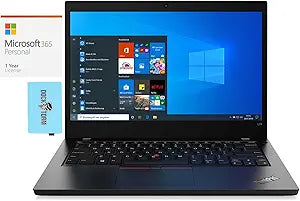
Lenovo 20U5S0N100-3727-41453 ThinkPad L14 Ryzen 5 Pro Laptop
1920x10808GB DDR465WBluetooth 5.2USB 3.1
Lenovo ThinkPad L14 business laptop with Ryzen 5 Pro, 1TB SSD, and Windows 10 Pro — built for mobile professionals who need reliability.
Check availability
Affiliate Disclosure: Studio Supplies may earn a commission from qualifying purchases made through links on this page, at no additional cost to you. This helps support our editorial team.
Notice a mistake? Let Us Know
Overview
Key Features
14.0" Full HD (1920x1080) 60Hz IPS Display; 802.11ax Wifi, Bluetooth 5.2, Ethernet LAN (RJ-45), 720p HD Webcam, .
AMD Ryzen 5 PRO 4650U Hexa Core 4th Gen AMD Ryzen 5 PRO 4650U 2.10GHz Processor
8GB DDR4 SODIMM; 65W Power Supply, 3-Cell 45 WHr Battery; Black Color, .
1TB PCIe NVMe SSD; 2 USB 3.1 Gen1, 1 HDMI, USB 3.1 Type-C Gen1, USB 3.2 Type-C Gen2, Micro Windows 10 Pro-64.,
Includes Microsoft 365 Personal 1 Year Subscription for 1 User
Specifications
Processor
AMD Ryzen 5 PRO 4650U (6-Core, 12-Thread, up to 4.0 GHz, 8MB Cache)
Memory
8GB DDR4 SODIMM
Storage
1TB PCIe NVMe SSD
Graphics
AMD Radeon Integrated Graphics
Display
14.0" Full HD (1920x1080) 60Hz IPS
Operating System
Windows 10 Pro 64-bit
Wi-Fi
802.11ax (Wi-Fi 6)
Bluetooth
5.2
Ethernet
RJ-45 LAN
Webcam
720p HD
Ports
2x USB 3.1 Gen1, 1x HDMI, 1x USB 3.1 Type-C Gen1, 1x USB 3.2 Type-C Gen2, Micro SD Reader, Headphone/Mic Combo
Battery
3-Cell 45 WHr
Power Supply
65W
Dimensions
13 x 9.25 x 1 in
Weight
3.6 lb
Color
Black
Software Included
Microsoft 365 Personal (1 Year)
Pros & Cons
👍 Pros
- 1TB PCIe NVMe SSD provides fast, spacious storage for applications and files
- AMD Ryzen 5 PRO 4650U offers 6 cores and 12 threads with enterprise security features like AMD Memory Guard
- 14-inch Full HD IPS display delivers clear visuals with wide viewing angles in a portable form factor
- Comprehensive port selection includes USB-C, USB 3.1, HDMI, Ethernet, and a microSD reader without needing dongles
- ThinkPad build quality and keyboard are well-regarded for comfort and durability during extended use
👎 Cons
- 8GB of RAM is limiting for heavy multitasking and should be upgraded for professional workloads
- The 45 WHr battery is on the smaller side for a 14-inch business laptop, reducing unplugged runtime
- The 720p webcam produces mediocre video quality for video conferencing compared to 1080p alternatives
- Ships with Windows 10 Pro rather than Windows 11, requiring a manual upgrade for the latest features
- Integrated AMD Radeon graphics are not suitable for graphic design, video editing, or any GPU-intensive tasks
Frequently Asked Questions
What does "Ryzen 5 PRO" mean compared to a standard Ryzen 5?
The AMD Ryzen 5 PRO 4650U includes enterprise-grade features not found in consumer Ryzen chips, including AMD PRO security with hardware-level encryption, AMD Memory Guard for full-memory encryption, and enhanced manageability tools for IT departments. Performance is comparable to the consumer variant.
Has this ThinkPad L14 been modified from its original factory configuration?
Yes, this unit has been upgraded by GreatPriceTech, who installed the 1TB PCIe NVMe SSD and tested the system to ensure all components perform to the advertised specifications. All installed components are brand new.
How is the battery life on this ThinkPad L14?
The L14 Gen 1 includes a 3-cell 45 WHr battery with a 65W power supply. With the Ryzen 5 PRO 4650U's efficient power profile, you can expect moderate battery life suitable for meetings and mobile work, though heavy workloads will reduce runtime. The smaller 45 WHr battery is a trade-off of this configuration.
Can the RAM be upgraded beyond 8GB?
The ThinkPad L14 Gen 1 supports DDR4 SODIMM memory upgrades. The included 8GB can be expanded, which is recommended if you plan to run multiple applications or virtual machines simultaneously.
Can this laptop be upgraded from Windows 10 Pro to Windows 11?
The AMD Ryzen 5 PRO 4650U processor is on Microsoft's supported list for Windows 11, so this machine is eligible for the free upgrade to Windows 11 Pro through Windows Update or the Installation Assistant.
Related Products


