



Lenovo
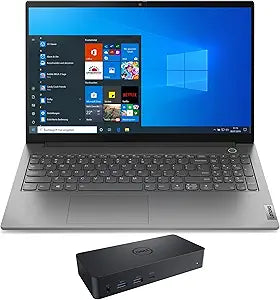
Lenovo 20VE003KUS-4301-42776 ThinkBook 15 G2 i7 12GB RAM Laptop
1920x1080i7-1165G712GB RAM12GB DDR4500GB HDD
Tiger Lake i7 paired with dual-storage architecture and Thunderbolt 4 delivers workstation-class productivity in a 15-inch business chassis.
Check availability
Affiliate Disclosure: Studio Supplies may earn a commission from qualifying purchases made through links on this page, at no additional cost to you. This helps support our editorial team.
Notice a mistake? Let Us Know
Overview
Key Features
15.6" Full HD (1920x1080) 60Hz IPS Display; Wi-Fi 6 AX201 Wifi, Bluetooth 5.1, 720p HD Webcam, FP Security, Backlit, .
Intel Core i7-1165G7 Quad Core 11th Gen Intel Core i7-1165G7 2.80GHz Processor
12GB DDR4 RAM (8GB Onboard + 4GB SODIMM); 65W Power Supply, 3-Cell 45 WHr Battery; Mineral Grey Color, .
128GB PCIe NVMe SSD + 500GB HDD; 2 USB 3.2 Gen1, 1 HDMI, Thunderbolt 4 (Type-C), USB 3.2 Type-C Gen2, Windows 10 Pro-64.,
Includes Universal Dock D6000
Specifications
Brand
Lenovo
Model
ThinkBook 15 G2 ITL (20VE003KUS)
Processor
Intel Core i7-1165G7, 4-Core, 2.80GHz (up to 4.7GHz Turbo)
RAM
12GB DDR4 (8GB Onboard + 4GB SO-DIMM)
Storage
128GB PCIe NVMe SSD + 500GB HDD
Display
15.6" Full HD (1920x1080) IPS, 60Hz
Graphics
Intel Iris Xe (Integrated)
Operating System
Windows 10 Pro 64-bit
Wireless
Wi-Fi 6 (AX201)
Bluetooth
5.1
Webcam
720p HD
Ports
2x USB 3.2 Gen1, 1x HDMI, Thunderbolt 4 (USB-C), USB 3.2 Type-C Gen2
Battery
3-Cell, 45 WHr
Power Adapter
65W
Color
Mineral Grey
Included
Universal Dock D6000
Pros & Cons
👍 Pros
- i7-1165G7 turbos to 4.7GHz on single-core tasks, delivering strong single-threaded application performance
- Thunderbolt 4 port enables 40Gbps peripherals, eGPU enclosures, and dual 4K display output from a single cable
- Dual-storage layout puts the NVMe SSD on the fast path and relegates bulk storage to the HDD, maximizing OS/app responsiveness
- Wi-Fi 6 (AX201) supports 160MHz channel width for up to 2.4Gbps theoretical throughput on compatible routers
- Included D6000 dock expands the laptop into a multi-display workstation without additional purchase
👎 Cons
- 45 WHr battery is undersized for the i7-1165G7's power envelope — expect 5–6 hours of office workload, less under load
- 128GB NVMe SSD fills quickly with OS, apps, and Windows updates — active project storage will overflow to the slower HDD
- 8GB of RAM is soldered and cannot be removed, making memory upgrades partial rather than full replacement
- Intel Iris Xe has no dedicated VRAM — it draws from system RAM, reducing effective usable memory under GPU load
- 720p webcam is below the 1080p standard now common on competing business laptops
Frequently Asked Questions
What is the effective performance difference between the 128GB SSD and 500GB HDD in daily use?
The PCIe NVMe SSD handles OS boot, application launch, and active project files — expect boot times under 15 seconds and application launches 3–5x faster than HDD. The 500GB HDD is best reserved for archival storage, large media libraries, or infrequently accessed data where its ~100MB/s throughput is not a bottleneck.
What does Thunderbolt 4 enable that standard USB-C does not?
Thunderbolt 4 on this ThinkBook delivers up to 40Gbps bidirectional bandwidth, support for dual 4K external displays, and daisy-chaining of up to six TB4 peripherals. Standard USB 3.2 Gen 2 tops out at 10Gbps and does not support display daisy-chaining or eGPU enclosures.
Is the RAM on this ThinkBook 15 G2 upgradeable?
Partially. The configuration ships with 8GB soldered on the motherboard and 4GB on a single SO-DIMM slot, totaling 12GB. The SO-DIMM slot supports up to 32GB, allowing a single-stick upgrade to a maximum of approximately 40GB — but the 8GB onboard cannot be removed or replaced.
How does the Intel Iris Xe integrated graphics perform for light creative work?
Iris Xe is a significant step above previous Intel integrated graphics. It handles 4K video playback, basic photo editing in Lightroom, and light 2D design work without issue. It is not suitable for 3D rendering, GPU-accelerated video encoding at scale, or any GPU-compute workload that a discrete card would handle.
What does the included Universal Dock D6000 add to this laptop's connectivity?
The D6000 connects via USB-C and adds up to six video outputs (supporting dual 4K or triple 1080p configurations), additional USB-A ports, Gigabit Ethernet, and audio jacks. It converts the ThinkBook into a capable multi-monitor workstation when docked.
Related Products


