



Lenovo
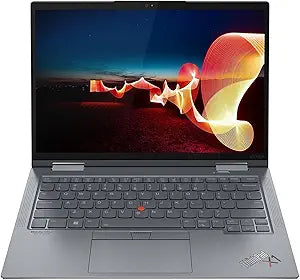
Lenovo 21CD0047US ThinkPad X1 Yoga Gen 7 14" Touch i7 16GB 512GB SSD
3840 x 2400512GB SSD
The world's lightest 14" business convertible pairs a 3840×2400 OLED-class display with 12th Gen Core i7 for executives who work in all four modes.
View price on Amazon
Affiliate Disclosure: Studio Supplies may earn a commission from qualifying purchases made through links on this page, at no additional cost to you. This helps support our editorial team.
Notice a mistake? Let Us Know
Overview
Key Features
With 16 GB LPDDR5 of memory, runs as many programs as you want without losing the execution
The 14" 3840 x 2400 screen provides a great movie watching experience
512 GB total SSD capacity is enough to store your essential documents and files, favorite songs, movies and pictures
Specifications
Processor
Intel Core i7-1265U (12th Gen), 10-core (2P+8E), 15W
Memory
16GB LPDDR5 (soldered)
Storage
512GB SSD
Display
14" Touchscreen, 3840×2400 (WQUXGA)
Form Factor
2-in-1 Convertible (4 modes)
Stylus
Integrated ThinkPad Pen Pro (garage storage)
Operating System
Windows (pre-installed)
Model
21CD0047US
Brand
Lenovo
Pros & Cons
👍 Pros
- 3840×2400 WQUXGA touchscreen at 14" delivers over 320 PPI pixel density — PDF annotation, spreadsheet work, and presentation review are noticeably cleaner than on 1920×1200 panels in the same class.
- Integrated ThinkPad Pen Pro garages inside the chassis, meaning it is always available for stylus input without a separate case or accessory pouch.
- Four-mode convertible design (laptop, tent, stand, tablet) makes the X1 Yoga a single device that handles conference room presentations, in-flight reading, and desk productivity without separate hardware.
- 16GB LPDDR5 provides sufficient bandwidth headroom for the i7-1265U's memory-dependent integrated graphics, improving light creative workloads compared to LPDDR4x configurations.
- 512GB SSD storage offers enough capacity for full OS, business application stack, and active project files without requiring an external drive for day-to-day use.
👎 Cons
- 16GB LPDDR5 is soldered and non-upgradeable — users running multiple virtual machines, heavy browser sessions, or memory-intensive development environments will find this ceiling constraining with no hardware recourse.
- The i7-1265U is a 15W efficiency processor — sustained CPU-intensive tasks like video encoding or large compilation jobs will throttle sooner than in 28W or 45W mobile counterparts.
- Running the 3840×2400 display at native resolution accelerates battery drain — real-world battery life under productivity workloads at native resolution will fall short of manufacturer estimates.
- As a premium thin-and-light business convertible, the X1 Yoga Gen 7 commands a price tier that makes it a difficult justification for users who primarily need laptop-mode productivity without the convertible form factor.
Frequently Asked Questions
What does the 3840×2400 resolution mean in practical terms on a 14" display, and is it worth the battery trade-off?
At 3840×2400 (WQUXGA), pixel density exceeds 320 PPI on a 14" panel — text rendering is razor-sharp, and UI scaling at 200% still leaves substantial screen real estate for multitasking. The resolution draws more GPU power than 2560×1600, so expect battery life to be shorter at native resolution than spec-sheet figures suggest. Most users running productivity software at 150% scaling see a meaningful improvement in battery duration without noticeable fidelity loss.
How does the i7-1265U perform compared to higher-TDP mobile processors in a thin convertible chassis?
The i7-1265U is a 15W UP3 processor — a low-power efficiency-first design rather than a performance-first 28W or 45W mobile CPU. Its 10-core (2P+8E) architecture handles sustained office workloads, multitasking, and light creative tasks well, but sustained CPU-intensive workloads like video encoding or large dataset processing will be power-throttled faster than H-series counterparts. For the intended business use case, this trade-off favors portability and battery life.
Does the 16GB LPDDR5 memory support upgrading or is it soldered?
LPDDR5 in the X1 Yoga Gen 7 is soldered directly to the motherboard — it cannot be upgraded after purchase. 16GB is the configuration here; buyers who anticipate memory-intensive workloads such as large virtual machines or heavy browser tab usage should evaluate whether this ceiling is sufficient before purchasing.
Is the integrated stylus included with this unit, and what does it enable?
The ThinkPad X1 Yoga Gen 7 features an integrated ThinkPad Pen Pro that garages inside the chassis — it is part of the laptop, not a separate accessory. The touchscreen in tent and tablet mode supports stylus annotation, diagram sketching, and document markup directly on-screen, which is the primary differentiation of the convertible form factor for business users.
What connectivity options are available, and does this model include Thunderbolt?
The i7-1265U platform supports Thunderbolt 4, which provides 40 Gbps bandwidth per port for external GPU docks, high-resolution external displays, and fast external NVMe storage. The specific port configuration includes USB-C Thunderbolt 4 ports alongside standard USB-A and HDMI — confirming before purchase against your specific docking station is recommended.
Related Products


