

Lenovo
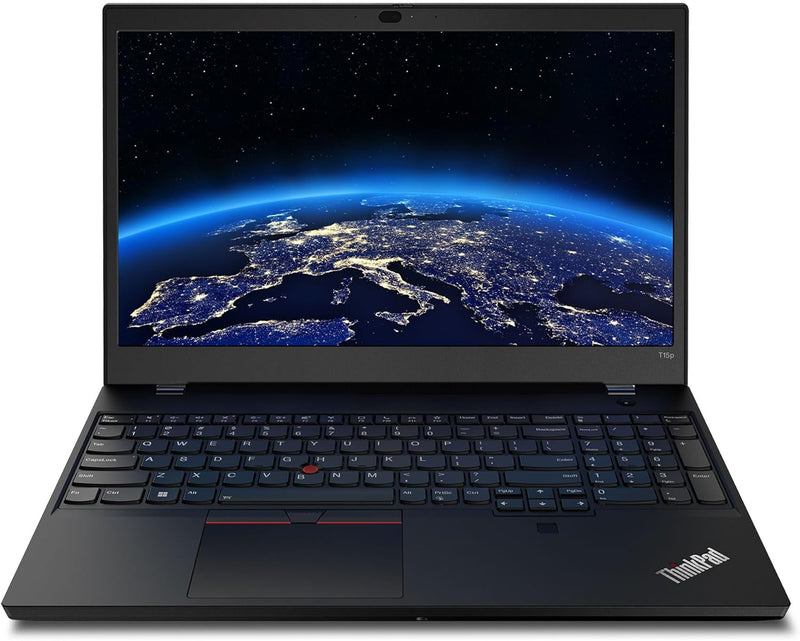
Lenovo 21DA000XUS ThinkPad T15p Gen 3 i7-12700H 32GB 1TB SSD UHD Laptop
UHD3840 x 2160i7-12700H1TB SSD1 TB SSD
A 14-core i7-12700H paired with RTX 3050 and a 3840×2160 panel gives professionals a desktop-class compute-to-display ratio in a portable chassis.
$2,629.00*
Check availability
*Price sourced from Amazon.com. Last updated:Jul 15, 2026.Price and availability are subject to change.
Affiliate Disclosure: Studio Supplies may earn a commission from qualifying purchases made through links on this page, at no additional cost to you. This helps support our editorial team.
Notice a mistake? Let Us Know
Overview
Key Features
Intel Core i7 2.30 GHz processor provides lightning fast speed and peak performance for the toughest of tasks and games
With 32 GB of memory, runs as many programs as you want without losing the execution
15.6" display with 3840 x 2160 resolution showcases movies, games and photos with impressive clarity
1 TB SSD for spacious storage with much faster data transfer speed than standard hard drives
Specifications
Processor
Intel Core i7-12700H, 14-Core (6P+8E), 2.30 GHz base / 4.70 GHz Turbo
Memory
32GB DDR5 SO-DIMM
Storage
1TB NVMe SSD
Display
15.6" IPS UHD (3840×2160)
Graphics
NVIDIA GeForce RTX 3050, 4GB GDDR6
Operating System
Windows 11
Color
Black
Brand
Lenovo
Model
21DA000XUS
Pros & Cons
👍 Pros
- i7-12700H's 14-core hybrid architecture sustains higher multi-threaded throughput than previous-gen 8-core laptop CPUs, measurably reducing compile and render times.
- 3840×2160 IPS panel provides pixel density critical for detail-oriented professional work — photo editing, CAD review, and data-dense spreadsheets all benefit directly.
- 32GB DDR5 SO-DIMM configuration handles large datasets and multi-application workflows without paging, and slots are user-accessible for future 64GB expansion.
- 1TB NVMe SSD delivers sequential reads well above 3,000 MB/s on PCIe Gen 4 (platform-dependent), a real-world improvement over SATA SSDs for large file transfers.
- ThinkPad chassis retains MIL-SPEC durability ratings and the best-in-class keyboard — tangible advantages for professionals logging heavy daily keystrokes.
👎 Cons
- RTX 3050 with 4GB GDDR6 VRAM is the configuration's primary bottleneck for GPU-intensive professional workloads; 4K texture sets and large 3D scenes will exhaust VRAM and force system RAM fallback.
- Driving a 3840×2160 panel significantly reduces battery runtime compared to lower-resolution ThinkPad T-series configs — real-world battery life under workload will be well below the rated maximum.
- The 15.6" 4K form factor places this chassis in heavier laptop territory; weight and fan noise under sustained CPU/GPU load are considerations for frequent travelers.
- No discrete WWAN (LTE/5G) option is listed, meaning mobile connectivity depends on external hotspotting rather than an integrated cellular modem.
Frequently Asked Questions
How does the i7-12700H's hybrid architecture affect real-world performance?
The 12700H uses Intel's Alder Lake hybrid design: 6 Performance-cores (P-cores) at up to 4.7 GHz and 8 Efficiency-cores (E-cores), totaling 14 cores and 20 threads. P-cores handle latency-sensitive tasks like compiling or rendering a single complex frame; E-cores absorb background threads. The result is higher sustained multi-threaded throughput than same-generation monolithic designs, and better battery life during light workloads.
Is the 32GB of RAM soldered or upgradeable?
The T15p Gen 3 uses SO-DIMM slots, not soldered memory, meaning the 32GB configuration is expandable. The platform supports up to 64GB DDR5, so users with memory-intensive workloads have a clear upgrade path without replacing the machine.
Will the RTX 3050 4GB handle workstation-class applications like CAD or 3D rendering?
Yes, for entry-level workstation tasks. The RTX 3050 supports CUDA and NVIDIA's Quadro driver stack via Studio drivers, making it capable for Blender rendering, AutoCAD, and Adobe Premiere GPU acceleration. However, 4GB of GDDR6 VRAM becomes a constraint with large textures or complex 3D scenes — professionals handling high-poly assets regularly should consider higher VRAM options.
What does the UHD (3840×2160) display resolution mean for productivity versus battery life?
At 3840×2160, the panel renders at four times the pixel density of a standard 1080p display, which is a material difference for detail work — photo editing, engineering drawings, and dense data visualization. The trade-off is GPU load: driving a 4K panel at full resolution reduces battery life compared to a 1080p or 2K panel, as the GPU must push four times the pixels for the same frame content.
Does this laptop support Thunderbolt 4?
The ThinkPad T15p Gen 3 includes a Thunderbolt 4 port, enabling 40Gb/s data transfer, external GPU enclosures, and daisy-chaining up to two 4K displays or one 8K display — a significant I/O capability for a business laptop.
Related Products


