

Lenovo
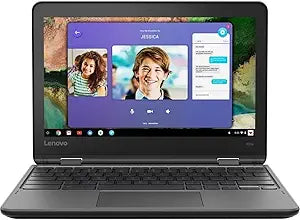
Lenovo 300e 2nd Gen 11.6" Touch Chromebook
Versatile Learning Companion: Lenovo Chromebook 300e 2nd Gen (Renewed) The Lenovo Chromebook 300e 2nd Gen is a flexible and durable device designed for the modern classroom. With its multi-touch display, 360° Yoga Hinge, and reliable performance, this Chromebook is perfect for students and educa...
Check availability
Affiliate Disclosure: Studio Supplies may earn a commission from qualifying purchases made through links on this page, at no additional cost to you. This helps support our editorial team.
Notice a mistake? Let Us Know
Overview
Versatile Learning Companion: Lenovo Chromebook 300e 2nd Gen (Renewed)
The Lenovo Chromebook 300e 2nd Gen is a flexible and durable device designed for the modern classroom. With its multi-touch display, 360° Yoga Hinge, and reliable performance, this Chromebook is perfect for students and educators alike.
Specifications:
- Display: 11.6" Touch
- Memory: 4GB
- Storage: 32GB eMMC
- Processor: AMD A4-9120C 1.6GHz
- Operating System: ChromeOS
- Hinge: 360° Yoga Hinge
- Webcam: 720p
- Wireless: AC WiFi with Bluetooth 4.2
Specifications
Brand
Lenovo
Model
300e 2nd Gen
Screen Size
11.6 inches
Touchscreen
Yes
Operating System
Chrome OS
Frequently Asked Questions
Is the Lenovo 300e 2nd Gen Chromebook suitable for students?
Yes, the Lenovo 300e 2nd Gen is designed with educational environments in mind, featuring an 11.6-inch touchscreen and running on the Google Chrome OS.
Can this Chromebook be used for tasks beyond web browsing?
While optimized for cloud-based tasks and web browsing, this Chromebook can run Android apps from the Google Play Store, expanding its functionality for productivity and entertainment.
What are the benefits of Chrome OS on this device?
Chrome OS offers a fast boot time, integrated security features, and automatic updates, providing a low-maintenance and secure computing experience.
Is the 11.6-inch screen large enough for daily use?
The 11.6-inch screen is compact for portability, which is beneficial for travel and small workspaces, but may feel restrictive for extensive multitasking or detailed graphic work.
Does this model include a stylus for the touchscreen?
The product title specifies "Touch Chromebook," confirming touchscreen functionality, but it does not explicitly state the inclusion of a stylus.
What kind of applications can I run on this Chromebook?
You can run web-based applications and many Android apps available through the Google Play Store, providing access to a wide range of tools for work and leisure.
Related Products


