

Lenovo
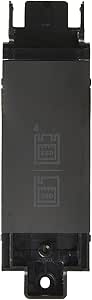
Lenovo 4XB0K59917 ThinkPad M.2 SSD Tray Adapter
★★★★★
Mount an M.2 SSD in your ThinkPad's storage bay with a purpose-built adapter that ensures proper alignment and connectivity.
$44.99*
View on Amazon
✓ In Stock on Amazon.com
*Price sourced from Amazon.com. Last updated:Jul 15, 2026.Price and availability are subject to change.
Affiliate Disclosure: Studio Supplies may earn a commission from qualifying purchases made through links on this page, at no additional cost to you. This helps support our editorial team.
Notice a mistake? Let Us Know
Overview
Key Features
Designed For: ThinkPad L560 20F1, 20F2; P50 20EN, 20EQ; P70 20ER, 20ES; ThinkPad Yoga 460 20EL, 20EM
Product Type: storage bay adapter
Made by Lenovo
Specifications
Brand
Lenovo
Model
4XB0K59917
Product Type
Storage Bay Adapter
Color
Black
Compatibility
ThinkPad L560 (20F1, 20F2), P50 (20EN, 20EQ), P70 (20ER, 20ES), Yoga 460 (20EL, 20EM)
Pros & Cons
👍 Pros
- OEM Lenovo part guarantees exact dimensional fit and connector alignment with supported ThinkPad bays.
- Enables M.2 SSD installation in a standard storage bay, unlocking faster storage without sacrificing an existing drive slot.
- Simple mechanical adapter with no drivers or firmware required — install the tray and the system recognizes the drive.
- Compatible across four ThinkPad product lines, covering both mobile workstation and ultrabook form factors.
👎 Cons
- Strictly limited to four ThinkPad sub-models — incompatible with any other Lenovo laptops or newer ThinkPad generations.
- Functions only as a physical mounting tray with no electronics, so drive protocol support depends entirely on the host machine's bay controller.
- Lenovo does not clearly document which M.2 key types and lengths the tray accommodates, requiring manual verification.
- Availability can be inconsistent as an older OEM part, with pricing that sometimes exceeds the cost of the M.2 drive itself.
Frequently Asked Questions
Which ThinkPad models does the 4XB0K59917 tray support?
It is compatible with the ThinkPad L560 (20F1, 20F2), P50 (20EN, 20EQ), P70 (20ER, 20ES), and ThinkPad Yoga 460 (20EL, 20EM). Check your machine type against these specific sub-model numbers before purchasing, as other ThinkPad generations use different tray dimensions.
Does this adapter support both SATA and NVMe M.2 drives?
The adapter is a physical tray that seats an M.2 form factor drive into the laptop's storage bay. Whether it passes SATA or NVMe signals depends on your ThinkPad's bay controller — consult Lenovo's hardware maintenance manual for your model to confirm which M.2 protocols the bay supports.
Can I use this tray to add a second drive alongside my existing primary SSD?
Yes, if your compatible ThinkPad has an open M.2 bay slot. The P50 and P70, for example, support multiple storage devices. This tray lets you populate an additional bay with an M.2 SSD without replacing your primary drive.
Does the tray come with mounting screws and installation hardware?
It is an OEM Lenovo storage bay adapter. Confirm the included hardware against your model's service documentation, as some ThinkPad bays use screws that ship with the laptop chassis rather than the tray accessory.
Related Products


