



Lenovo
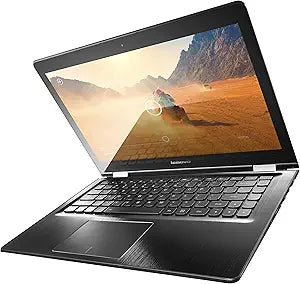
Lenovo 80JK0020US Flex 3 14" Touchscreen Laptop i5 8GB/500GB
★★★★★
1920x1080i5-5500U500GB HDD
A 360-degree hinge and full-HD touchscreen on a 5th-gen Core i5 platform make the Flex 3 one of the more versatile convertible laptops in the under-$500 segment.
Check availability
Affiliate Disclosure: Studio Supplies may earn a commission from qualifying purchases made through links on this page, at no additional cost to you. This helps support our editorial team.
Notice a mistake? Let Us Know
Overview
Key Features
Intel Core i5-5500U 2.2 GHz Processor
8 GB DDR3 RAM
500GB HDD Storage; No optical drive
14 inches 1920x1080 pixels LED-lit Screen
Windows 8.1 Operating System; Black Chassis
Specifications
Processor
Intel Core i5-5500U, 2.2 GHz base (up to 3.0 GHz boost)
Memory
8GB DDR3
Storage
500GB HDD
Display
14-inch LED-lit touchscreen, 1920×1080 (Full HD)
Graphics
Intel HD Graphics 5500 (integrated)
Operating System
Windows 8.1
Hinge Type
360-degree convertible
Optical Drive
None
Color
Black
Pros & Cons
👍 Pros
- 1920×1080 IPS-class touchscreen at 14 inches delivers sufficient pixel density (157 PPI) for crisp text and comfortable all-day use
- 360-degree hinge enables four distinct use modes — laptop, stand, tent, tablet — from a single device without any mechanical detachment
- Core i5-5500U dual-core with 3.0 GHz boost handles Microsoft Office, web browsing, and video playback without perceptible lag
- 500GB HDD provides substantially more raw storage than typical entry-level SSD-only configurations in the same price tier
- Standard 2.5-inch SATA bay allows straightforward SSD upgrade to dramatically improve system responsiveness without chassis disassembly complexity
👎 Cons
- 500GB 5400 RPM HDD is the primary performance bottleneck — sequential reads near 100 MB/s make OS boot and large file operations noticeably slow compared to NVMe alternatives
- 8GB DDR3 (not DDR4) memory is soldered or limited by the Broadwell platform's dual-channel ceiling, constraining memory bandwidth for memory-intensive applications
- Windows 8.1 is past end-of-life as of January 2023, presenting a security liability without an OS upgrade
- At 14 inches and approximately 4.4 lbs, tablet mode is physically unwieldy for extended hand-held use compared to lighter convertibles in the category
- No dedicated GPU means graphics-intensive tasks — including GPU-accelerated creative applications — are handled entirely by Intel HD 5500, which lacks the compute throughput for demanding workloads
Frequently Asked Questions
Does the 360-degree hinge on the Flex 3 14 hold its position reliably in tent and stand modes?
The hinge is rated for four distinct positions — laptop, stand, tent, and tablet — and uses a friction mechanism to hold each configuration. In practice, the hinge holds adequately in tent and stand modes on flat surfaces, though tablet mode at 14 inches is physically large and heavy compared to purpose-built tablets, making extended hand-held use tiring.
Can the 500GB HDD be upgraded to an SSD for better performance?
Yes — the Flex 3's storage bay is accessible and accepts standard 2.5-inch SATA drives. Replacing the HDD with a SATA SSD is the single most impactful upgrade available on this system, reducing boot time from roughly 45 seconds to under 15 seconds and significantly improving application launch responsiveness.
Does the 1920×1080 touchscreen support stylus input?
The display supports standard capacitive multi-touch input. There is no active stylus digitizer listed in the specifications, meaning pressure-sensitive stylus input is not supported — only finger-based touch interaction.
What is the GPU situation — can this handle light photo or video editing?
The Core i5-5500U includes Intel HD Graphics 5500 (Broadwell GT2), which supports hardware video decode acceleration and can handle light photo editing in applications like Lightroom at reduced resolution. It is not suited for GPU-accelerated rendering or real-time video effects in professional NLEs.
Does Windows 8.1 present any compatibility problems with modern software?
Windows 8.1 reached end of support in January 2023, meaning no further security patches are issued. Most modern applications no longer officially support it. Users should plan to upgrade to Windows 10 or Windows 11 (if the hardware meets TPM and CPU requirements) before deploying this system for any security-sensitive work.
Related Products


