



Lenovo
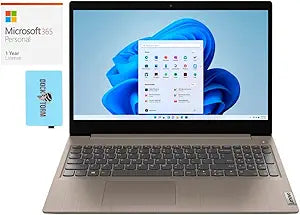
Lenovo 81X800ENUS-3315-28600 IdeaPad 3 i3-1115G4 12GB 2TB SSD Touch Win 11
1366x768i3-1115G412GB DDR42TB SSD65W
2TB of NVMe SSD storage and a 12GB DDR4 configuration give this everyday laptop a storage footprint that eliminates the compromises that define budget computing.
Check availability
Affiliate Disclosure: Studio Supplies may earn a commission from qualifying purchases made through links on this page, at no additional cost to you. This helps support our editorial team.
Notice a mistake? Let Us Know
Overview
Key Features
15.6" HD (1366x768) 60Hz Touchscreen LCD Display; 802.11ax Wifi, Bluetooth 5.2, 720p HD Webcam.
11th Gen Intel Core i3-1115G4 3.00GHz Processor
12GB DDR4 RAM (4GB Onboard + 8GB SODIMM); 65W Power Supply, 2-Cell 35 WHr Battery; Almond Color.
2TB PCIe NVMe SSD; 2 USB 3.2 Gen1, 1 USB 2.0, 1 HDMI, , Windows 11 Home S-Mode-64,
Includes Microsoft 365 Personal 1 Year Subscription for 1 User
Specifications
Processor
Intel Core i3-1115G4 (3.00GHz base, up to 4.1GHz boost)
RAM
12GB DDR4 (4GB onboard + 8GB SO-DIMM)
Storage
2TB PCIe NVMe SSD
Display
15.6" HD (1366x768) 60Hz Touchscreen
Graphics
Intel UHD Graphics
Operating System
Windows 11 Home S-Mode (64-bit)
Wireless
802.11ax (Wi-Fi 6)
Bluetooth
5.2
Webcam
720p HD
Ports
2x USB 3.2 Gen1, 1x USB 2.0, 1x HDMI, SD Card Reader
Battery
2-Cell 35 WHr
Power Supply
65W
Color
Almond
Included Software
Microsoft 365 Personal (1-year, 1 user)
Pros & Cons
👍 Pros
- The 2TB PCIe NVMe SSD provides a storage capacity and access speed combination rarely seen at this price tier — cold boot to desktop in under 20 seconds, with room for years of files without space management.
- The 11th Gen i3-1115G4 handles the processor demands of everyday productivity, video calling, and light multitasking efficiently within its dual-core architecture.
- The 12GB DDR4 RAM configuration (4GB onboard + 8GB SO-DIMM) provides enough working memory headroom to run a browser with many tabs alongside productivity applications without paging to disk.
- 802.11ax (Wi-Fi 6) support delivers faster wireless throughput and better congestion resistance on crowded networks compared to the Wi-Fi 5 found in comparable budget laptops.
- The touchscreen display adds an input modality useful for note-taking, form navigation, and casual media interaction without requiring additional peripherals.
👎 Cons
- The 1366x768 display resolution is a genuine quality ceiling — at 15.6 inches, pixel density is low enough that text and images appear noticeably softer compared to 1080p alternatives at a similar price.
- The 35 WHr battery is small for a 15.6-inch laptop — real-world battery life is likely to fall short of a full workday under moderate use, making a power outlet a practical necessity.
- Windows 11 Home S-Mode ships locked to Microsoft Store apps only; users must manually switch out of S-Mode before installing most standard third-party software, which is an unintuitive first step for less technical users.
- Intel UHD integrated graphics provide no meaningful capability for video editing, photo processing in large RAW files, or any 3D workload beyond casual browser-based content.
- The 4GB soldered onboard RAM creates a floor that limits future upgrade flexibility — the maximum achievable RAM is constrained by what Lenovo's board supports in the single SO-DIMM slot.
Frequently Asked Questions
Is the RAM upgradeable, or is the 12GB configuration fixed?
Partially upgradeable. The configuration is split — 4GB is soldered onboard and not removable, while the additional 8GB sits in a standard SO-DIMM slot. You can replace the SO-DIMM stick, but you cannot remove the onboard 4GB, and the total maximum depends on what Lenovo's controller supports.
What does Windows 11 Home S-Mode mean, and will it limit what software I can install?
S-Mode restricts software installation to the Microsoft Store only, which means third-party applications like Chrome, VLC, or most professional software will not install without first switching out of S-Mode. Switching is free and permanent, but it's a step many users need to take before the laptop functions as a general-purpose machine.
How does the i3-1115G4 perform for typical productivity workloads — spreadsheets, video calls, browser tabs?
The dual-core i3-1115G4 handles standard productivity tasks without issue — document editing, browser-based work, and video conferencing all run smoothly. It is not suited for video encoding, gaming, or running multiple resource-intensive applications simultaneously.
Is the 1366x768 display resolution a real-world limitation?
Yes, at 15.6 inches, 768p pixel density is noticeably lower than 1080p alternatives — text is softer and fine detail in photos or documents is less sharp. For web browsing and productivity it is functional, but users doing image work or extended reading will notice the difference.
Does the 2TB PCIe NVMe SSD provide meaningful speed over a standard HDD in this class?
Substantially — PCIe NVMe sequential read speeds are typically 10-20x faster than a mechanical HDD, making boot times, application launches, and large file transfers dramatically quicker even with the i3 processor as the ceiling.
Related Products


