



Lenovo
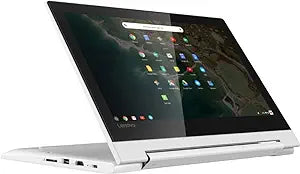
Lenovo C330 2-in-1 Chromebook 11.6" Touchscreen MediaTek 4GB RAM
★★★★★
1366x7684GB RAM32GB eMMC
The Lenovo C330 Chromebook squeezes a fanless quad-core SoC, 360-degree hinge, and 10-point multitouch into an 11.6-inch convertible that runs Chrome OS without thermal throttling under typical workloads.
View price on Amazon
Affiliate Disclosure: Studio Supplies may earn a commission from qualifying purchases made through links on this page, at no additional cost to you. This helps support our editorial team.
Notice a mistake? Let Us Know
Overview
Key Features
11. 6" HD (1366x768) 10-point Multi-touch IPS 300nits Anti-glare Display. Integrated PowerVR GX6250 Graphics
MediaTek MT8173C Quad-Core Base Clock Speed 1. 3 GHz, Maximum Boost Speed 2. 16 GHz (4C, 2x A72 @ 2. 1GHz + 2x A53 @ 1. 7GHz)
4GB Soldered LPDDR3-1866 Memory, 32GB eMMC 5. 1, No Optical Drive
802. 11a/g/n/ac, 1x1 + BT4. 2, 720p HD webcam, 1 x USB 3. 1 Gen 1 Type-C, 1 x USB 3. 1 Gen 1 Type-A, 1 x HDMI, 1 x 1/8" (3. 5 mm)
Google Chrome OS; Blizzard White
Specifications
Display Size
11.6 inches
Display Resolution
HD (1366x768)
Display Type
10-point Multi-touch IPS 300nits Anti-glare
Processor
MediaTek MT8173C Quad-Core
Processor Base Clock Speed
1.3 GHz
Processor Max Boost Speed
2.16 GHz
Graphics
Integrated PowerVR GX6250 Graphics
RAM
4GB Soldered LPDDR3-1866 Memory
Storage
32GB eMMC 5.1
Operating System
Google Chrome OS
Wireless Connectivity
802.11a/g/n/ac, 1x1 + BT4.2
Webcam
720p HD webcam
USB-C Ports
1 x USB 3.1 Gen 1 Type-C
USB-A Ports
1 x USB 3.1 Gen 1 Type-A
HDMI Ports
1 x HDMI
Audio Ports
1 x 1/8" (3.5 mm)
Color
Blizzard White
Pros & Cons
👍 Pros
- MediaTek MT8173C's heterogeneous big.LITTLE architecture (2x A72 + 2x A53) delivers burst performance for active tasks while sustaining efficient idle power draw
- MT8173C big.LITTLE architecture enables the C330 to manage background Chrome OS tasks on efficiency cores, preserving the approximately 10-hour rated battery life under mixed-use conditions.
- 32GB eMMC 5.1 storage provides faster random-access read/write performance than eMMC 4.x drives, meaning Chrome OS boot times and app launch speeds are measurably snappier than budget Chromebooks on older storage controllers.
- IPS panel with 300 nits brightness and anti-glare coating maintains readability in varied ambient lighting conditions without the washout common to TN Chromebook displays
- 802.11ac Wi-Fi (1x1) supports 5GHz band operation, which matters for latency-sensitive tasks like video conferencing on congested networks
- 11.6-inch IPS panel at 300 nits with 10-point multitouch and 360-degree hinge provides the full convertible use case — tablet mode, tent mode, and laptop mode — in a chassis that fits in a standard school backpack.
- USB 3.1 Gen 1 ports on both Type-A and Type-C connectors deliver up to 5Gbps transfer throughput, enabling reasonably fast external storage and peripheral connectivity for the class.
- 10-point multi-touch on the 360° hinge display enables tablet-mode use cases including Android app interaction with native touch input
- Both USB 3.1 Gen 1 ports (Type-A and Type-C) sustain up to 5Gbps transfer — meaningful for external drive use and reliable for HDMI adapter throughput
- Integrated HDMI port enables direct connection to classroom projectors and monitors without requiring a dongle — a practical advantage over USB-C-only configurations in education environments.
👎 Cons
- 32GB eMMC 5.1 storage is a hard ceiling — after Chrome OS overhead, usable space is approximately 24GB, which constrains offline media storage and Android app installations
- 4GB of soldered LPDDR3-1866 RAM is non-upgradeable and represents the maximum memory ceiling for this unit — Chrome OS manages tab suspension aggressively when RAM is under pressure, which users running 8+ tabs or Android apps will encounter regularly.
- The 1366x768 HD display resolution is below the 1920x1080 floor that most current Chromebooks at this tier offer; pixel density at 11.6 inches is noticeably coarser than FHD alternatives.
- 4GB LPDDR3-1866 is soldered and non-upgradeable; memory pressure appears at roughly 8–10 active browser tabs, limiting power-user multitasking
- PowerVR GX6250 integrated graphics performs adequately for 1080p video decode but lacks the headroom for Android gaming titles with higher GPU demands
- PowerVR GX6250 integrated graphics has no hardware acceleration path for modern Android games or complex WebGL applications, limiting the C330's usefulness as an Android app device beyond utility-tier applications.
- The 802.11ac 1x1 antenna configuration imposes a hard ceiling on wireless throughput that cannot be overcome through router upgrades — the hardware limitation is fixed in silicon.
- 1x1 Wi-Fi antenna configuration (single spatial stream) achieves roughly half the throughput ceiling of 2x2 implementations at the same distance from the access point
- 1366x768 resolution on an 11.6" panel produces approximately 135 PPI — noticeably lower pixel density than competing Chromebooks with 1080p displays at the same size
- 512GB eMMC 5.1 with no optical drive and no specified microSD expansion means users dependent on local media libraries or large file workflows will quickly saturate internal storage.
Frequently Asked Questions
What is the real-world performance difference between the MT8173C's A72 and A53 cores?
The two Cortex-A72 cores clock at 2.1GHz and handle performance-intensive tasks — active browser tabs, video playback, and app switching. The two Cortex-A53 cores run at 1.7GHz and manage background processes and idle states. Chrome OS's scheduler routes work between them automatically; users experience this as responsive bursts followed by efficient idle behavior, not as a user-configurable parameter.
What does the MediaTek MT8173C processor's architecture mean for everyday performance on this Chromebook?
The MT8173C uses a big.LITTLE configuration — two high-performance ARM Cortex-A72 cores at 2.1GHz paired with two efficiency Cortex-A53 cores at 1.7GHz. Chrome OS routes light tasks (background sync, notifications) to the A53 cores to preserve battery, while the A72 cores handle active tab rendering and web apps. It's adequate for Google Workspace, streaming, and light Android apps, but multi-tab heavy workloads will expose its limits relative to Intel-based Chromebooks.
How much storage does the C330 have, and can it be expanded?
The C330 ships with 32GB of eMMC 5.1 internal storage — fast sequential access for OS operations but limited for local file storage. Chrome OS is cloud-first by design, so 32GB is functional for most users. There is no microSD slot specified in the feature set, so local expansion options are limited to USB storage.
Can the 32GB eMMC storage run out quickly, and is it expandable?
32GB eMMC fills faster than it appears — Chrome OS itself occupies roughly 6–8GB, leaving approximately 24GB for downloads, Android apps, and offline files. The C330 includes a MicroSD slot for storage expansion, which is the primary mitigation for the limited internal capacity.
Does the 11.6" IPS display support stylus input?
The display supports 10-point multi-touch via finger input. Stylus support is not specified for this model, so active stylus use is not guaranteed.
What does the 802.11ac (Wi-Fi 5) 1x1 antenna configuration mean for wireless performance?
The single spatial stream (1x1) antenna design means the C330's theoretical maximum Wi-Fi throughput is half that of a 2x2 MIMO configuration at the same protocol. In practice on a home network with a modern 802.11ac router, real-world speeds are sufficient for 1080p streaming and video calls, but users on congested networks or at range will notice the single-stream limitation more acutely.
Does the USB-C port on the C330 support charging and video output?
The C330 includes one USB 3.1 Gen 1 Type-C port. On Lenovo Chromebooks of this generation, the USB-C port typically supports charging and DisplayPort Alt Mode for external display output, but the listing does not explicitly confirm DisplayPort Alt Mode; verify with Lenovo's spec sheet before purchasing for external monitor use.
What does USB 3.1 Gen 1 Type-C enable on this Chromebook beyond charging?
USB 3.1 Gen 1 Type-C on the C330 delivers up to 5Gbps data transfer and supports video output via DisplayPort Alt Mode (if the connected adapter supports it), plus power delivery for charging. It does not support Thunderbolt 3.
Is the 4GB LPDDR3-1866 RAM soldered, and can it be upgraded?
Yes, the 4GB LPDDR3-1866 RAM is soldered directly to the board and cannot be upgraded. 4GB is adequate for 5–8 active Chrome browser tabs and moderate Android app use, but will show memory pressure with heavier multitasking workloads.
What is the C330's battery life, and is the display bright enough for outdoor use?
Lenovo rates the C330 for up to approximately 10 hours of battery life under typical use. The IPS display is rated at 300 nits — sufficient for indoor office and classroom environments but marginal for direct sunlight outdoor use, where 400+ nits is generally recommended.
Related Products


