



Lenovo
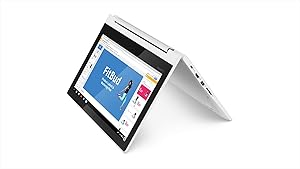
Lenovo Chromebook C330 2-in-1 Convertible Laptop
★★★★★
A dual-core MediaTek processor and 64GB eMMC storage keep ChromeOS running lean and fast on an 11.6-inch convertible that weighs less than a textbook.
View price on Amazon
Affiliate Disclosure: Studio Supplies may earn a commission from qualifying purchases made through links on this page, at no additional cost to you. This helps support our editorial team.
Notice a mistake? Let Us Know
Overview
Specifications
Type
2-in-1 Convertible Laptop
Model Name
Chromebook C330
Pros & Cons
👍 Pros
- 64GB eMMC doubles the usable storage versus 32GB configurations, providing meaningful capacity for Android app libraries and offline content without immediate MicroSD dependency
- 64GB eMMC storage provides 13x the on-device capacity of baseline 4GB Chromebooks, creating meaningful offline storage headroom for downloaded media and Android apps
- LPDDR3 memory is tightly integrated with the MT8173C SoC for low-latency data access — ChromeOS's memory efficiency translates this into snappy web browsing performance despite the modest spec
- IPS display at 1366x768 with multi-touch support enables tablet-mode Android app interaction with accurate 10-point touch response across the full 360° hinge range
- MediaTek MT8173C's big.LITTLE architecture (2x Cortex-A72 + 2x Cortex-A53) sustains active Chrome performance while keeping background battery draw low — a measurable efficiency advantage over fixed-clock competitors at this tier
- 11.6-inch IPS display provides accurate color and consistent viewing angles versus TN panels common in budget Chromebooks — relevant for collaborative classroom use from non-center viewing positions
- 360-degree hinge enables tent and stand modes that a traditional laptop cannot achieve, expanding use cases for touchscreen-centric ChromeOS apps and media consumption
- USB 3.1 Gen 1 Type-C with DP Alt Mode supports external display connection at up to 4K resolution without a separate HDMI port or dock requirement
- Chrome OS's update architecture delivers security patches and feature updates automatically without user intervention, keeping the device current across its Auto Update Expiry lifecycle
- The renewed condition provides a cost-effective entry point to a Lenovo-quality build chassis with known Chromebook hardware compatibility and stable ChromeOS driver support
👎 Cons
- 4GB LPDDR3 is soldered and non-upgradeable — simultaneous Android app use and heavy tab loads (10+ tabs) will encounter memory pressure that cannot be resolved without hardware replacement
- MediaTek MT8173C's ARM architecture means some Linux (Crostini) applications and Android apps compiled for x86 will not run — a hard compatibility wall for users who need specific non-ARM executables
- 1366x768 HD panel resolution is below the 1920x1080 threshold that modern web content and video streaming is mastered for — small text and fine UI elements appear soft at native resolution
- 1366x768 IPS resolution at 11.6 inches produces approximately 135 PPI — visibly lower pixel density than 1080p panels at this size, which some users find noticeable in text rendering on high-DPI content
- MediaTek MT8173C lacks x86 architecture support, meaning Linux (Crostini) application compatibility is limited compared to Intel-based Chromebooks running the same Chrome OS version
- The 2019-era ARM Cortex-A72 performance cores will reach ChromeOS's automatic end-of-support (AUE) date, ending security updates at a firmware-defined cutoff
- Non-removable battery means eventual battery degradation requires professional service — no user-replaceable path as capacity fades after 3-4 years of daily use
- Single-stream 802.11ac Wi-Fi (1x1) limits throughput to approximately half the ceiling of 2x2 implementations at equivalent signal strength — a constraint in bandwidth-heavy multi-device household environments
- eMMC 5.1 storage performs well for ChromeOS but cannot be upgraded or replaced — the 64GB ceiling is fixed for the device's lifetime regardless of storage needs growth
- 4GB LPDDR3 RAM is a hard ceiling that cannot be upgraded post-purchase — as ChromeOS and Android app memory requirements grow, multitasking headroom will decrease over time
Frequently Asked Questions
What is the performance difference between this C330 with 64GB storage versus the 32GB model?
The 64GB eMMC provides approximately 56GB of usable space after Chrome OS overhead — roughly double the effective storage of the 32GB configuration. This matters concretely for Android app installations and offline media: Android apps can occupy 1–5GB each, and the larger storage removes the need for constant app management. Performance (read/write speed) is unchanged between 32GB and 64GB eMMC 5.1 configurations.
How does the MediaTek MT8173C processor compare to Intel Celeron options in Chromebook performance?
The MT8173C uses a big.LITTLE architecture with two Cortex-A72 performance cores and two Cortex-A53 efficiency cores. For ChromeOS web browsing, Google Docs, and media playback, performance is comparable to entry-level Intel Celeron N3350 Chromebooks. Where the MT8173C falls short is in sustained multi-tab workloads — the ARM architecture has less headroom for concurrent Chrome processes versus even modest Intel cores.
Is 4GB RAM sufficient for student or office ChromeOS workflows?
Yes, for the core ChromeOS use case. ChromeOS's Linux-based memory management is more efficient than Windows — 4GB comfortably handles 8-12 Chrome tabs, Google Docs/Sheets/Slides, and a media stream simultaneously without visible slowdown. Running Android apps alongside browser tabs will consume that headroom faster, particularly with heavier Android applications.
Does the MediaTek MT8173C support Linux (Crostini) or Android apps?
Android app support via the Google Play Store is available on this model. Linux (Crostini) support on MT8173C-based Chromebooks is limited — ARM-based ChromeOS Linux support has historically been less comprehensive than x86 implementations, and not all Linux packages run on ARM. Users whose workflow requires Linux app compatibility should verify specific application support.
Is the 4GB LPDDR3 RAM sufficient for Chromebook use in 2025 and beyond?
4GB LPDDR3 supports 8–10 active Chrome tabs, light Android app use, and standard Google Workspace tasks without measurable slowdown. ChromeOS is architecturally efficient with 4GB — it is not equivalent to 4GB on Windows. The binding constraint is typically that simultaneous heavy Android app use alongside a large tab count can push visible memory pressure; for a single primary-use case (browsing, Docs, video), 4GB holds up.
Does the 360-degree hinge enable genuine tablet-mode use, or is it primarily a tent-mode stand?
The 360-degree hinge enables all four modes — laptop, tent, stand, and tablet. Tablet mode on an 11.6-inch 1.35kg Chromebook is heavier than a dedicated tablet and the non-detachable keyboard adds awkward bulk during held use. Tent and stand modes for media viewing or touchscreen interaction are the more ergonomically practical configurations for most users.
Does 64GB eMMC storage fill up quickly on ChromeOS?
ChromeOS itself occupies approximately 3-5GB of managed storage. Offline Google Drive files, Android apps, and downloaded media are the primary consumers of the remaining space. For a student using cloud-first workflows (Google Drive, web apps), 64GB is adequate. Offline-heavy users or those installing many Android apps will find 64GB tight after a semester of use.
Does the USB 3.1 Gen 1 Type-C port support video output?
USB 3.1 Gen 1 Type-C supports DP Alt Mode on this platform, enabling external display output via a USB-C to HDMI or USB-C to DisplayPort adapter. The MT8173C supports this at up to 4K resolution for compatible displays, making it possible to extend or mirror the 11.6-inch panel to a larger external monitor.
How does the 360° hinge affect the structural longevity of the C330 under daily use?
Lenovo's C330 hinge is rated for a high number of fold cycles — the C-series Chromebook hinges are designed for student/education deployment durability. In reported real-world use, the hinge maintains resistance and alignment without loosening over typical 2–3 year ownership cycles. It does not introduce chassis flex at the display-base joint under standard use.
What is the effective battery life in classroom or daily use, and does ChromeOS contribute to that?
ChromeOS's efficient memory and background process management, combined with the MT8173C's ARM efficiency cores, extends battery life in light use scenarios. While the exact rated figure for this configuration isn't specified, MT8173C-based Chromebooks typically deliver 8-10 hours of mixed web and productivity use — a full school day on a single charge in most classroom workflows.
Related Products


