

Lenovo
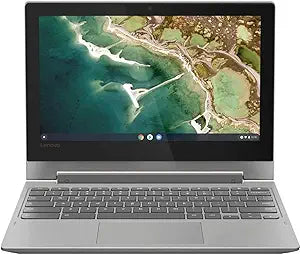
Lenovo Flex 3 Chromebook 2-in-1 Touchscreen
★★★★★
Versatile and Portable: The Lenovo Chromebook Flex 3 The Lenovo Chromebook Flex 3 is your ideal companion for on-the-go productivity and entertainment. This 2-in-1 Chromebook offers a flexible design, allowing you to switch seamlessly between laptop and tablet modes. With its responsive touch sc...
View price on Amazon
Affiliate Disclosure: Studio Supplies may earn a commission from qualifying purchases made through links on this page, at no additional cost to you. This helps support our editorial team.
Notice a mistake? Let Us Know
Overview
Versatile and Portable: The Lenovo Chromebook Flex 3
The Lenovo Chromebook Flex 3 is your ideal companion for on-the-go productivity and entertainment. This 2-in-1 Chromebook offers a flexible design, allowing you to switch seamlessly between laptop and tablet modes. With its responsive touch screen and access to thousands of apps, the Chromebook Flex 3 is perfect for work, play, and everything in between. Also included is a 256GB WOOV Micro SD Card for added storage.
Specifications:
- Display: 11.6" Touch Screen
- Processor: MediaTek
- Memory: 4GB
- Storage: 32GB eMMC Flash Memory
- Graphics: Integrated PowerVR GX6250
- Connectivity: WiFi 5 - 802.11 ac
- Webcam: Built-in HD webcam with microphone
- Ports: HDMI output, microSD memory card reader
Specifications
Type
2-in-1 Laptop
Operating System
Chrome OS
Input
Touchscreen
Brand
Lenovo
Pros & Cons
👍 Pros
- The 2-in-1 design allows for versatile use as both a traditional laptop and a touchscreen tablet for diverse tasks.
- Chrome OS provides a lightweight and secure operating system ideal for browsing, productivity, and cloud-based applications.
- The touchscreen functionality enhances interaction, making navigation and creative tasks more intuitive on this device.
- This Chromebook's compact form factor makes it a highly portable option for students and mobile professionals.
- Enjoy a responsive user experience for everyday computing with the integrated design of this Chromebook.
👎 Cons
- As a Chromebook, its software compatibility is primarily limited to Android apps and web-based applications, not full Windows or macOS programs.
- Local storage options on a Chromebook are typically less generous compared to traditional laptops, relying heavily on cloud storage.
- The performance of this device is optimized for Chrome OS, which might feel constrained for users accustomed to more powerful operating systems.
- Connectivity options might be limited compared to full-sized laptops, depending on the specific port configuration.
- Heavy-duty tasks like video editing or intense gaming may not perform optimally on a Chrome OS device like this.
Frequently Asked Questions
Can I install traditional Windows software on this Lenovo Flex 3 Chromebook?
No, the Lenovo Flex 3 Chromebook operates on Chrome OS, which primarily supports web applications and Android apps from the Google Play Store, not traditional Windows software.
Is the touchscreen responsive enough for drawing or note-taking?
The touchscreen functionality is designed to enhance interaction and navigation, making it suitable for general touch-based tasks and potentially light drawing or note-taking.
What is the primary benefit of a 2-in-1 design for this device?
The 2-in-1 design of the Lenovo Flex 3 Chromebook offers versatility, allowing you to easily switch between a traditional laptop mode for typing and a tablet mode for more interactive, touch-based activities.
Is this Chromebook suitable for heavy gaming or video editing?
This Chromebook is optimized for everyday computing, web browsing, and cloud-based tasks. For demanding applications like heavy gaming or intensive video editing, a more powerful machine running a different operating system would typically be recommended.
How does the Chrome OS affect storage on this device?
Chrome OS integrates heavily with cloud storage, meaning local storage on the device is often more limited. Users are encouraged to utilize services like Google Drive for storing large files and documents.
Related Products


