

Lenovo
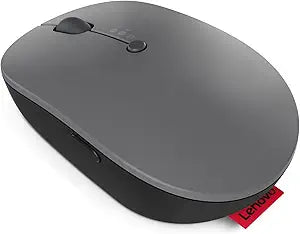
Lenovo Go Multi-Device Wireless Mouse USB-C Bluetooth Renewed
USB-C
Ergonomic Control for Multi-Device Use: Lenovo Go Wireless MouseThe Lenovo Go Multi-Device Wireless Mouse offers versatile connectivity and ergonomic comfort. Designed for use with multiple devices, it features a rechargeable battery and ambidextrous design. Connectivity: 2.4GHz Nano USB-C...
View on Amazon for pricing
Affiliate Disclosure: Studio Supplies may earn a commission from qualifying purchases made through links on this page, at no additional cost to you. This helps support our editorial team.
Notice a mistake? Let Us Know
Overview
Ergonomic Control for Multi-Device Use: Lenovo Go Wireless Mouse
The Lenovo Go Multi-Device Wireless Mouse offers versatile connectivity and ergonomic comfort. Designed for use with multiple devices, it features a rechargeable battery and ambidextrous design.
- Connectivity: 2.4GHz Nano USB-C Receiver, Bluetooth
- Battery: USB-C Rechargeable, Qi Wireless Charging
- Design: Ambidextrous
- Color: Grey
Key Features
The Lenovo Go Wireless Multi-Device Mouse supports pairing up to 3 devices using USB-C and Bluetooth with a quick switch button, while the Lenovo Unified Pairing Receiver allows you to connect other devices with one dongle
The blue optical sensor on this wireless mouse ensures you experience maximum precision on almost every surface, plus you'll enjoy on-the-fly adjustable DPI sensitivity
Crafted as an all-in-one solution, this mouse features a programmable utility button with shortcuts configured for Microsoft Teams meetings by default
With a fast-chargeable battery that provides 2 months of use on a single 1.5-hour charge and supports both wired USB-C and wireless Qi charging, the Lenovo Go Wireless Multi-Device Mouse is hard to beat
Compatible with Windows and Chrome devices; 2.4 GHz connection required at launch
Specifications
Connectivity
USB-C, Bluetooth, 2.4 GHz (via Lenovo Unified Pairing Receiver)
Multi-Device Pairing
Up to 3 devices
Sensor Type
Blue Optical Sensor
Features
Adjustable DPI, Programmable Utility Button
Battery Life
2 months on 1.5-hour charge
Charging
Wired USB-C, Wireless Qi
Compatibility
Windows, Chrome devices
Condition
Renewed
Pros & Cons
👍 Pros
- Supports pairing with up to 3 devices using USB-C and Bluetooth, allowing for seamless switching between multiple systems.
- Features a quick switch button for effortless transitioning between connected devices, enhancing productivity across different platforms.
- Equipped with a blue optical sensor that ensures maximum precision on almost every surface, providing versatile usage environments.
- Offers on-the-fly adjustable DPI sensitivity, enabling users to customize cursor speed and responsiveness to their preference.
- Includes a programmable utility button, pre-configured with shortcuts for Microsoft Teams meetings for quick access to common functions.
👎 Cons
- The mouse is a renewed product, which may affect warranty coverage and long-term support compared to a brand new unit.
- Requires a 2.4 GHz connection at launch, which might necessitate the use of the unified pairing receiver for initial setup.
- Specific details on the exact DPI range or the number of programmable buttons (beyond the utility button) are not provided.
- While supporting Qi wireless charging, a Qi charger is not included, requiring an additional purchase for wireless charging functionality.
- Compatibility is explicitly mentioned for Windows and Chrome devices; explicit support for other operating systems like macOS or Linux is not detailed.
Frequently Asked Questions
How many devices can the Lenovo Go Multi-Device Wireless Mouse connect to?
This mouse supports pairing with up to 3 devices simultaneously, using either USB-C or Bluetooth, with a quick switch button for easy transitions.
What kind of sensor does this mouse use for tracking?
It uses a blue optical sensor that provides maximum precision on almost every surface, offering versatile tracking performance.
How long does the battery last on a single charge and how is it charged?
The fast-chargeable battery provides up to 2 months of use on a single 1.5-hour charge and supports both wired USB-C and wireless Qi charging.
Can the mouse's sensitivity be adjusted?
Yes, the Lenovo Go Multi-Device Wireless Mouse features on-the-fly adjustable DPI sensitivity, allowing you to customize cursor speed.
Does this mouse have programmable buttons?
Yes, it features a programmable utility button, which is configured with shortcuts for Microsoft Teams meetings by default.
Is this mouse compatible with Mac operating systems?
Compatibility is explicitly stated for Windows and Chrome devices, with no specific mention of macOS compatibility in the provided features.
Related Products


