

Lenovo
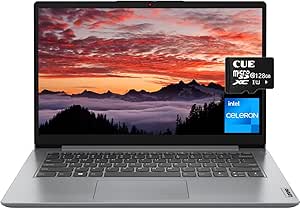
Lenovo Lenovo Ideapad 1 14" Celeron 4GB 192GB Laptop
★★★★★
1366 x 76864GB eMMCUSB 2.0USB 3.2USB-C
Stay Productive on the Go with the Lenovo IdeaPad 1The Lenovo IdeaPad 1 is designed for everyday computing, combining portability and essential features in a slim and stylish package. Perfect for students and professionals alike. Processor: Intel Celeron N4020 (Up to 2.8GHz) Memory: 4GB DDR4 RA...
$199.99*
Check availability
*Price sourced from Amazon.com. Last updated:Jul 16, 2026.Price and availability are subject to change.
Affiliate Disclosure: Studio Supplies may earn a commission from qualifying purchases made through links on this page, at no additional cost to you. This helps support our editorial team.
Notice a mistake? Let Us Know
Overview
Stay Productive on the Go with the Lenovo IdeaPad 1
The Lenovo IdeaPad 1 is designed for everyday computing, combining portability and essential features in a slim and stylish package. Perfect for students and professionals alike.
- Processor: Intel Celeron N4020 (Up to 2.8GHz)
- Memory: 4GB DDR4 RAM
- Storage: 64GB eMMC + 128GB SD Card
- Display: 14.0" HD (1366 x 768)
- Operating System: Windows 11 Home in S mode
- Connectivity: Wi-Fi 6, Bluetooth 5.1
- Ports: 1 x Card reader, 1 x HDMI 1.4b, 1 x Headphone/microphone combo jack, 1 x USB 2.0, 1 x USB 3.2 Gen 1, 1 x USB-C 3.2 Gen 1 (data transfer only)
- Camera: HD 720p
- Color: Cloud Grey
- Dimensions: 12.8 x 8.52 x 0.70 inches
- Weight: 2.87 lbs
Key Features
【Futureproof Processing】Intel Celeron N4020, 2 Cores & 2 Threads, 1.10GHz Base Clock, Up to 2.80GHz, The extra performance makes content-rich webpages fast, provides crisp video playback, and enables you to multitask effortlessly by allowing multiple pages to run at the same time.
【4GB LPDDR4x RAM & 64GB eMMC + 128GB SD Card Storage】This ultracompact memory system is ideal for mobile devices and applications, providing enhanced storage capabilities, streamlined data management, quick boot-up times and support for high-definition video playback.
【14" HD Display】14.0-inch diagonal, HD (1366 x 768), micro-edge, BrightView. With its thin and light design, 6.5 mm micro-edge bezel display, and 79% screen to body ratio – take this PC anywhere and see and do more.
【Ports】1x Card reader, 1x HDMI 1.4b, 1x Headphone / microphone combo jack (3.5mm), 1x Power connector, 1x USB 2.0, 1x USB 3.2 Gen 1, 1x USB-C 3.2 Gen 1 (support data transfer only)
【Windows 11 Home in S mode】You may switch to regular windows 11: Press "Start button" bottom left of the screen; Select "Settings" icon above "power" icon;Select Update & Security and Activation, then Go to Store; Select "Get" option under "Switch out of S mode"; Hit Install. (If you also see an "Upgrade your edition of Windows" section, be careful not to click the "Go to the Store" link that appears there.)
Specifications
Processor
Intel Celeron N4020
Processor Cores
2
Processor Threads
2
Processor Base Clock Speed
1.10GHz
Processor Max Boost Clock Speed
Up to 2.80GHz
RAM
4GB LPDDR4x
Storage
64GB eMMC + 128GB SD Card
Display Size
14.0-inch
Display Resolution
HD (1366 x 768)
Display Type
micro-edge, BrightView
Screen-to-Body Ratio
79%
HDMI Port
1x HDMI 1.4b
USB Ports
1x USB 2.0, 1x USB 3.2 Gen 1, 1x USB-C 3.2 Gen 1 (data transfer only)
Card Reader
1x Card reader
Audio Jack
1x Headphone / microphone combo jack (3.5mm)
Operating System
Windows 11 Home in S mode
Pros & Cons
👍 Pros
- Equipped with an Intel Celeron N4020 processor, offering sufficient performance for web browsing and basic multitasking.
- Features a combination of 4GB LPDDR4x RAM and 64GB eMMC with an additional 128GB SD Card, providing enhanced storage capabilities.
- The 14" HD micro-edge display offers a larger screen-to-body ratio for an immersive viewing experience.
- Includes a variety of ports such as USB-C 3.2 Gen 1, USB 3.2 Gen 1, USB 2.0, HDMI, and a card reader for versatile connectivity.
- Comes with Windows 11 Home in S mode, which can be easily switched to regular Windows 11 for broader software compatibility.
👎 Cons
- The Intel Celeron N4020 processor is best suited for basic tasks and may struggle with more demanding applications or heavy multitasking.
- The 4GB LPDDR4x RAM might become a bottleneck for users requiring multiple complex applications running simultaneously.
- The 14" HD (1366 x 768) display resolution is lower than Full HD, potentially offering less sharpness for detailed work.
- The 64GB eMMC storage, even with a 128GB SD card, may be insufficient for users needing to install many large programs or store extensive media locally.
- Windows 11 Home in S mode, while offering security, requires an additional step to switch out for full application flexibility, which might be inconvenient for some users.
Frequently Asked Questions
What kind of performance does the Intel Celeron N4020 processor offer in this laptop?
The Intel Celeron N4020 processor, with 2 cores and 2 threads, provides efficient performance for content-rich webpages, crisp video playback, and effortless basic multitasking.
How much storage capacity does this laptop provide?
This laptop comes with 64GB eMMC storage and an additional 128GB SD Card, totaling 192GB, designed for enhanced storage capabilities and quick boot-up times.
Can I run regular Windows applications on this laptop, or is it limited to S mode?
The laptop ships with Windows 11 Home in S mode, but you can switch to regular Windows 11 through the settings to gain broader application compatibility.
What is the resolution of the display on this laptop?
It features a 14.0-inch HD (1366 x 768) micro-edge, BrightView display, offering a clear visual experience with a high screen-to-body ratio.
What types of ports are available for connecting peripherals and external devices?
The laptop includes a card reader, HDMI 1.4b, a headphone/microphone combo jack, a power connector, one USB 2.0, one USB 3.2 Gen 1, and one USB-C 3.2 Gen 1 (for data transfer only).
Related Products


