

Price history
Lenovo
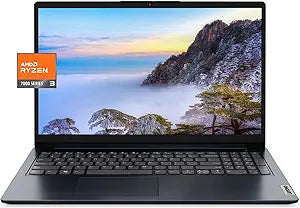
Lenovo IdeaPad Laptop Ryzen 3 8GB 512GB SSD 15.6" FHD
★★★★★
FHD1920 x 1080Ryzen 3 7320U512GB SSDUSB-C
Everyday Performance and Essential Features in a Stylish LaptopIntroducing the Lenovo IdeaPad, a versatile laptop designed for everyday tasks and on-the-go productivity. Featuring an AMD Ryzen processor, ample memory, and a fast SSD, this laptop delivers reliable performance in a sleek design. ...
$359.00*$469.00Save 23%
View on Amazon
✓ In Stock on Amazon.com
*Price sourced from Amazon.com. Last updated:Jul 20, 2026.Price and availability are subject to change.
Affiliate Disclosure: Studio Supplies may earn a commission from qualifying purchases made through links on this page, at no additional cost to you. This helps support our editorial team.
Notice a mistake? Let Us Know
Overview
Everyday Performance and Essential Features in a Stylish Laptop
Introducing the Lenovo IdeaPad, a versatile laptop designed for everyday tasks and on-the-go productivity. Featuring an AMD Ryzen processor, ample memory, and a fast SSD, this laptop delivers reliable performance in a sleek design.
- Brand: Lenovo
- Model: IdeaPad
- Processor: AMD Ryzen 3 7320U (up to 4.1GHz)
- Memory: 8GB DDR5 RAM
- Storage: 512GB SSD
- Display: 15.6" FHD (1920x1080)
- Graphics: Integrated AMD Radeon 610M
- Operating System: Windows 11 Home in S Mode
- Connectivity: Wi-Fi 6, Bluetooth 5.1
- Ports: USB-C, USB-A, HDMI, SD Card Reader
- Color: Abyss Blue
Key Features
MEMORY & STORAGE - Memory is 8GB high-bandwidth RAM to smoothly run multiple applications and browser tabs all at once. Hard Drive is upgraded to 1TB PCIe Solid State Drive which allows to fast bootup and data transfer
PROCESSOR - AMD Ryzen 3 7320U Processor (4 Cores, 8 Threads, 2.4 GHz at Base Frequency, Up to 4.1 GHz at Max Turbo Frequency); with AMD Radeon Graphics
DISPLAY - 15.6" FHD (1920 x 1080) anti-glare, 45% NTSC, 60Hz Refresh Rate; non-touch screen
TECH SPECS - 1 x USB-C 3.2 Gen 1, 1 x USB-A 3.2 Gen 1, 1 x USB-A 2.0, 1 x SD Card Reader, 1 x HDMI, 1 x Headphone/mic combo; Wi-Fi 6 and Bluetooth, Webcam
WINDOWS 11 S MODE - You may switch win 11 S mode to the regular win 11: Update Microsoft App Store to the latest version. Press "Start button" bottom left of the screen; Select "Settings" icon above "power" icon; Select Update & Security and Activation, then Go to Store; Select "Get" option under "Switch out of S mode"; Hit Install.
Specifications
Processor
AMD Ryzen 3 7320U Processor (4 Cores, 8 Threads, 2.4 GHz base, up to 4.1 GHz max turbo)
Graphics
AMD Radeon Graphics
Memory
8GB high-bandwidth RAM
Storage
1TB PCIe Solid State Drive (upgraded from 512GB)
Display
15.6" FHD (1920 x 1080) anti-glare, 45% NTSC, 60Hz Refresh Rate
Operating System
Windows 11 S Mode (switchable to regular Windows 11)
USB-C Ports
1 x USB-C 3.2 Gen 1
USB-A Ports
1 x USB-A 3.2 Gen 1, 1 x USB-A 2.0
Video Output
1 x HDMI
Card Reader
1 x SD Card Reader
Audio Jack
1 x Headphone/mic combo
Wireless Connectivity
Wi-Fi 6, Bluetooth
Webcam
Yes
Frequently Asked Questions
Can I run multiple applications on this laptop without experiencing slowdowns?
Yes, the laptop is equipped with 8GB of high-bandwidth RAM, which is designed to smoothly run multiple applications and browser tabs simultaneously.
What is the benefit of the upgraded 1TB PCIe Solid State Drive?
The upgraded 1TB PCIe Solid State Drive allows for significantly faster bootup times and quicker data transfer compared to traditional hard drives.
Is the operating system restricted in any way?
The laptop comes with Windows 11 S Mode, but you can switch it to the regular Windows 11 by following the provided instructions in the Microsoft App Store.
What kind of display quality can I expect from this laptop?
It features a 15.6" FHD (1920 x 1080) anti-glare display with 45% NTSC and a 60Hz refresh rate, offering clear visuals for everyday tasks.
Does this laptop have modern connectivity options for peripherals and networks?
Yes, it includes Wi-Fi 6 and Bluetooth for wireless connections, along with ports like 1 x USB-C 3.2 Gen 1, 1 x USB-A 3.2 Gen 1, 1 x USB-A 2.0, 1 x SD Card Reader, and 1 x HDMI.
Related Products


