



Lenovo
Lenovo 500w Gen 3 2-in-1 Student Laptop, 11.6" Touchscreen, 8GB, 128GB SSD, Win 11
★★★★★
1366 x 768128GB SSD500wUSB-C
A ruggedized, genuinely versatile 2-in-1 that gives students Wi-Fi 6 and a touchscreen without asking for a premium price.
$420.00*
View on Amazon
✓ In Stock on Amazon.com
*Price sourced from Amazon.com. Last updated:Jun 07, 2026.Price and availability are subject to change.
Affiliate Disclosure: Studio Supplies may earn a commission from qualifying purchases made through links on this page, at no additional cost to you. This helps support our editorial team.
Notice a mistake? Let Us Know
Overview
Key Features
[High Speed RAM And Enormous Space] 8GB high-bandwidth RAM to smoothly run multiple applications and browser tabs all at once; 128GB PCIe NVMe M.2 Solid State Drive allows to fast bootup and data transfer
[Processor] Intel Pentium Silver N6000 Processor (4 Cores, 4 Threads, 4MB L3 Cache, Base Frequency at 1.1 GHz, Up to 3.0 GHz at Max Turbo Frequency)
[Display] 11.6" HD (1366 x 768), IPS, Glare, Touch, 50%NTSC, 250 nits, Glass
[Tech Specs] 1 x USB-C 3.2 Gen 1, 2 x USB-A 3.2 Gen 1, 1 x HDMI 1.4b, 1 x Headphone / mic combo, 1 x MicroSD card reader, Touchscreen, Touchpad, Webcam, Wi-Fi 6
[Operating System] Windows 11 Home - Beautiful, more consistent new design, Great window layout options, Improved performance features, New videogame selection and capabilities, Compatible with Android Apps
Specifications
Display Size
11.6"
Display Resolution
HD (1366 x 768)
Display Type
IPS, Glare, Touch, 50%NTSC, 250 nits, Glass
Processor
Intel Pentium Silver N6000 Processor
Processor Cores
4 Cores
Processor Threads
4 Threads
Processor L3 Cache
4MB
Base Frequency
1.1 GHz
Max Turbo Frequency
3.0 GHz
RAM
8GB
Storage
128GB PCIe NVMe M.2 Solid State Drive
USB-C Ports
1 x USB-C 3.2 Gen 1
USB-A Ports
2 x USB-A 3.2 Gen 1
HDMI Ports
1 x HDMI 1.4b
Audio Port
1 x Headphone / mic combo
Card Reader
1 x MicroSD card reader
Wireless Connectivity
Wi-Fi 6
Operating System
Windows 11 Home
Pros & Cons
👍 Pros
- Wi-Fi 6 is a meaningful spec upgrade at this price tier — it future-proofs the device for faster routers and handles congested school networks better than older Wi-Fi 5 cards.
- The 128GB PCIe NVMe SSD delivers noticeably faster boot times and app launches than eMMC storage used in cheaper Chromebook-class devices at similar prices.
- A full Windows 11 Home install means compatibility with any school-required software, including apps that won't run on ChromeOS or iPadOS.
- The port selection is genuinely complete for a student device: USB-C, two USB-A, HDMI, headphone/mic combo, and microSD — no dongles needed for everyday use.
- At 2.9 lbs and 11.6 inches, the 500w Gen 3 is light enough to carry all day without fatigue.
👎 Cons
- The 1366x768 HD display resolution is below what competing devices in this category offer — text and media look noticeably less sharp than on a 1080p screen, even at 11.6 inches.
- 250 nits of brightness is dim by modern standards; outdoor use or brightly lit classrooms can make the screen hard to read.
- The Intel Pentium Silver N6000 has no headroom for anything beyond productivity tasks — any creative, technical, or gaming workload will expose its limits quickly.
- 50% NTSC color gamut is mediocre; color-sensitive work like photo editing or art class projects will look washed out compared to a wider-gamut display.
- RAM is fixed at 8GB with no upgrade path, which may feel constrained if the device is expected to last through multiple school years as software demands grow.
Frequently Asked Questions
Is the Intel Pentium Silver N6000 fast enough for school and light productivity?
For the target use case — yes. The N6000 handles web browsing, Google Docs, Microsoft Office, video calls, and streaming without trouble. It's not suited for video editing, gaming, or running demanding software, but for classroom and homework workloads it's appropriately sized. The 3.0 GHz turbo ceiling helps with short bursts of heavier load.
Can the RAM or SSD be upgraded later?
In most configurations of the 500w Gen 3, RAM is soldered to the motherboard and cannot be upgraded. The 128GB SSD is an M.2 form factor, but serviceability depends on the specific unit — check Lenovo's hardware maintenance manual for your configuration before assuming it's user-accessible.
Does it actually function as a tablet, or is the 2-in-1 mode just a gimmick here?
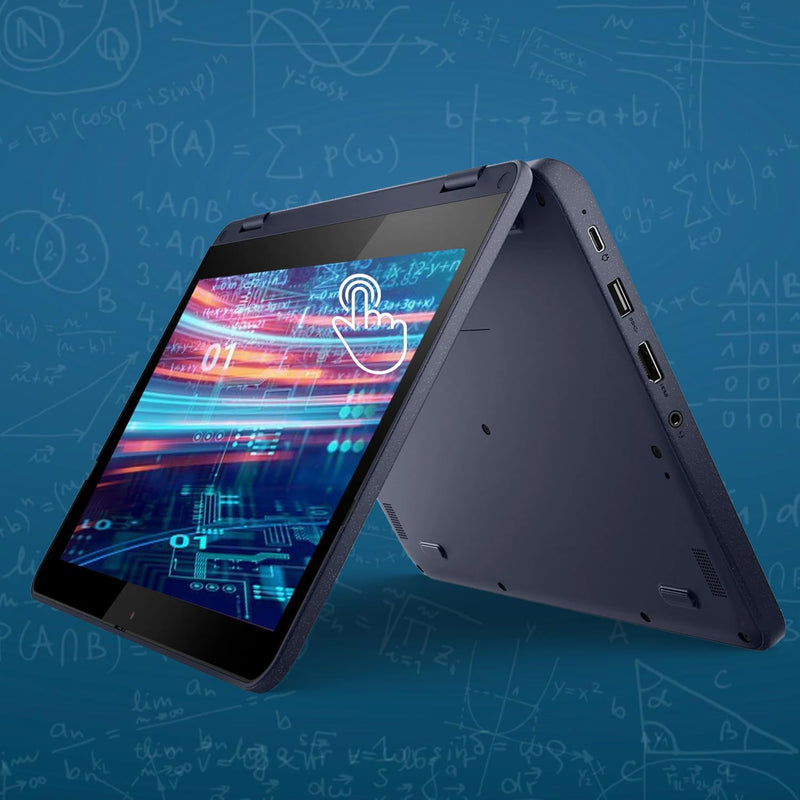
The 360-degree hinge means it converts fully into tent, stand, and tablet modes — all usable. The 11.6-inch size and 2.9 lb weight make tablet mode reasonably practical for lighter tasks like reading or annotating documents. It's not as fluid as a dedicated tablet, but it's a genuine use case rather than a checkbox feature.
How does Wi-Fi 6 make a practical difference on this laptop?
Wi-Fi 6 delivers faster throughput and better performance in congested environments — like a school with dozens of devices on the same network. Even if your router is Wi-Fi 5, the card is backward compatible. The real-world benefit on a school network is reduced latency and more stable connections during peak usage.
Is 128GB enough storage for a student?
It's workable with discipline. Windows 11 consumes roughly 25–30GB, leaving around 90–100GB usable. Students relying on cloud storage (OneDrive, Google Drive) and streaming rather than local media will be fine. Those who download a lot of video or large files will hit the ceiling and need an external drive or microSD card.
Related Products


