

Lenovo
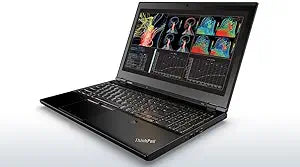
Lenovo ThinkPad P50 i7 Quadro M1000M Mobile Workstation
1920x1080i7-6700HQUSB 3.0Thunderbolt 3DisplayPort
Unleash Your Potential with the Lenovo ThinkPad P50 Mobile Workstation The Lenovo ThinkPad P50 is a high-performance mobile workstation, engineered for professionals who demand power and portability. Featuring a robust Intel Core i7 processor, dedicated NVIDIA Quadro graphics, a spacious SSD, and...
Check availability
Affiliate Disclosure: Studio Supplies may earn a commission from qualifying purchases made through links on this page, at no additional cost to you. This helps support our editorial team.
Notice a mistake? Let Us Know
Overview
Unleash Your Potential with the Lenovo ThinkPad P50 Mobile Workstation
The Lenovo ThinkPad P50 is a high-performance mobile workstation, engineered for professionals who demand power and portability. Featuring a robust Intel Core i7 processor, dedicated NVIDIA Quadro graphics, a spacious SSD, and ample RAM, this laptop is designed to handle demanding tasks such as 3D rendering, video editing, and complex simulations with ease. Its durable construction and comprehensive features make it an ideal choice for professionals on the go.
- Processor: Intel Core i7-6700HQ (6M Cache, up to 3.5 GHz)
- Operating System: Windows 8.1 Pro 64-bit
- Display: 15.6" Full HD IPS (1920 x 1080) Anti-Glare, Non-Touch
- Storage: 4TB Solid State Drive
- Memory: 16GB DDR4 RAM, 2133 MHz
- Graphics: NVIDIA Quadro M1000M with 4GB VRAM
- Wireless: Intel Dual Band Wireless-AC (2x2) 8260, Bluetooth 4.1
- Webcam: 720p HD Webcam with Dual Array Microphone
- Security: Fingerprint Reader, Smart Card Reader
- Keyboard: Backlit, Spill-Resistant with Full Number Pad
- Ports: 4x USB 3.0 (one Always On), HDMI, mini-DisplayPort, Ethernet (RJ-45), USB Type-C / Thunderbolt 3, Headphone/Mic Combo, 4-in-1 Card Reader, Dock Connector
Key Features
Intel Core i7-6700HQ (6M Cache, up to 3.5 GHz) - 4TB Solid State Drive - 16GB PC4-17000 DDR4 SDRAM, 2133MHz SODIMM
15.6" Full HD IPS (1920x1080) Anti-Glare, Non-Touch Display - NVIDIA Quadro M1000M Discrete Graphics with upgraded 4GB VRAM - Stereo Speakers
Built in HD 720p Webcam with Dual noise-cancelling Microphones - Intel Dual Band Wireless-AC (2x2) 8260, Bluetooth Version 4.1 - Fingerprint Reader - Smart Card Reader
4x USB 3.0 ports (one Always On), HDMI, mini-DisplayPort, Ethernet (RJ-45), USB Type-C / Thunderbolt 3, Dock Connector, 4-in-1 card Reader, Dock Connector, Headphone/Mic Combo
Windows 8.1 Pro 64-Bit - ThinkPad Precision Spill-Resistant, Backlit Keyboard with Full NumberPad / 6-cell Li-Polymer (90Whr) External Battery / 170-Watt AC-Adapter
Specifications
Processor
Intel Core i7-6700HQ
Processor Speed
Up to 3.5 GHz
RAM
16GB PC4-17000 DDR4 SDRAM (2133MHz)
Storage
4TB Solid State Drive
Display Size
15.6"
Display Resolution
1920x1080
Display Type
Full HD IPS Anti-Glare, Non-Touch
Graphics
NVIDIA Quadro M1000M (4GB VRAM)
Operating System
Windows 8.1 Pro 64-Bit
Wireless
Intel Dual Band Wireless-AC (2x2) 8260, Bluetooth Version 4.1
Webcam
HD 720p
Battery
6-cell Li-Polymer (90Whr) External
Power Adapter
170-Watt AC-Adapter
Pros & Cons
👍 Pros
- Equipped with an Intel Core i7-6700HQ processor, delivering strong performance up to 3.5 GHz for demanding applications
- Features 4GB dedicated VRAM on its NVIDIA Quadro M1000M discrete graphics card, ideal for professional design and rendering
- Boasts a 4TB Solid State Drive, providing massive and fast storage capacity for large files and quick application loading
- Comes with 16GB of DDR4 SDRAM, supporting robust multitasking and memory-intensive workflows at 2133MHz
- Includes a 15.6" Full HD IPS anti-glare display, offering clear visuals and comfortable viewing for extended periods
- Provides a comprehensive array of ports including USB 3.0, HDMI, mini-DisplayPort, and Thunderbolt 3 for versatile connectivity
- Features a spill-resistant, backlit keyboard with a full number pad, enhancing productivity and usability in various environments
- Incorporates a Fingerprint Reader and Smart Card Reader for enhanced security and convenient access control
- Offers Intel Dual Band Wireless-AC 8260 and Bluetooth 4.1 for reliable wireless connectivity
- Includes a 6-cell 90Whr external battery and 170-watt AC adapter for robust power and charging
👎 Cons
- Ships with Windows 8.1 Pro, which is an older operating system and may require an upgrade for modern software compatibility
- The Intel Core i7-6700HQ is a 6th generation processor, which is not the latest generation available, potentially impacting future-proofing
- The 15.6" Full HD (1920x1080) resolution, while good, may not be sufficient for users requiring 4K or higher pixel density displays
- The 170-watt AC adapter is specific to this model and may be bulky to carry along with the workstation
- The "non-touch" display limits interaction methods, which might be a drawback for users who prefer touch-enabled screens
Frequently Asked Questions
What processor is included in the Lenovo ThinkPad P50 workstation?
This workstation is equipped with an Intel Core i7-6700HQ processor, offering speeds up to 3.5 GHz for demanding tasks.
How much storage and RAM does this ThinkPad P50 have?
It comes with a 4TB Solid State Drive and 16GB of PC4-17000 DDR4 SDRAM for ample storage and multitasking capabilities.
What kind of display does the ThinkPad P50 feature?
The ThinkPad P50 has a 15.6" Full HD IPS (1920x1080) Anti-Glare, Non-Touch Display, suitable for professional use.
Does this laptop include a dedicated graphics card?
Yes, it features an NVIDIA Quadro M1000M discrete graphics card with an upgraded 4GB VRAM, designed for professional graphics applications.
What operating system is pre-installed on this workstation?
This Lenovo ThinkPad P50 comes with Windows 8.1 Pro 64-Bit pre-installed.
Are there advanced security features like a fingerprint reader?
Yes, it includes both a Fingerprint Reader and a Smart Card Reader for enhanced security and convenient access.
What connectivity options are available on this model?
It offers a variety of ports including 4x USB 3.0, HDMI, mini-DisplayPort, Ethernet, USB Type-C / Thunderbolt 3, and a 4-in-1 card Reader.
Related Products


