

Lenovo
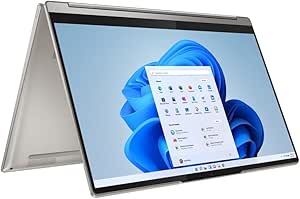
Lenovo Yoga 9i 14" 4K UHD Touchscreen 2-in-1 Laptop
Lenovo Yoga 9i: Versatile 2-in-1 with Stunning 4K Visuals The Lenovo Yoga 9i is a premium 2-in-1 laptop that combines sleek design with powerful performance. Its 14-inch 4K UHD touchscreen display delivers vibrant visuals, while the Intel Core i7 processor and ample RAM ensure smooth multitasking...
View price on Amazon
Affiliate Disclosure: Studio Supplies may earn a commission from qualifying purchases made through links on this page, at no additional cost to you. This helps support our editorial team.
Notice a mistake? Let Us Know
Overview
Lenovo Yoga 9i: Versatile 2-in-1 with Stunning 4K Visuals
The Lenovo Yoga 9i is a premium 2-in-1 laptop that combines sleek design with powerful performance. Its 14-inch 4K UHD touchscreen display delivers vibrant visuals, while the Intel Core i7 processor and ample RAM ensure smooth multitasking. The Yoga 9i easily transforms between laptop, tablet, tent, and stand modes, offering versatility for any task. Included stylus enhances creativity and precision, making this laptop ideal for both work and play.
Specifications:
- Display: 14" Touchscreen
- Resolution: 4K UHD (3840x2160) IPS
- Processor: Intel Core i7-1195G7
- Memory: 16GB 4266MHz LPDDR4x RAM
- Storage: 512GB NVMe SSD
- Form Factor: 2-in-1
- Includes: Stylus
Specifications
Display
14" 4K UHD Touchscreen
Type
2-in-1 Laptop
Brand
Lenovo
Pros & Cons
👍 Pros
- Features a vibrant 4K UHD touchscreen display, offering crisp visuals and intuitive touch interaction for diverse tasks.
- Its 2-in-1 convertible design provides flexibility, allowing use as a traditional laptop or a versatile tablet.
- Offers a high-resolution screen ideal for detailed work, creative endeavors, and immersive media consumption.
- Provides the adaptability of a touchscreen, enhancing user experience with direct manipulation of on-screen elements.
- The Yoga 9i's form factor is designed for portability, making it suitable for users who need a powerful device on the go.
👎 Cons
- The 4K UHD display, while sharp, may consume more battery life compared to lower-resolution screens.
- A 14-inch form factor, even in a 2-in-1, might be less compact than smaller tablets or traditional ultrabooks.
- High-resolution screens can sometimes lead to scaling issues with older software applications.
- The glossy nature of a touchscreen display can be prone to glare in brightly lit environments.
- Maintaining the pristine appearance of a touchscreen can require frequent cleaning to remove fingerprints and smudges.
Frequently Asked Questions
What is the primary display resolution of this laptop?
The Lenovo Yoga 9i features a 4K UHD touchscreen display, providing extremely sharp and detailed visuals.
Can this laptop be used as a tablet?
Yes, the Yoga 9i is a 2-in-1 laptop, which means its design allows it to convert into a tablet form factor for versatile use.
Is the screen on this model a touchscreen?
Yes, this model includes a touchscreen display, enabling direct interaction with the screen for navigation and input.
What are the main benefits of a 4K UHD touchscreen on a laptop?
A 4K UHD touchscreen offers exceptional visual clarity for tasks like photo editing and video viewing, combined with the convenience of touch input for a more interactive experience.
What is the screen size of the Lenovo Yoga 9i?
The Lenovo Yoga 9i comes with a 14-inch display, balancing screen real estate with portability for various user needs.
Related Products


