

Logitech
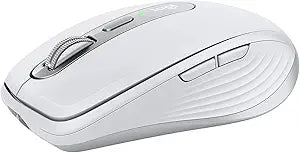
Logitech 910-005989 MX Anywhere 3 Compact Wireless Mouse
★★★★★
USB-C
Experience Precision and Comfort with the Logitech MX Anywhere 3 Mouse The Logitech MX Anywhere 3 is a compact performance mouse designed for productivity on the go. Featuring magnetic scrolling, an ergonomic design, and customizable buttons, this wireless mouse provides exceptional control and ...
$82.99*
Check availability
*Price sourced from Amazon.com. Last updated:Jul 14, 2026.Price and availability are subject to change.
Affiliate Disclosure: Studio Supplies may earn a commission from qualifying purchases made through links on this page, at no additional cost to you. This helps support our editorial team.
Notice a mistake? Let Us Know
Overview
Experience Precision and Comfort with the Logitech MX Anywhere 3 Mouse
The Logitech MX Anywhere 3 is a compact performance mouse designed for productivity on the go. Featuring magnetic scrolling, an ergonomic design, and customizable buttons, this wireless mouse provides exceptional control and comfort for any task.
Detailed Specifications:
- Brand: Logitech
- Model: MX Anywhere 3
- Type: Compact Performance Mouse
- Hand Orientation: Right-Hand
- Wireless Technology: RF Wireless + Bluetooth
- DPI: 4000
- Scrolling: MagSpeed Electromagnetic
- Charging: USB-C Quick Charging
- Multi-Device: Connect up to 3 Devices
Key Features
MAGSPEED SCROLLING: Scroll 1,000 lines in a second and stop on a pixel. MagSpeed electromagnetic scrolling blends speed and precision with silence. Shift from ratchet to hyper-fast with a single flick
PORTABLE COMFORT: MX Anywhere 3 travels with you – no matter where you work. The low-profile ergonomic design is contoured for your hand, with ultra-soft silicone side grips for go-anywhere comfort
TRACK ANYWHERE: Track on virtually any surface, even glass, thanks to a 4000DPI sensor. Work seamlessly on the go whether you’re at a gaming café, at your home desk, or sitting on the couch
USB-C QUICK CHARGING: Stay powered up for 70 days on a full charge. Quick charging gives you three hours of use in just one minute. Charge and work simultaneously with a USB-C cable
MULTI-DEVICE CONNECTIONS: Use Bluetooth or the included Unifying USB dongle to connect up to three devices at once. Switch between your PC, laptop, computer and iPad at the tap of a button
FULLY CUSTOMISABLE: Optimise your workflow. Work faster with customised buttons and predefined app profiles for Adobe Photoshop, Final Cut Pro, Google Chrome, Safari, Microsoft Office and more
Claim your complimentary 1-month Adobe Creative Cloud subscription or 2-month Adobe Photography Plan with purchase of the MX Anywhere 3 to create, make and do like never before.
Specifications
Model Number
910-005989
Sensor Technology
4000 DPI
Scrolling Technology
MagSpeed electromagnetic scrolling
Connectivity
Bluetooth, Unifying USB dongle
Charging Port
USB-C
Battery Life
70 days (full charge), 3 hours (1 minute quick charge)
Side Grips Material
Ultra-soft silicone
Programmable Buttons
Yes
Pros & Cons
👍 Pros
- Features MagSpeed electromagnetic scrolling to glide through 1,000 lines per second with pixel-level precision.
- Designed for portable comfort with a low-profile ergonomic shape and ultra-soft silicone side grips for extended use.
- Tracks on virtually any surface, including glass, thanks to its 4000 DPI sensor, making it ideal for diverse work environments.
- Offers USB-C quick charging, providing 70 days of use on a full charge and three hours of power from just a one-minute charge.
- Supports multi-device connections via Bluetooth or the included Unifying USB dongle, switching between three devices at a button tap.
- Buttons are fully customizable with predefined app profiles for popular software like Adobe Photoshop and Microsoft Office, optimizing workflow.
- Includes a complimentary 1-month Adobe Creative Cloud or 2-month Adobe Photography Plan subscription with purchase.
👎 Cons
- The advanced MagSpeed scrolling feature might take some time for new users to fully adapt to its speed and precision.
- While portable, the compact size may not be ideal for users who prefer larger mice for palm grip comfort during prolonged use.
- Requires a USB-C cable for charging, which means users without USB-C ports on their older devices may need an adapter.
- The specialized customization features are most beneficial for users of specific creative and office applications, less so for general browsing.
- Requires installation of Logitech software to fully utilize button customization and predefined app profiles, adding an extra setup step.
- The 4000 DPI sensor, while versatile, might be considered excessive for users who only perform basic desktop tasks.
Frequently Asked Questions
How fast is the scrolling on the Logitech MX Anywhere 3 mouse?
The Logitech MX Anywhere 3 features MagSpeed electromagnetic scrolling, allowing you to scroll through 1,000 lines in a second with the ability to stop on a pixel.
Can this mouse be used on different surfaces?
Yes, the MX Anywhere 3 is designed to track on virtually any surface, including glass, due to its 4000 DPI sensor.
What is the battery life and charging speed of this mouse?
This mouse can last for 70 days on a full charge, and quick charging provides three hours of use in just one minute via its USB-C port.
How many devices can the MX Anywhere 3 connect to simultaneously?
It supports multi-device connections, allowing you to connect and switch between up to three devices at once using either Bluetooth or the included Unifying USB dongle.
Are the buttons on the MX Anywhere 3 customizable?
Yes, the buttons are fully customizable, and the mouse offers predefined app profiles for various software such as Adobe Photoshop, Final Cut Pro, and Microsoft Office.
Is there any bonus content included with the purchase of this mouse?
Yes, with the purchase of the MX Anywhere 3, you can claim a complimentary 1-month Adobe Creative Cloud subscription or a 2-month Adobe Photography Plan.
Related Products


