



Logitech
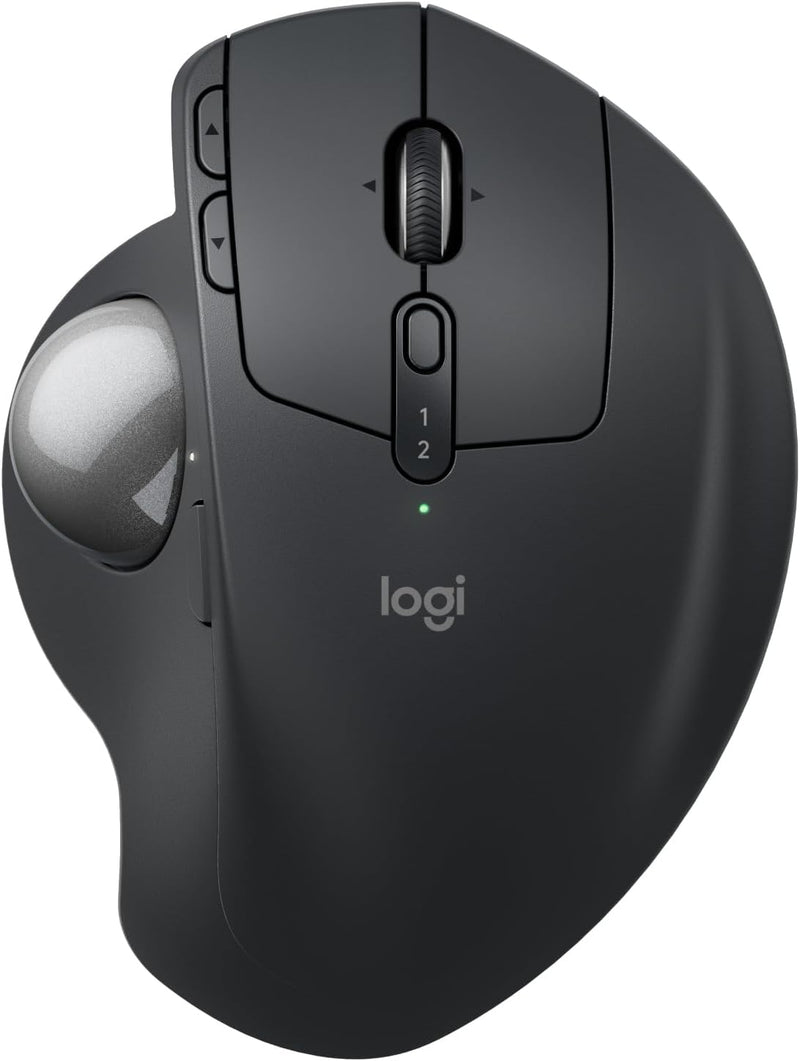
Logitech MX Ergo S Advanced Wireless Trackball Mouse
★★★★★
Ergonomic Precision: Logitech MX Ergo S Advanced Wireless Trackball Mouse Experience superior comfort and precision with the Logitech MX Ergo S Advanced Wireless Trackball Mouse. This ergonomic mouse features a 20-degree tilt angle, precise thumb control, and customizable buttons, providing all-d...
$114.99*$119.99Save 4%
View on Amazon
✓ In Stock on Amazon.com
*Price sourced from Amazon.com. Last updated:Jul 15, 2026.Price and availability are subject to change.
Affiliate Disclosure: Studio Supplies may earn a commission from qualifying purchases made through links on this page, at no additional cost to you. This helps support our editorial team.
Notice a mistake? Let Us Know
Overview
Ergonomic Precision: Logitech MX Ergo S Advanced Wireless Trackball Mouse
Experience superior comfort and precision with the Logitech MX Ergo S Advanced Wireless Trackball Mouse. This ergonomic mouse features a 20-degree tilt angle, precise thumb control, and customizable buttons, providing all-day comfort and enhanced productivity. With dual wireless connectivity, USB-C charging, and made with recycled plastic, it's the perfect blend of performance and sustainability.
Specifications:
- Design: Ergonomic Trackball Mouse with 20-degree tilt
- Connectivity: Bluetooth, Logi Bolt USB Receiver
- Buttons: 6 Programmable Buttons
- Charging: USB-C Rechargeable
- Battery Life: Up to 120 days on a full charge
- Material: Made with recycled plastic
- Compatibility: PC/Mac
Key Features
Advanced thumb control: The MX Ergo S Advanced wireless trackball mouse gives more control with less movement; switch between speed and high-precision tracking at the tap of a button
20-degree tilt: A wireless ergonomic mouse with a tilt angle for better forearm posture, reducing muscle strain by 27% (1); now with 80% quieter clicks (5)
Contoured for your hand: The MX Ergo S is certified by ergonomists for improved comfort, with a sculpted ergonomic design, 20-degree tilt angle, and soft rubber grip; for medium- to large-sized hands
Boost your productivity using the Logi Options+ App (2): Experience enhanced control in your daily tasks with 6 customizable buttons, time-saving shortcuts, and Smart Actions
Quick USB-C charging: Enjoy up to 24h of use from a 1 min charge or up to 120 days (3) with a full charge; charges with a USB Type C to Type C or USB Type A to Type C cable (not included)
Dual wireless connectivity: Connect your rechargeable wireless mouse via Bluetooth or Logi Bolt USB receiver (included); supported by an Easy-Switch button
Made with recycled plastic: The plastic parts in the MX Ergo S wireless rechargeable mouse are made of 20% certified post-consumer recycled plastic (4)
Complete your advanced setup: Pair the MX Ergo S with the ERGO K860 ergonomic split-curved keyboard, featuring an integrated cushioned palm rest for all-day comfort
Note: In case of Wireless mouse, the USB receiver will be provided inside or along with the mouse
Specifications
Connectivity
Bluetooth, Logi Bolt USB Receiver
Ergonomic Tilt Angle
20 degrees
Programmable Buttons
6
Battery Life (Full Charge)
Up to 120 days
Quick Charge
1 min charge for 24 hours of use
Charging Port
USB-C
Recycled Plastic Content
20% (plastic parts)
Click Noise Reduction
80% quieter clicks
Pros & Cons
👍 Pros
- Offers advanced thumb control with a switchable button for instant transitions between speed and high-precision tracking.
- Features an ergonomic 20-degree tilt angle to promote better forearm posture and help reduce muscle strain by 27%.
- Designed with 80% quieter clicks compared to previous models, providing a less distracting user experience.
- Certified by ergonomists for improved comfort, featuring a sculpted design and soft rubber grip suitable for medium- to large-sized hands.
- Enhance productivity with 6 customizable buttons, time-saving shortcuts, and Smart Actions through the Logi Options+ App.
- Delivers up to 120 days of use on a full charge, with quick USB-C charging offering 24 hours of use from a 1-minute charge.
- Provides dual wireless connectivity options via Bluetooth or the included Logi Bolt USB receiver, with an Easy-Switch button.
- Constructed with plastic parts made of 20% certified post-consumer recycled plastic, promoting environmental responsibility.
👎 Cons
- The USB Type C to Type C or USB Type A to Type C charging cable is not included, requiring a separate purchase.
- Optimized for medium- to large-sized hands, which may not provide ideal comfort for users with smaller hands.
- Full customization of buttons and features requires the Logi Options+ App, adding a software dependency.
- While offering dual connectivity, some users may prefer a single, universal connection method for simplicity.
Frequently Asked Questions
How long does the battery last on a full charge?
The MX Ergo S can last up to 120 days on a full charge, providing extended use without frequent recharging.
Can I customize the buttons on this trackball mouse?
Yes, it features 6 customizable buttons that can be configured for time-saving shortcuts and Smart Actions using the Logi Options+ App.
What kind of charging cable is needed for this mouse?
The mouse charges via USB-C, and it is compatible with a USB Type C to Type C or USB Type A to Type C cable, though the cable is not included.
What are the connectivity options for this trackball?
You can connect the MX Ergo S wirelessly via Bluetooth or using the included Logi Bolt USB receiver, with an Easy-Switch button to move between devices.
Is this mouse designed for a specific hand size?
The MX Ergo S is contoured for hands and certified by ergonomists for improved comfort, especially suited for medium- to large-sized hands.
Related Products


