



Logitech
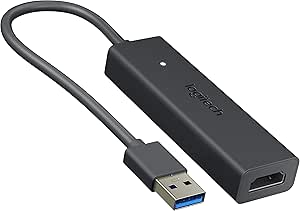
Logitech 939-001553 Screen Share HDMI Adapter
★★★★★
1080p
Plug-and-play HDMI-to-USB adapter that lets you share your screen in any conference room without software.
$239.99*
View on Amazon
✓ In Stock on Amazon.com
*Price sourced from Amazon.com. Last updated:Jun 04, 2026.Price and availability are subject to change.
Affiliate Disclosure: Studio Supplies may earn a commission from qualifying purchases made through links on this page, at no additional cost to you. This helps support our editorial team.
Notice a mistake? Let Us Know
Overview
Key Features
In-Room Projection - Stop crowding around a laptop! Just connect to Logitech Screen Share to project your presentations, spreadsheets, documents, and videos on the in-room display
Adapter and Mobile-Friendly - share from any device with a video output, including smartphones, tablets, Chromebooks, digital cameras, and media players
HD Video + Audio - Logitech Screen Share lets you present videos as they were meant to be seen and heard
Sharp and Responsive - natural-feeling navigation, instant typing, smooth scrolling, and 1080p HD video at up to 30 frames per second
Complements Your Kit - Add wired content sharing to rooms equipped with Logitech ConferenceCam Kit with Intel NUC to instantly share your screen into any online meeting
Specifications
Input
HDMI 1.4a and higher
Output
USB 3.0 or 2.0
Video Resolution
1080p HD
Frame Rate
Up to 30 fps
Audio
Yes (HD audio passthrough)
System Requirements
Windows 7 / 8.1 / 10 or later; macOS 10.10+
Software Required
None (plug-and-play)
Pros & Cons
👍 Pros
- No software installation or internet connection needed — truly plug-and-play screen sharing.
- Supports any HDMI-equipped device, from laptops and tablets to cameras and media players.
- Passes both HD video and audio through a single connection for seamless presentations.
- Simple setup reduces technical delays at the start of meetings.
- Compatible with both Windows and macOS environments.
👎 Cons
- Limited to 1080p at 30fps, which may feel sluggish for fast-moving content or high-refresh workflows.
- Requires a USB 2.0 or 3.0 port on the receiving display system, which may not be available on all screens.
- Does not support wireless sharing — a physical HDMI cable connection is always required.
- No Linux support listed in the official system requirements.
Frequently Asked Questions
Do I need to install any software or drivers to use Logitech Screen Share?
No, it is a plug-and-play device. You connect your laptop or device via HDMI, and the adapter outputs to the room's display through USB — no software installation or internet connection required.
What video resolution and frame rate does Logitech Screen Share support?
It supports up to 1080p Full HD video at up to 30 frames per second, with audio passed through as well.
Can I use this with devices other than laptops?
Yes, it works with any device that has an HDMI video output, including smartphones (with an HDMI adapter), tablets, Chromebooks, digital cameras, and media players.
What operating systems are compatible with Logitech Screen Share?
It supports Windows 7, Windows 8.1, Windows 10 or later, and macOS 10.10 and higher.
Does this work as a standalone device or does it require other Logitech equipment?
It can function on its own for basic screen sharing, and it also complements Logitech ConferenceCam Kits with Intel NUC for integrated meeting room setups.
Related Products


