

Microsoft
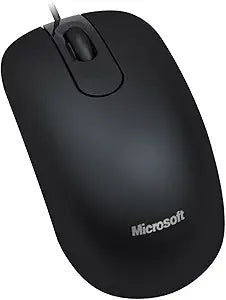
Microsoft 35H-00002 Optical Mouse 200: Black, USB, OEM
★★★★★
Reliable Performance for Everyday Use: Microsoft Optical Mouse 200 The Microsoft Optical Mouse 200 for Business offers precise tracking and comfortable use. Designed for both Mac and Windows, this USB mouse is a reliable choice for daily computing tasks. Specifications: Brand: Microsoft M...
Check availability
Affiliate Disclosure: Studio Supplies may earn a commission from qualifying purchases made through links on this page, at no additional cost to you. This helps support our editorial team.
Notice a mistake? Let Us Know
Overview
Reliable Performance for Everyday Use: Microsoft Optical Mouse 200
The Microsoft Optical Mouse 200 for Business offers precise tracking and comfortable use. Designed for both Mac and Windows, this USB mouse is a reliable choice for daily computing tasks.
Specifications:
- Brand: Microsoft
- Model: Optical Mouse 200
- Color: Black
- Interface: USB
- Compatibility: Mac, Windows
Key Features
Optical Mouse 200 f/ Business, USB
Specifications
Model
Optical Mouse 200
Color
Black
Connectivity
USB
Tracking Technology
Optical
Target Market
Business
Product Type
Mouse
Pros & Cons
👍 Pros
- This Microsoft Optical Mouse 200 is designed for business use, suggesting reliability and essential functionality for professional environments.
- Features optical tracking technology, providing precise and smooth cursor control on various surfaces.
- Connects via USB, offering universal compatibility with most desktop and laptop computers without needing special drivers.
- The "Black" color provides a professional and understated aesthetic that blends well in any office setup.
- As an OEM product, it can be a cost-effective choice for outfitting multiple workstations.
👎 Cons
- The product description does not specify the DPI or sensitivity of the optical sensor, which could be a factor for users requiring fine control.
- This is a basic optical mouse, meaning it lacks advanced features such as programmable buttons, ergonomic designs, or wireless connectivity.
- Being an OEM product, it might not come with retail packaging or a comprehensive user manual.
- The traditional wired USB connection means it will take up a USB port and has a physical cable, potentially limiting desk flexibility.
- Specific information on its ergonomic shape or handedness (left/right) is not provided, so comfort might vary for individual users.
Frequently Asked Questions
What type of connectivity does the Microsoft Optical Mouse 200 use?
The Microsoft Optical Mouse 200 connects via a USB cable, offering broad compatibility with computers.
Is this mouse designed for business or personal use?
This mouse is specifically marketed as "Optical Mouse 200 f/ Business," indicating its suitability for professional environments.
What color is the Microsoft Optical Mouse 200?
The mouse comes in a classic black color, fitting for most office or home setups.
What kind of tracking technology does this mouse utilize?
It uses optical tracking technology, which generally provides smooth and accurate cursor movement on various surfaces.
Does this mouse require special software to function?
As a basic USB optical mouse, it typically operates plug-and-play with standard operating systems, not requiring special software.
Related Products


