

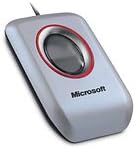
Microsoft
Microsoft DG2-00004 USB Fingerprint Reader
This Microsoft USB fingerprint reader replaces password prompts with a single-touch biometric login — fast, hardware-based identity verification for Windows systems.
Check availability
Affiliate Disclosure: Studio Supplies may earn a commission from qualifying purchases made through links on this page, at no additional cost to you. This helps support our editorial team.
Notice a mistake? Let Us Know
Overview
Specifications
Type
Fingerprint reader (biometric)
Interface
USB
Stated OS Compatibility
Windows Vista
Brand
Microsoft
Model
DG2-00004
Pros & Cons
👍 Pros
- USB plug-and-play connection requires no internal installation or motherboard modification — the fingerprint reader works as an external peripheral on any machine with a USB Type-A port.
- Hardware-level biometric authentication eliminates the need to type a password for Windows login — fingerprint reading is faster than manual password entry in typical desktop sessions
- USB connectivity requires no internal installation or PCIe slot — plugs into any available USB port without opening the case
- Biometric authentication eliminates the need to type a password for login, removing the attack surface of keyboard-based credential entry visible to shoulder surfing or keyloggers on the host machine.
- Microsoft hardware design quality was consistently high for the era — the physical build of this reader is robust for a USB peripheral, with a stable base that stays planted on a desk during fingerprint placement.
- Microsoft-branded device was designed with native Windows Vista driver support, avoiding third-party driver uncertainty on that specific platform
- Physical fingerprint reading provides a two-factor-equivalent security upgrade over password-only login by introducing a biometric factor tied to physical presence
- Fingerprint authentication is faster than manual password entry for repeat logins throughout a work session, reducing friction for users who lock their workstation frequently per security policy.
- As an original Microsoft-branded product, it offered first-party software integration with the Windows credential management system available at the time of its release.
- Single-touch enrollment and login interaction is simpler than smart card or token-based authentication systems that require carrying additional hardware
👎 Cons
- Documented OS compatibility is Windows Vista — support for Windows 10 and Windows 11 is unconfirmed and depends on legacy driver recognition, making this a significant compatibility risk for modern deployments.
- Officially compatible only with Windows Vista — modern Windows 10 and 11 users cannot rely on this device for Windows Hello integration or standard biometric login
- As a legacy USB device with no updated driver release cadence, long-term driver compatibility with operating system security updates is not maintained
- This device predates the Windows Hello biometric framework, meaning it does not integrate with the modern Microsoft Passport / Windows Hello authentication ecosystem used by current enterprise and consumer Windows environments.
- No hardware fingerprint template storage — biometric enrollment data is maintained in host PC software, which creates a dependency on legacy enrollment application availability and continued functionality on newer OS versions.
- The device does not support Windows Hello's WHQL biometric standard, meaning it cannot participate in PIN/Hello ecosystem features on modern Windows platforms
- USB Type-A connector occupies a port permanently while the device is in use — on modern laptops with limited USB-A ports, this is a meaningful trade-off
- As a legacy USB device with no documented recent driver updates, this reader cannot be recommended for any security-critical deployment where authentication reliability must be verified and maintained.
- The USB-A Type connector requires an adapter on modern laptops that have transitioned entirely to USB-C, adding a physical dependency that may introduce connection reliability issues in portable use scenarios.
- No disclosed specifications for false acceptance rate (FAR) or false rejection rate (FRR) — the security and reliability characteristics of the fingerprint sensor are not formally published
Frequently Asked Questions
Is this fingerprint reader compatible with Windows 10 and Windows 11, or only Windows Vista as the listing states?
The product description specifies Windows Vista compatibility as the documented OS at time of manufacture. As a legacy USB fingerprint reader released in the mid-2000s, compatibility with Windows 10 and Windows 11 depends entirely on whether Microsoft's built-in Windows Biometric Framework drivers recognize the device — this is not guaranteed. Verify driver compatibility with your OS version before purchasing if Windows 10/11 support is required.
What operating systems are compatible with the Microsoft DG2-00004 fingerprint reader?
Microsoft lists compatibility with Windows Vista. This is a legacy device — it predates Windows Hello and the WHQL biometric framework used in Windows 8 and later. Compatibility with Windows 10 or Windows 11 is not guaranteed and is not part of the product specification; users on modern Windows versions should verify driver availability before purchasing.
Does this device work with Windows Hello on Windows 10 or 11?
The DG2-00004 was designed for Windows Vista and does not carry Windows Hello certification. Windows Hello requires devices that meet the WHQL biometric device class specification introduced with Windows 8. This reader may not be recognized as a Windows Hello-compatible fingerprint device on Windows 10/11.
Does this device support Windows Hello biometric authentication, or does it use its own proprietary authentication software?
This product predates the Windows Hello framework (introduced with Windows 10 in 2015) and was originally designed for the Microsoft Fingerprint Reader proprietary software stack on Windows Vista. Windows Hello compatibility is not confirmed for this device — modern Windows Hello-compatible fingerprint readers use the Windows Biometric Framework and are explicitly certified for it.
What USB specification does this reader use — USB 2.0 or USB 3.0 — and will it work on a USB-C only laptop?
The Microsoft Fingerprint Reader uses a USB 2.0 connection (standard Type-A connector). USB 2.0 bandwidth is entirely sufficient for biometric data transmission. On USB-C only laptops, a USB-A to USB-C adapter will provide the physical connection, but driver compatibility with modern OS versions remains the primary concern for this legacy device.
What interface does the Microsoft fingerprint reader use, and does it require a driver?
The reader connects via USB — a standard Type-A connector. On Windows Vista, Microsoft provided native driver support. On modern operating systems, driver availability depends on whether Microsoft has maintained updated drivers; check the Microsoft Download Center for current driver status before deploying on non-Vista systems.
How many fingerprints can be enrolled on this device?
The product specifications do not disclose the maximum enrolled fingerprint count. For specifics on enrollment capacity, consult the device's original documentation or Microsoft's support pages for the DG2-00004 model.
How many fingerprints can be enrolled on this device, and is fingerprint data stored on the device or on the host PC?
The original Microsoft Fingerprint Reader software stores fingerprint template data on the host computer rather than within the device hardware. The number of enrollable fingerprints depends on the software version; the original software supported multiple fingerprint enrollments per user. Note that the enrollment software is a legacy application designed for older Windows versions.
Is this device appropriate for a new PC build in 2024, or is it a legacy product?
This is a legacy product originally released for Windows Vista. For a current PC build, a modern USB fingerprint reader with documented Windows 10/11 and Windows Hello certification will provide reliable biometric login with current driver support. This device may function on modern systems if the Biometric Framework recognizes it, but it carries meaningful compatibility risk that a current-generation reader does not.
Is this fingerprint reader suitable for a multi-user Windows environment?
On compatible Windows Vista systems, multiple users can enroll their own fingerprints for individual account login. The device's fingerprint management software handles per-user profile storage. In a multi-user environment, confirm that the management software supports the number of users and accounts required.
Related Products


