

Microsoft
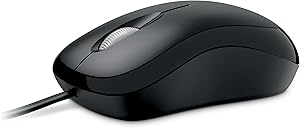
Microsoft P58-00061 Basic Optical Mouse USB Wired
★★★★★
Experience Effortless Control with the Microsoft Basic Optical Mouse The Microsoft Basic Optical Mouse delivers precise and comfortable navigation for everyday computing. Featuring optical technology and an ergonomic design, this mouse is a reliable choice for both left and right-handed users. ...
$32.99*
View on Amazon
✓ In Stock on Amazon.com
*Price sourced from Amazon.com. Last updated:Jul 14, 2026.Price and availability are subject to change.
Affiliate Disclosure: Studio Supplies may earn a commission from qualifying purchases made through links on this page, at no additional cost to you. This helps support our editorial team.
Notice a mistake? Let Us Know
Overview
Experience Effortless Control with the Microsoft Basic Optical Mouse
The Microsoft Basic Optical Mouse delivers precise and comfortable navigation for everyday computing. Featuring optical technology and an ergonomic design, this mouse is a reliable choice for both left and right-handed users.
- Optical Technology: Provides enhanced speed, accuracy, and reliability on virtually any surface.
- Scroll Wheel: Enables quick and confident navigation through documents.
- Ambidextrous Design: Offers comfortable use for both left and right hands.
- Customizable Buttons: Allows quick access to frequently used media, programs, and files.
- Ergonomic Design: Provides comfort for extended use.
- System Requirements: Compatible with Windows 8, Windows 7, Windows Vista, Windows 98/2000/XP/Pro/Home/Media Center Edition/Tablet PC Edition, requires a USB port.
Key Features
Scroll Wheel - Move through your documents quickly without having to click the on-screen scroll bar.
Comfort - Get a grip with a comfortable design created for either hand.
Easy to Set Up and Use - No software to install, no feature setup required.
Microsoft Optical Technology - High Performance Optical Technology - no mouse ball. Optical sensor delivers greater accuracy and control.
Specifications
Connectivity
USB Wired
Technology
Optical
Tracking Sensor
Optical Sensor
Scroll Feature
Scroll Wheel
Design
Ambidextrous
Setup
No software installation required
Pros & Cons
👍 Pros
- Features a scroll wheel that allows for quick navigation through documents without needing to click on-screen scroll bars
- Designed for comfort, offering a comfortable grip that accommodates both left and right-handed users
- Offers high-performance optical technology, eliminating the need for a traditional mouse ball for tracking
- The optical sensor delivers greater accuracy and control compared to older mechanical mouse designs
- Provides an easy plug-and-play experience with no software installation or feature setup required, simplifying use
- Offers reliable wired USB connectivity, ensuring consistent performance without battery concerns or wireless interference
- The classic design emphasizes functionality and ease of use, suitable for a wide range of computer tasks
👎 Cons
- Wired USB connection might restrict movement and create cable clutter compared to wireless mice
- Lacks advanced customization options such as programmable buttons or adjustable DPI settings
- The "Basic" nature suggests a lack of ergonomic features for extended use or specialized tasks
- Specific details on DPI or tracking speed are not provided, making it difficult to assess precision for specific needs
- May not be ideal for gaming or graphic design due to the absence of advanced features
Frequently Asked Questions
Is the Microsoft Basic Optical Mouse suitable for both left and right-handed users?
Yes, the mouse is designed for comfort with a shape created to accommodate either hand.
Does this mouse require any software installation?
No, the Microsoft Basic Optical Mouse is easy to set up and use, with no software to install or feature setup required.
What type of tracking technology does this mouse use?
This mouse uses Microsoft Optical Technology, featuring an optical sensor for greater accuracy and control, eliminating the need for a mouse ball.
How does the scroll wheel function on this mouse?
The scroll wheel allows you to move quickly through your documents without needing to click the on-screen scroll bar.
What kind of connection does this mouse use?
The Microsoft Basic Optical Mouse uses a USB wired connection for reliable and consistent performance.
Related Products


