

Microsoft
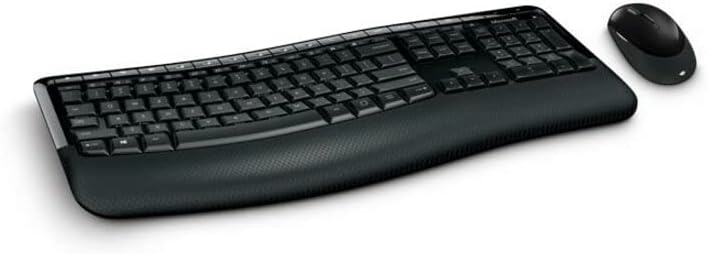
Microsoft PP4-00002 Wireless Comfort Desktop 5050 - AES
★★★★★
Ergonomic Comfort and Wireless Freedom with the Microsoft Comfort Desktop 5050The Microsoft Wireless Comfort Desktop 5050 is a stylish and ergonomic keyboard and mouse combo designed for all-day comfort and productivity. Featuring a curved keyboard layout, a built-in palm rest, and a reliable wir...
$389.90*
View on Amazon
✓ In Stock on Amazon.com
*Price sourced from Amazon.com. Last updated:Jul 14, 2026.Price and availability are subject to change.
Affiliate Disclosure: Studio Supplies may earn a commission from qualifying purchases made through links on this page, at no additional cost to you. This helps support our editorial team.
Notice a mistake? Let Us Know
Overview
Ergonomic Comfort and Wireless Freedom with the Microsoft Comfort Desktop 5050
The Microsoft Wireless Comfort Desktop 5050 is a stylish and ergonomic keyboard and mouse combo designed for all-day comfort and productivity. Featuring a curved keyboard layout, a built-in palm rest, and a reliable wireless connection, this desktop set is perfect for creating a comfortable and clutter-free workspace.
- Design: Comfort Curve design
- Palm Rest: Built-in palm rest
- Wireless Range: Up to 30 feet
- Color: Black
- Connectivity: Wireless
- Batteries: 4 AA batteries required (included)
Key Features
The comfort curve design from Microsoft encourages natural wrist posture and is easy to use
Built in Palm rest helps support and straighten wrists
Give yourself room to move with a wireless keyboard that lets you work without worrying about tangled wires
Ergonomist-approved comfort curve design
Specifications
Design
Comfort Curve, Ergonomist-approved
Features
Built-in Palm Rest
Connectivity
Wireless
Brand
Microsoft
Pros & Cons
👍 Pros
- Features Microsoft's Comfort Curve design, specifically encouraging a natural wrist posture during use.
- The ergonomist-approved design is user-friendly and helps promote proper alignment and comfort.
- Includes a built-in palm rest that provides support and helps to straighten wrists, reducing strain.
- Offers wireless connectivity, allowing users the freedom to work without the constraint of tangled wires.
- The wireless setup provides flexibility in keyboard placement, enhancing desk organization and personal workspace ergonomics.
👎 Cons
- The comfort curve design might require an adjustment period for users accustomed to traditional flat keyboards.
- Being a wireless keyboard, it will require batteries, which adds an ongoing maintenance task and potential for interruption if power is low.
- The "Comfort Desktop" designation suggests it may be part of a larger set, but only the keyboard's features are explicitly detailed.
- While wireless, the range and specific type of wireless technology (e.g., 2.4GHz, Bluetooth) are not specified, which could impact connectivity performance.
- The keyboard focuses on ergonomic comfort, but there is no mention of customizable keys, backlighting, or mechanical switch types, which some users might prefer.
Frequently Asked Questions
What is the main benefit of the Microsoft Comfort Curve design?
The comfort curve design from Microsoft is specifically intended to encourage natural wrist posture, promoting comfort during extended use.
Does this keyboard include a feature to support wrists?
Yes, the Microsoft Wireless Comfort Desktop 5050 includes a built-in palm rest that is designed to help support and straighten wrists.
Is this a wired or wireless keyboard?
This is a wireless keyboard, giving you room to move and work without worrying about tangled wires on your desktop.
Has the design of this keyboard been evaluated for ergonomic benefits?
Yes, this keyboard features an ergonomist-approved comfort curve design, ensuring it supports user well-being.
How does the wireless functionality enhance the user experience?
The wireless keyboard allows for a clutter-free workspace and provides the flexibility to position the keyboard optimally for your comfort without cable restrictions.
Is the comfort curve design easy to adapt to for new users?
The comfort curve design is described as being easy to use, suggesting a relatively smooth transition for most individuals seeking ergonomic benefits.
Related Products


