

Microsoft
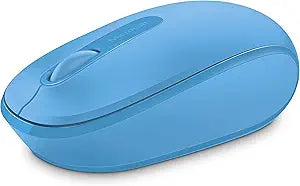
Microsoft 1850 Wireless Mobile Mouse Cyan Blue
★★★★★
Microsoft Wireless Mobile Mouse 1850: Comfortable and Portable ComputingThe Microsoft Wireless Mobile Mouse 1850 delivers comfortable and reliable wireless performance for your PC, laptop, or desktop. Designed for both right and left-hand use, this mouse features a plug-and-go nano transceiver fo...
Check availability
Affiliate Disclosure: Studio Supplies may earn a commission from qualifying purchases made through links on this page, at no additional cost to you. This helps support our editorial team.
Notice a mistake? Let Us Know
Overview
Microsoft Wireless Mobile Mouse 1850: Comfortable and Portable Computing
The Microsoft Wireless Mobile Mouse 1850 delivers comfortable and reliable wireless performance for your PC, laptop, or desktop. Designed for both right and left-hand use, this mouse features a plug-and-go nano transceiver for easy setup and portability.
Key Specifications:
- Brand: Microsoft
- Model: U7Z-00055
- Color: Cyan Blue
- Connectivity: Wireless
- Ergonomics: Comfortable right/left-hand use
- Transceiver: Plug-and-go nano transceiver
- Compatibility: PC, Laptop, Desktop; Mac, Windows 8/10/11
- Features: Scroll wheel
Key Features
Scroll wheel
Comfort and portability
Plug-and-go nano transceiver
Comfortable in either hand
Scroll wheel
Note : In case of Wireless mouse, the USB receiver will be provided inside or along with the mouse
Comfort and portability
Plug-and-go nano transceiver
Comfortable in either hand
Specifications
Connectivity
Wireless (Plug-and-go nano transceiver)
Color
Cyan Blue
Features
Scroll wheel, Comfortable and portable design, Ambidextrous
Pros & Cons
👍 Pros
- Equipped with a scroll wheel for easy and efficient navigation through documents and web pages.
- Designed for comfort and portability, making it convenient for mobile use or small workspaces.
- Features a plug-and-go nano transceiver, simplifying connection without complicated setup.
- Ambidextrous design ensures it is comfortable to use in either the left or right hand.
- The wireless nature of the mouse reduces cable clutter on your desk for a cleaner setup.
👎 Cons
- The product description does not specify the type of sensor (e.g., optical, laser) or its DPI, which can impact precision.
- Specific information on battery life or type of battery required is not provided, making it hard to gauge running costs.
- The "nano transceiver" typically uses a USB-A port, which might require an adapter for devices with only USB-C.
- Without additional buttons beyond the standard left/right click and scroll, advanced customization options are limited.
- The mouse connects via a nano transceiver, which occupies a USB port, unlike Bluetooth mice that don't need a dedicated dongle.
Frequently Asked Questions
Does the Microsoft 1850 Wireless Mobile Mouse have a scroll wheel?
Yes, this mouse is equipped with a scroll wheel for easy navigation.
Is this mouse designed for portability?
Yes, the Microsoft 1850 Wireless Mobile Mouse is designed for comfort and portability, making it ideal for mobile use.
How do I connect this wireless mouse to my computer?
You connect it using the plug-and-go nano transceiver, which is typically found inside or along with the mouse.
Can this mouse be used by both left-handed and right-handed users?
Yes, it features an ambidextrous design, ensuring it is comfortable for use in either hand.
Where is the USB receiver for the wireless mouse located?
The USB receiver for the wireless mouse will be provided inside or along with the mouse.
Related Products


