



Price history
Milue
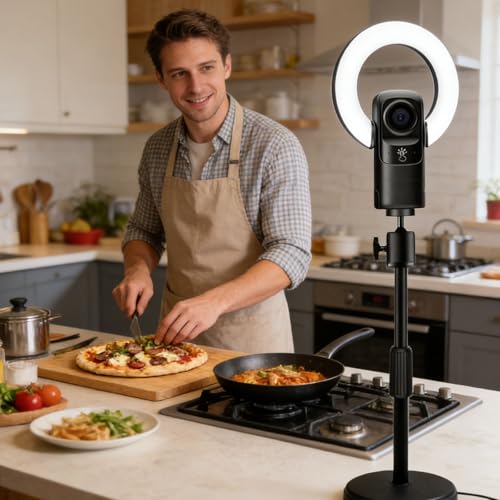
Milue 2160P USB Webcam with Fill Light and Remote
A 4K webcam that solves your lighting problem too, with a nine-level touch-controlled fill light and a 17-button remote for adjusting brightness and zoom without leaving your call
$72.89*
View on Amazon
✓ In Stock on Amazon.com
*Price sourced from Amazon.com. Last updated:Jul 23, 2026.Price and availability are subject to change.
Affiliate Disclosure: Studio Supplies may earn a commission from qualifying purchases made through links on this page, at no additional cost to you. This helps support our editorial team.
Notice a mistake? Let Us Know
Overview
Key Features
Adjustable fill light: Built in 9 touch controlled fill light provides balanced illuminating in low light environments Enhances for nighttime streaming or dimly lit conferences, ensuring you always appear bright and professional
Works seamlessly via USB2.0 with multiple systems without driver The 150cm cable offering flexible placement, while universally Type C simplifies connection crosses laptops and desktops
Multimedia: Combines a built in reducing microphone, 2160P resolution, and 4K autofocus in compactly design The included 17 button remote enables control for lighting, zooming, and settings during recordings or calls
Smart Autofocusing & Zooming: Features Autofocusing and automatic zooming to maintain optimal focusing for remote teaching or video calls, eliminating manual adjustments while keeping subjects perfectly framed at all times
UHD 4K Resolution: Delivers clear 3840x2160 resolution for sharped video, for meetings and live streaming The 30FPS frame ensuring smooth motion capturing without blurring, enhancing both work presentations and entertainment
Specifications
Brand
Milue
Resolution
2160P UHD 4K (3840x2160)
Frame Rate
30FPS
Focus
4K autofocus with automatic zoom
Fill Light
Built-in, 9 levels, touch controlled
Microphone
Built-in noise reducing
Interface
USB 2.0, Type-C
Cable Length
150cm
Remote Control
17-button, included
Driver Required
No, plug and play across multiple systems
Frequently Asked Questions
Does the fill light actually replace a separate ring light for evening calls?
For most desk setups, yes. The built-in light offers 9 touch-controlled levels aimed at balanced illumination in low-light rooms, which covers nighttime streaming and dimly lit conferences without extra gear.
Can it really deliver 4K video over a USB 2.0 connection?
The listed spec is 3840x2160 at 30FPS over USB 2.0. That bus has real bandwidth limits, so expect compression at full resolution rather than the uncompressed quality a USB 3.0 camera might offer.
What does the 17-button remote actually control on this webcam?
Lighting, zoom, and camera settings. It's designed for adjustments during active recordings or calls, so you can raise the fill light or reframe without opening a settings panel mid-session.
Do I need to install software or drivers before using this camera?
No. It works via USB 2.0 with multiple operating systems driver-free, and the universal Type-C connection is intended to simplify hookup across both laptops and desktops.
Is the 150cm cable long enough to reach a desktop tower on the floor?
In most cases, yes. At roughly five feet, the cable is meant to give flexible placement, whether the camera sits on a monitor and the PC is under the desk or off to one side.
Will I need a separate microphone for meetings and online classes?
Not for basic calls. A noise-reducing microphone is built into the compact housing, so the camera handles audio and video together without requiring a headset.
Does the autofocus require manual adjustment when I move during a call?
No. Autofocus and automatic zoom work together to maintain focus and framing, which the manufacturer positions specifically for remote teaching and video calls where you shift position.
Related Products


