

Monoprice
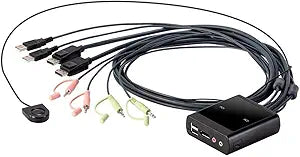
Monoprice 138294 2-Port USB DisplayPort KVM Switch
★★★★★
4096x2160DisplayPort
Seamlessly Switch Between Two Computers with One Set of PeripheralsThe Monoprice 2-Port USB DisplayPort Cable KVM Switch allows you to control two computers using a single DisplayPort monitor, USB keyboard, USB mouse, microphone, and speakers. With support for high resolutions and a remote port s...
$86.98*
View on Amazon
✓ In Stock on Amazon.com
*Price sourced from Amazon.com. Last updated:Jun 04, 2026.Price and availability are subject to change.
Affiliate Disclosure: Studio Supplies may earn a commission from qualifying purchases made through links on this page, at no additional cost to you. This helps support our editorial team.
Notice a mistake? Let Us Know
Overview
Seamlessly Switch Between Two Computers with One Set of Peripherals
The Monoprice 2-Port USB DisplayPort Cable KVM Switch allows you to control two computers using a single DisplayPort monitor, USB keyboard, USB mouse, microphone, and speakers. With support for high resolutions and a remote port selector, this KVM switch simplifies your workspace and boosts productivity.
Specifications:
- Number of Ports: 2
- Video Input: DisplayPort
- USB Ports: USB Keyboard, USB Mouse
- Audio Support: Microphone and Speakers
- Maximum Resolution: 4096x2160@30Hz
- Features: Remote Port Selector
Key Features
One KVM console controls two USB/DisplayPort computers. Superior video quality up to 4096x2160@30hz.
Computer selection via remote port selector. Os support: Windows, Mac OS x, and Linux.
Supports microphone and speakers. The USB ports can be used for USB peripheral sharing.
Supports USB hot-plugging.
Hdcp compatible. Bus powered.
Specifications
Number of Ports
2
Video Input
DisplayPort
Video Resolution Support
Up to 4096x2160@30hz
HDCP Compatibility
Yes
Audio Support
Microphone and Speakers
Computer Selection Method
Remote port selector
Operating System Support
Windows, Mac OS X, Linux
USB Features
USB peripheral sharing, USB hot-plugging
Power Source
Bus powered
Pros & Cons
👍 Pros
- Allows one KVM console to control two USB/DisplayPort computers, simplifying a multi-system setup.
- Supports superior video quality, achieving resolutions up to 4096x2160@30hz for crisp and clear displays.
- Features computer selection via a remote port selector, providing convenient control without needing direct access to the unit.
- Offers operating system support for Windows, Mac OS X, and Linux, ensuring broad compatibility across various platforms.
- Includes support for both a microphone and speakers, allowing for complete audio integration with your connected systems.
- The USB ports are designed for USB peripheral sharing, enabling multiple devices to share peripherals like printers or external drives.
- Supports USB hot-plugging, allowing for devices to be connected or disconnected without needing to power down the KVM or computers.
- Features HDCP compatibility, ensuring content protection for media playback across connected DisplayPort devices.
- The KVM switch is bus powered, eliminating the need for an external power adapter and simplifying installation.
👎 Cons
- The video quality is capped at 4096x2160@30hz, which may be a limitation for users requiring higher refresh rates for gaming or smoother motion.
- Computer selection primarily relies on a remote port selector, with no mention of hotkey switching, which some users might prefer.
- While USB peripheral sharing is supported, the specific USB version (e.g., 2.0 or 3.0) and number of shared ports are not detailed.
- The KVM switch is specific to DisplayPort video input, meaning it won't be compatible with other video standards like HDMI or DVI without adapters.
- The lack of an external power source means it relies on the connected computers for power, which might not be ideal in all configurations or for all peripherals.
Frequently Asked Questions
What is the maximum video resolution supported by this KVM switch?
This Monoprice 2-Port USB DisplayPort KVM switch supports superior video quality with resolutions up to 4096x2160@30hz, providing a clear visual experience.
How do I switch between the connected computers?
Computer selection is managed via a remote port selector, offering a convenient way to toggle between the two USB/DisplayPort computers.
Can I use this KVM switch with different operating systems?
Yes, this KVM switch offers broad operating system support, including Windows, Mac OS X, and Linux, making it versatile for various setups.
Does this device allow for sharing of USB peripherals?
Yes, the USB ports on this KVM switch are designed for USB peripheral sharing, allowing you to connect and share devices like printers or external drives between computers.
Is external power required for this KVM switch?
No, this KVM switch is bus powered, meaning it draws power from the connected computers and does not require an external power adapter.
Related Products


