



MSI
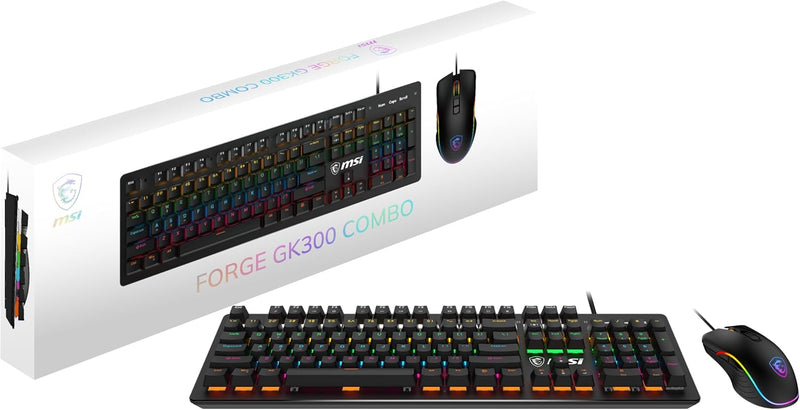
MSI Forge GK300 Combo Blue Gaming Keyboard Mouse
★★★★★
Blue mechanical switches and a 7,200 DPI optical sensor in one wired combo deliver tactile keystroke feedback and precise tracking without per-component premium pricing.
$37.79*$59.99Save 37%
Check availability
*Price sourced from Amazon.com. Last updated:Jul 16, 2026.Price and availability are subject to change.
Affiliate Disclosure: Studio Supplies may earn a commission from qualifying purchases made through links on this page, at no additional cost to you. This helps support our editorial team.
Notice a mistake? Let Us Know
Overview
Key Features
Anti-ghosting - Up to 26-key anti-ghosting allows for simultaneous key presses.
Mechanical Blue Switches - The durable & dustproof mechanical switches offer a tactile and audible click when typing for a satisfying experience.
Durable mouse switches - Enjoy years of gaming with main button switches rated for over 10 Million clicks.
Precise Optical Sensor - An optical sensor provides up to 7,200 DPI to deliver precise tracking.
MSI Center not supported.
Specifications
Keyboard Type
Gaming Keyboard
Switch Type
Mechanical Blue Switches
Anti-Ghosting
Up to 26-key
Mouse Sensor Type
Optical Sensor
Mouse DPI
Up to 7,200
Mouse Main Button Switch Rating
Over 10 Million clicks
MSI Software Support
MSI Center not supported
Switch Durability
Durable & dustproof
Pros & Cons
👍 Pros
- Mechanical blue switches provide tactile and audible actuation feedback, allowing typists to confirm key registration without bottoming out on every stroke.
- 26-key anti-ghosting correctly registers simultaneous multi-key inputs across the 104-key full layout, covering virtually all real-world gaming input combinations.
- The GM300's optical sensor reaches 7,200 DPI, providing a wide sensitivity range that covers low-DPI precision work and high-DPI fast-sweep configurations.
- GM300 main button switches are rated for over 10 million clicks, a durability specification that outpaces typical office mouse switches by a significant margin.
- Ambidextrous GM300 body design makes the combo accessible to left-handed users without requiring a separate mouse purchase.
👎 Cons
- Blue switches produce a sharp audible click on every actuation — in shared spaces, offices, or open-plan environments, the noise level will be noticeable to others within several feet.
- MSI Center software is explicitly not supported for this combo, meaning there is no official tool for remapping keys, adjusting DPI steps, or customizing lighting profiles beyond any onboard presets.
- The 7,200 DPI ceiling, while adequate for most users, falls below the 12,000–26,000 DPI ratings found on mid-range and enthusiast mice — users requiring ultra-high-DPI configurations for large-format displays will hit this ceiling.
- USB wired connectivity eliminates wireless flexibility — cable length and desk routing become physical constraints in tight or cable-managed setups.
- Windows 10 and above is the only officially supported OS, leaving macOS and Linux users without guaranteed feature parity or driver support.
Frequently Asked Questions
What type of switches does the GK300 keyboard use and how do they behave under input?
The GK300 uses mechanical blue switches. Blue switches are clicky-tactile — they produce a physical bump and an audible click at the actuation point. Actuation registers before the full key travel bottoms out, which is the characteristic that separates mechanical blues from membrane switches where you must bottom out to register input.
What is the anti-ghosting capability of the GK300 keyboard?
The GK300 supports up to 26-key anti-ghosting. This means up to 26 simultaneous key presses are registered correctly without phantom inputs. For the vast majority of gaming and typing scenarios, 26-key anti-ghosting is more than sufficient — most players never activate more than 6–8 keys simultaneously.
What DPI range does the included GM300 gaming mouse cover?
The GM300 mouse uses an optical sensor rated up to 7,200 DPI. DPI governs cursor movement distance per inch of physical mouse movement — at 7,200 DPI, small hand movements produce large on-screen displacements. Most FPS players operate between 400–1,600 DPI, so the upper range provides headroom for users who prefer high-sensitivity configurations.
Is this combo compatible with macOS or only Windows?
The listed operating system compatibility is Windows 10 and above. As a USB HID device the keyboard and mouse will function at a basic input level on macOS, but any RGB lighting effects or advanced configuration tied to MSI software will be unavailable, and MSI Center is explicitly noted as not supported for this product.
Is the GM300 mouse ambidextrous or right-handed?
The GM300 is ambidextrous in design, meaning the button layout and body shape are symmetrical and usable with either hand — a practical consideration for shared setups or left-handed users.
Related Products


