



MSI
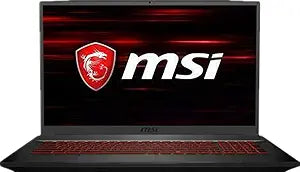
MSI GF75 17.3" 120Hz FHD Gaming Laptop i7-9750H GTX 1050 Ti
A 17.3-inch 120Hz IPS panel paired with a six-core i7-9750H gives this gaming laptop display fidelity and CPU headroom that smaller screens and quad-core chips can't match.
Check availability
Affiliate Disclosure: As an Amazon Associate, Studio Supplies earns from qualifying purchases made through links on this page, at no additional cost to you. This helps support our editorial team.
Notice a mistake? Let Us Know
Overview
Specifications
Processor
Intel Core i7-9750H (9th Gen), 6-Core / 12-Thread, up to 4.5 GHz
Memory
32GB DDR4 2666MHz
Primary Storage
2TB PCIe NVMe SSD
Secondary Storage
1TB HDD
Graphics
NVIDIA GeForce GTX 1050 Ti, 4GB GDDR5
Display
17.3" FHD (1920x1080), 120Hz, IPS-Level
Operating System
Windows 10
Wireless
Intel 9560 (802.11ac 2x2), Bluetooth 5.0
Ports
3x USB 3.2 Gen1, 1x USB 3.2 Gen2 Type-C, HDMI (4K@30Hz)
Keyboard
Single-zone backlit, Anti-Ghost, Silver Lining
Dimensions
15.63" x 10.24" x 0.9"
Weight
4.85 lbs
Frequently Asked Questions
Is the GTX 1050 Ti still competitive for gaming at 1080p, and what frame rates should I expect?
The GTX 1050 Ti 4GB GDDR5 is a 75W mobile GPU capable of hitting 60 fps in older or less demanding titles at 1080p medium-to-high settings. In current AAA titles (2023–2025), expect 30–50 fps at medium settings. The 120Hz panel's advantage is best realized with less GPU-intensive games or esports titles — the display capability outpaces the GPU's ability to drive it in demanding scenarios.
Does the i7-9750H bottleneck the GTX 1050 Ti, or is it the other way around?
The GPU is the bottleneck in this pairing, not the CPU. The i7-9750H (6-core, 12-thread, up to 4.5 GHz) has significantly more headroom than the GTX 1050 Ti can utilize in gaming workloads. The CPU is genuinely well-matched for content creation, compilation, and CPU-threaded tasks — it won't constrain the GPU, but the GPU will constrain gaming performance well before the CPU does.
What does the 120Hz IPS-level panel actually improve over a standard 60Hz display?
At 120Hz, motion clarity is doubled versus 60Hz — fast-moving content (competitive shooters, action games) appears noticeably smoother with less motion blur. The IPS-level panel adds wider viewing angles and better color accuracy compared to TN panels at the same refresh rate. The practical benefit depends on whether the GPU can sustain frame rates above 60 fps in your target titles.
How does the 2TB PCIe SSD + 1TB HDD storage configuration perform?
The 2TB PCIe SSD is the primary drive — PCIe NVMe delivers dramatically faster load times than SATA SSD and eliminates HDD-related stutter. The 1TB HDD serves as secondary storage for large game libraries and media. Running games from the SSD versus the HDD will produce meaningfully different load time results; install active titles on the SSD.
How does the 32GB DDR4-2666MHz RAM affect gaming and multitasking?
32GB is well beyond the gaming requirement (16GB covers nearly all titles) — the headroom is genuinely useful for content creation workflows running alongside a game, or for video editing and 3D rendering tasks where RAM capacity directly impacts project scope. For pure gaming, the extra 16GB over a 16GB config will go largely unused.
Related Products


