



MSI
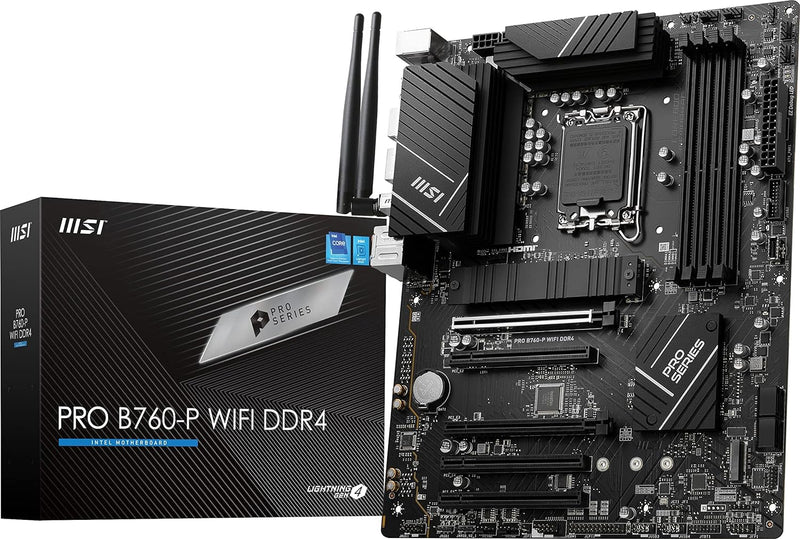
MSI PROB760PWIFID4 B760-P WiFi DDR4 Motherboard
★★★★★
7W2oz
MSI's B760-P WiFi DDR4 motherboard pairs 12th/13th/14th Gen Intel support with Wi-Fi 6E and a robust 12+1 power design.
View price on Amazon
Affiliate Disclosure: Studio Supplies may earn a commission from qualifying purchases made through links on this page, at no additional cost to you. This helps support our editorial team.
Notice a mistake? Let Us Know
Overview
Key Features
Supports 12th/13th Gen Intel Core, Pentium Gold and Celeron processors for LGA 1700 socket
Supports DDR4 Memory, Dual Channel DDR4 5333+MHz (OC)
Enhanced Power Design: 12+1 Duet Rail Power System with P-PAK, 8-pin + 4-pin CPU power connectors, Core Boost, Memory Boost
Premium Thermal Solution: Extended Heatsink, MOSFET thermal pads rated for 7W/mK, additional choke thermal pads and M.2 Shield Frozr are built for high performance system and non-stop gaming experience
High Quality PCB: 6-layer PCB made by 2oz thickened copper and server grade level material
Specifications
Socket
LGA 1700
Chipset
Intel B760
CPU Support
12th/13th/14th Gen Intel Core, Pentium Gold, Celeron
Memory
DDR4, Dual Channel, up to 5333+ MHz (OC)
Power Design
12+1 Duet Rail Power System with P-PAK
CPU Power Connectors
8-pin + 4-pin
PCB
6-layer, 2oz thickened copper, server-grade material
Wireless
Wi-Fi 6E, Bluetooth 5.3
LAN
2.5 Gbps
USB
USB 3.2 Gen2
Video Output
HDMI, DisplayPort
Form Factor
ATX
Similar Products
Other products from the same family that visitors often consider:
 Currently Unavailable
MSI Z690EDGEWID4 DDR4 Gaming Motherboard WiFi 6
Check on Amazon → Currently Unavailable
MSI PROB760MAWID4 DDR4 WiFi mATX Motherboard
Check on Amazon → ✓ Available
MSI PRO Z790-P WiFi DDR4 Gaming Motherboard Renewed
View on Amazon → ✓ Available
MSI MPG Z690 EDGE WIFI DDR4 Gaming Motherboard Bundle
View on Amazon → Currently Unavailable
MSI MAG Z790 Tomahawk WiFi DDR4 Gaming Motherboard
Check on Amazon →Pros & Cons
👍 Pros
- Broad CPU compatibility spanning three generations of Intel processors on the LGA 1700 socket
- Built-in Wi-Fi 6E and Bluetooth 5.3 eliminates the need for add-in wireless cards
- 12+1 phase power design with quality MOSFET thermal pads provides stable power delivery
- 6-layer server-grade PCB with 2oz thickened copper improves durability and signal integrity
- 2.5 Gbps LAN port offers fast wired networking without a separate NIC
👎 Cons
- Limited to DDR4 memory, which may restrict future upgrade paths compared to DDR5 boards
- B760 chipset does not support CPU overclocking, only memory overclocking
- Lacks Thunderbolt headers found on higher-tier MSI boards
- No integrated debug LED or POST code display for troubleshooting
Frequently Asked Questions
Which Intel processors are compatible with the MSI PRO B760-P WiFi DDR4?
It supports 12th, 13th, and 14th Gen Intel Core, Pentium Gold, and Celeron processors using the LGA 1700 socket.
Does this motherboard support DDR5 memory?
No. The B760-P WiFi DDR4 is specifically designed for DDR4 memory, supporting dual-channel configurations up to DDR4 5333+ MHz with overclocking.
What wireless connectivity does this board include?
It comes with built-in Wi-Fi 6E and Bluetooth 5.3, so no additional wireless adapter is needed.
What is the form factor of this motherboard?
It is a standard ATX form factor, fitting most mid-tower and full-tower cases.
How many CPU power connectors does the board use?
It uses an 8-pin plus a 4-pin CPU power connector to support its 12+1 Duet Rail Power System.
Related Products


