



MSI
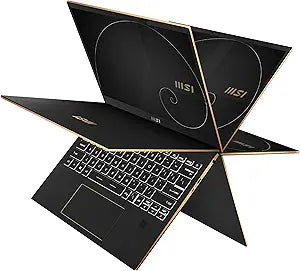
MSI Summit E13FlipEvo A12MT-003 13.4" Touch 2-in-1 Laptop
★★★★★
4Ki5-1240PPCIe Gen4HDR
Intel Evo-certified i5-1240P, 120Hz touch display, and a 360° hinge make the Summit E13 Flip a serious productivity machine that adapts to how you work.
View price on Amazon
Affiliate Disclosure: Studio Supplies may earn a commission from qualifying purchases made through links on this page, at no additional cost to you. This helps support our editorial team.
Notice a mistake? Let Us Know
Overview
Key Features
Powered by Intel's 12th Gen 12-Core CPU: With PCIe Gen4 performance and LPDDR5 memory with speeds of 4800MHz, the Intel i5-1240P 12-Core processor easily handles day to day tasks & more resource demanding programs as well.
Get Up To Date: Hit the ground running with the all new Windows 11 Pro perfect for at home use or running a business.
Elevate Creativity & Productivity: With Intel Iris Xe dedicated graphics experience amazing HD video capabilities for work, home & remote learning. With support for up to 3 simultaneous 4K HDR displays, immerse yourself in your favorite content.
Built For Power, Designed For Speed: The Intel Evo platform gives you the power to get things done faster from wherever. With faster processing, and better graphics, you can be at your most productive anytime, anywhere.
Ultra Thin 2-in-1 with 360° Hinge: Enjoy the high performance and reliability with long-lasting battery life, fast-charging technology and a 360° folding feature, be more productive without worrying about notebook constraints.
Specifications
Display
13.4" FHD+ (1920x1200) 120Hz Touchscreen
Processor
Intel Core i5-1240P (12-core)
Memory
16GB LPDDR5 4800MHz
Storage
512GB NVMe SSD
Graphics
Intel Iris Xe
Connectivity
Thunderbolt 4
Operating System
Windows 11 Pro
Form Factor
360-Degree Flip 2-in-1
Stylus
MSI Pen (included)
Platform Certification
Intel Evo
Pros & Cons
👍 Pros
- The i5-1240P's 12-core hybrid architecture handles demanding multitasking without the thermal throttling common in thin ultrabooks — measurable in sustained workloads like video calls with background processing.
- 16GB of LPDDR5 at 4800MHz provides enough bandwidth to keep pace with the processor under simultaneous workloads — no immediate RAM bottleneck for typical business and creative tasks.
- Thunderbolt 4 supports up to three 4K HDR external displays and full-speed PCIe Gen 4 peripherals — one port replaces a full docking setup.
- The 120Hz FHD+ (1920x1200) touchscreen delivers smoother scrolling and touch response than standard 60Hz business displays at this size.
- MSI Pen is included rather than sold separately — immediately useful for annotation and tablet-mode note-taking out of the box.
👎 Cons
- Intel Iris Xe integrated graphics handles HD video and light creative tasks but is not suited for GPU-accelerated workloads — 3D rendering, ML inference, or gaming above 1080p low settings will hit a hard ceiling.
- The 512GB NVMe SSD fills up quickly for users working with large media files, raw video, or extensive local development environments — external storage becomes a near-term necessity.
- At 13.4 inches, the display is compact enough that intensive data work or multi-window layouts feel constrained without an external monitor.
- LPDDR5 memory is soldered, meaning the 16GB configuration cannot be upgraded post-purchase — buyers who anticipate heavier workloads should treat this as a hard ceiling.
- The 13.4-inch form factor and premium build materials push weight and thickness in the ultrabook segment — thinner and lighter alternatives exist at similar price points.
Frequently Asked Questions
What does Intel Evo certification actually guarantee on the Summit E13 Flip Evo?
Intel Evo sets minimum verified thresholds — at least 9 hours of real-world battery life, wake from sleep under 1 second, Wi-Fi 6 connectivity, and Thunderbolt 4. It's a platform standard, not just a marketing badge, so you can expect these baselines to hold rather than just appearing in spec sheets.
The i5-1240P has 12 cores — what does that mean for multitasking and performance compared to older Intel laptops?
The 1240P uses Intel's hybrid architecture: 4 Performance cores for heavy single-threaded workloads and 8 Efficiency cores that handle background tasks without hammering the battery. For professionals running multiple apps simultaneously — browser tabs, spreadsheets, video conferencing, cloud sync — this architecture handles context-switching significantly better than previous quad-core ultrabook processors.
Can the Summit E13 Flip Evo drive external 4K monitors, and how many?
Yes — it supports up to three simultaneous 4K HDR displays via Thunderbolt 4 and the available display outputs. Thunderbolt 4 can carry video signal to one or two external 4K monitors depending on configuration, which makes it viable as a docked workstation even with a 13-inch internal display.
Does the 360° hinge hold position reliably in tent and presentation modes, or does it sag over time?
The 360-degree hinge is a structural element MSI builds to withstand repeated mode-switching in business environments. In practical use, it should hold position firmly in all four modes — laptop, tablet, tent, and presentation — without flopping. Long-term hinge durability is always a function of usage frequency, but the Summit series is built to commercial reliability standards.
Is the MSI Pen included, and what input scenarios does it support?
The MSI Pen is included in the box. It's designed for stylus input on the FHD+ touchscreen, making the E13 Flip a functional note-taking and annotation tool in tablet mode — useful for markup, sketching wireframes, or signing documents without a separate peripheral purchase.
Related Products


