



MSI
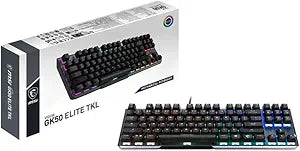
MSI VIGOR GK50 Elite TKL Mechanical RGB Gaming Keyboard
★★★★★
TKL mechanical gaming keyboard with Kailh Blue switches, per-key RGB lighting, and dedicated multimedia controls.
$34.99*$64.99Save 46%
Check availability
*Price sourced from Amazon.com. Last updated:Jul 13, 2026.Price and availability are subject to change.
Affiliate Disclosure: Studio Supplies may earn a commission from qualifying purchases made through links on this page, at no additional cost to you. This helps support our editorial team.
Notice a mistake? Let Us Know
Overview
Key Features
Kahil Blue Switches: lightning-fast response
Independent multimedia keys
HW control light color/profile
Compatible devices : PC
Specifications
Switch Type
Kailh Blue (Mechanical, Clicky)
Form Factor
TKL (Tenkeyless)
Lighting
Per-key RGB with hardware control
Multimedia Keys
Independent dedicated keys
Brand
MSI
Model
VIGOR GK50 ELITE TKL LL US
Pros & Cons
👍 Pros
- Kailh Blue switches deliver satisfying tactile and audible feedback for both gaming and typing
- TKL layout frees up desk space for wider mouse movements
- Hardware-controlled RGB lighting eliminates the need for always-running software
- Dedicated multimedia keys provide instant access to volume and playback controls
👎 Cons
- Kailh Blue switches are loud, which can be disruptive in shared or quiet environments
- TKL layout removes the number pad, inconvenient for users who rely on numeric data entry
- Limited specification detail from the manufacturer makes it harder to evaluate build materials and keycap quality
- Blue switches have a higher actuation force than linear alternatives, which may cause fatigue in extended sessions
Frequently Asked Questions
What type of switches does the GK50 Elite TKL use, and how do they feel?
It uses Kailh Blue mechanical switches, which provide a tactile bump and audible click on each keypress — preferred by typists and gamers who want clear feedback with every keystroke.
What does "TKL" mean and why would I want it?
TKL stands for tenkeyless, meaning the number pad is removed. This gives you more desk space for mouse movement, which is especially beneficial in fast-paced gaming.
Can I customize the RGB lighting without software?
Yes. The keyboard features hardware-based lighting control, allowing you to change colors and lighting profiles directly from the keyboard without installing additional software.
Does this keyboard have dedicated media keys?
Yes. Independent multimedia keys are built in, so you can adjust volume, play, pause, and skip tracks without key combinations or function layers.
Related Products


