



Outanaya
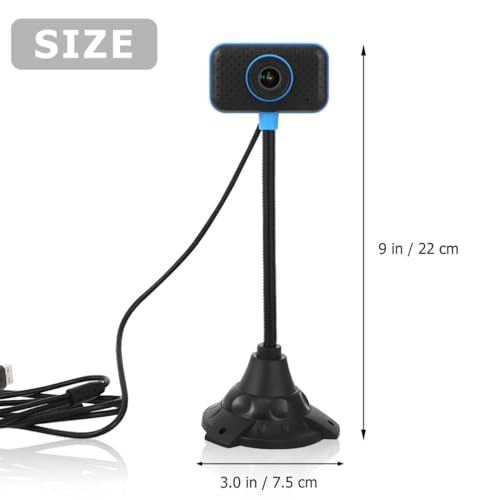
Outanaya USB Webcam with Built-In Microphone and Flexible Neck
A driver-free USB webcam with a bendable gooseneck stem that lets you point the camera exactly where you need it
Check availability
Affiliate Disclosure: Studio Supplies may earn a commission from qualifying purchases made through links on this page, at no additional cost to you. This helps support our editorial team.
Notice a mistake? Let Us Know
Overview
Key Features
Web camera for desktop computer--ideal for video conference, meeting video, works with many video conferencing software applications,desktop computer USB webcam
Webcam for desktop--built-in microphone, convenient for video chat and streaming,external webcam for laptop
Webcam for streaming--usb interface, designed for laptop and desktop, plug and play,usb camera for PC
Web cam with microphone--flexible tube design, easy to adjust to the angle you need,live streaming camera
PC webcam--made of material for lasting use,laptop webcam
Specifications
Brand
Outanaya
Resolution
0.3 MP
Connection
USB (plug and play)
Microphone
Built-in
Mount Design
Flexible tube / gooseneck stem
Driver Required
No, driver-free
Body Material
Plastic
Compatibility
Laptop and desktop
Intended Use
Video chat, online meetings, streaming
Frequently Asked Questions
Do I need to install drivers to use the Outanaya webcam?
No. The webcam is driver-free and plug-and-play, so it connects over USB and is recognized by your laptop or desktop without any software installation.
Does this webcam have a microphone built in?
Yes. It includes a built-in microphone for video chat and streaming, which means you can capture your voice without adding a separate headset or standalone mic.
How does the flexible tube design help with positioning?
The camera sits on a bendable gooseneck-style stem that adjusts to the angle you need, letting you point it precisely without wrestling with a rigid hinge or fixed clip.
Is the 0.3-megapixel resolution good enough for my needs?
It's entry-level, suited to basic video calls and online meetings rather than high-resolution streaming. If you need sharp, detailed footage, this sensor will feel limited.
Will this webcam work with my video conferencing software?
It's designed to work with many video conferencing software applications and connects through a standard USB interface, making it a flexible pick across common meeting platforms.
Related Products


