



QNAP
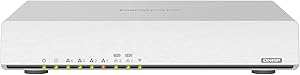
QNAP QHora-301W Wi-Fi 6 10GbE SD-WAN Wireless Router
301W
Dual 10GbE ports and Wi-Fi 6 at 3600Mbps give this QNAP router the raw throughput to stop being the bottleneck in a high-performance network.
$367.24*
Check availability
*Price sourced from Amazon.com. Last updated:Oct 23, 2026.Price and availability are subject to change — details.
Affiliate Disclosure: As an Amazon Associate, Studio Supplies earns from qualifying purchases made through links on this page, at no additional cost to you. This helps support our editorial team.
Notice a mistake? Let Us Know
Overview
Key Features
Connector Type : USB
Create a wireless network and share your Internet connection and files with other devices while checking emails
Uses ISM Band to connect your computers, wireless printers, game consoles, and other Wi-Fi devices for a smooth network experience
Access USB-compatible peripherals accross the wireless network via built-in USB port
Optimize the performance of business networks with the 10 Gigabit Ethernet connectivity
Desktop installation - Ideal for deployments outside the wiring closet
Specifications
Wireless Standard
Wi-Fi 6 (IEEE 802.11ax)
Frequency Bands
Dual-band (2.4GHz & 5GHz)
Maximum Wireless Speed
Up to 3600Mbps combined
10GbE Ports
2
Gigabit LAN Ports
4
Antennas
8 external
SD-WAN
QuWAN multi-site VPN (requires multiple QHora units)
SSID Groups
Up to 6 (VLAN-capable)
USB
Yes (peripheral sharing)
Installation
Desktop (non-rack)
Frequently Asked Questions
Do I need 10GbE switches and NICs to benefit from the QHora-301W's 10GbE ports?
Yes — the 10GbE ports on the QHora-301W run at 10Gbps only when connected to 10GbE-capable devices. If you connect a standard 1GbE NAS or PC, the link auto-negotiates to 1GbE. The benefit of the 10GbE ports appears when connecting a 10GbE NAS, a server, or an upstream ISP connection delivering multi-gigabit speeds. The four standard Gigabit LAN ports serve the rest of the network at 1Gbps.
What is QuWAN SD-WAN, and when does it provide a meaningful advantage over standard VPN?
QuWAN is QNAP's SD-WAN overlay that automates multi-site VPN tunnel creation, routing policy management, and failover between WAN connections across multiple QHora devices. Unlike a manually configured OpenVPN or IPsec tunnel, QuWAN handles peer discovery and topology changes automatically. It's most valuable for businesses with 3+ sites that need reliable inter-site connectivity without dedicated IT management of VPN configurations.
How does Wi-Fi 6's performance at 3600Mbps compare to Wi-Fi 5 (AC) in dense client environments?
Wi-Fi 6's primary advantage in dense environments is OFDMA (Orthogonal Frequency Division Multiple Access), which allows the QHora-301W to serve multiple clients simultaneously in a single transmission window rather than sequentially. The 3600Mbps theoretical maximum — split across 2.4GHz and 5GHz — is less important than OFDMA's efficiency gains when 15+ Wi-Fi 6 clients are connected. Wi-Fi 5 routers time-slice between clients; Wi-Fi 6 parallelizes them.
Can I configure multiple VLANs using the six SSID groups, and does this require enterprise networking knowledge?
Yes — the QHora-301W supports up to six SSID groups mapped to separate VLANs, enabling network segmentation for IoT devices, guest networks, and corporate traffic without additional managed switch hardware at the router level. QNAP's QuRouter management interface simplifies the configuration, though setting up VLAN tagging between the router and downstream managed switches requires understanding of 802.1Q VLAN concepts.
What is the performance impact of enabling QuWAN SD-WAN VPN across multiple sites on the router's throughput?
Encrypted VPN tunnels are CPU-intensive — the QHora-301W's hardware will show reduced WAN throughput when encrypting and decrypting multi-site VPN traffic compared to its maximum unencrypted forwarding rate. QNAP does not publish specific VPN throughput figures for this model. In practice, the impact is most noticeable on high-traffic inter-site replication or video conferencing routed over QuWAN tunnels.
Related Products

