



QNAP
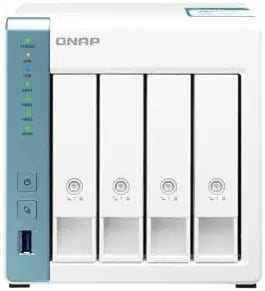
QNAP TS-431K 4 Bay Home NAS 1GbE Ports
USB 3.2
Four-bay NAS with quad-core processing and dual GbE gives home networks a dedicated, always-on storage hub that outgrows single-drive solutions.
Check availability
Affiliate Disclosure: As an Amazon Associate, Studio Supplies earns from qualifying purchases made through links on this page, at no additional cost to you. This helps support our editorial team.
Notice a mistake? Let Us Know
Overview
Key Features
Annapurna Labs AL-214 quad-core 1.7 GHz processor
1GB DDR3 RAM
2 x 1 GbE port
3 x USB 3.2 Gen 1 port
4 x 3.5-inch SATA 6Gb/s, 3Gb/s (Diskless)
Specifications
Processor
Annapurna Labs AL-214 Quad-Core 1.7 GHz
RAM
1GB DDR3 (fixed, non-upgradeable)
Drive Bays
4 x 3.5-inch SATA 6Gb/s, 3Gb/s (Diskless)
Network Ports
2 x 1 GbE
USB Ports
3 x USB 3.2 Gen 1
Model
TS-431K
Brand
QNAP
Frequently Asked Questions
Will the TS-431K work with drives I already own, and what capacities does it support?
The TS-431K accepts any 3.5-inch SATA drive running at 6Gb/s or 3Gb/s — it ships diskless, so you populate it with your own drives. QNAP maintains a hardware compatibility list, and most major desktop drives from WD, Seagate, and Toshiba are validated. Capacity per bay is constrained by whatever maximum capacity QNAP's firmware supports at the time, typically well beyond what consumer drives currently ship at.
What RAID configurations does the TS-431K support, and what does that mean for usable storage vs redundancy?
The four-bay design supports JBOD, RAID 0, 1, 5, 6, and 10. RAID 5 — the most common choice for this class of device — gives you three drives' worth of usable capacity with single-drive fault tolerance. RAID 6 allows two simultaneous drive failures but costs you two drives' worth of capacity. RAID 0 maximizes raw throughput but offers zero redundancy, making it unsuitable for primary backup use.
Does the 1GB DDR3 RAM limit the TS-431K's performance under heavy load?
For home use — file sharing, media streaming, and basic backup — 1GB DDR3 is functional. Under concurrent workloads such as running multiple virtual machines, heavy surveillance recording, or large simultaneous user connections, RAM becomes the bottleneck before the CPU or drives do. The AL-214 processor can handle the workload, but the fixed, non-upgradeable RAM constrains how many services you can run simultaneously.
How fast is real-world throughput over the 1GbE ports?
Dual 1GbE ports provide a theoretical ceiling of 1 Gbps per connection (~125 MB/s), with real-world sequential transfers typically landing in the 110–115 MB/s range depending on drive speed and RAID configuration. Port trunking allows the two ports to be bonded for increased aggregate throughput to multiple simultaneous users, though single-client speeds remain capped at one port's bandwidth.
Can the TS-431K replace a cloud backup subscription?
It can complement or partially replace cloud backup. QNAP's QTS operating system includes Hybrid Backup Sync, which supports local-to-local, local-to-cloud, and cloud-to-local backup jobs. The TS-431K itself is a single physical location, so for true disaster recovery, pairing it with an offsite cloud target (Amazon S3, Backblaze B2) remains best practice.
Related Products
