



Razer
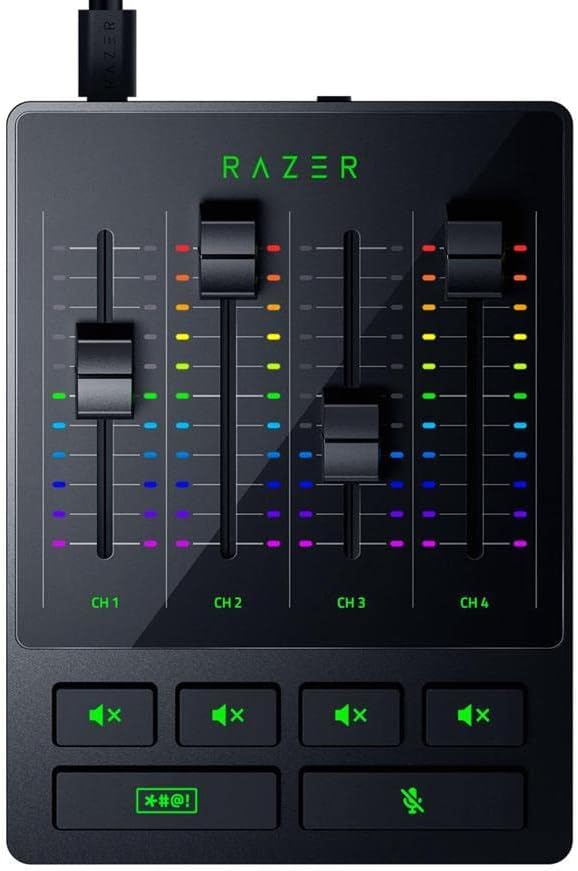
Razer Audio Mixer 4-Channel Streaming Broadcast Console
XLR
The Razer Audio Mixer delivers hardware-controlled 4-channel mixing with built-in voice processing for streamers who demand studio-quality sound.
$226.97*$249.99Save 9%
Check availability
*Price sourced from Amazon.com. Last updated:Aug 28, 2026.Price and availability are subject to change — details.
Affiliate Disclosure: As an Amazon Associate, Studio Supplies earns from qualifying purchases made through links on this page, at no additional cost to you. This helps support our editorial team.
Notice a mistake? Let Us Know
Overview
Key Features
Digital Audio Mixer: Adjust audio effortlessly with a mixer that’s completely hardware-controlled once configured, includes multiple input sources for digital connections
4-Channel Design with Mute Buttons: With 1 direct line out for the mic and 3 other channels assigned via Razer Synapse, get the perfect mix between mic, game, music/chat, and system volumes that can we tweaked or muted individually
XLR Preamp: The mixer supports XLR mics and can boost their output thanks to an ultra-clean low-noise-gain preamp with adjustable gain from -12dB to 39.7dB at 0.75dB per step
Built-in Voice Settings and Audio Processing: Tweak your voice using hardware-controlled EQ, compressor, and noise gate settings as the mixer handles all of your audio—freeing up resources on your rig for other tasks
Plug and Play: Get the mixer up and running in minutes simply by plugging in your mic, hooking it up to your PC, and assigning your desired programs to each channel via Razer Synapse
Powered by Razer Chroma RGB : Sync the mixer to your Razer Chroma ecosystem, watch it light up to indicate volume levels or when it’s muted, and have it interact with your audience via our Streamer Companion App
Compatibility: The Audio Mixer requires Razer Synapse and Microsoft Windows 10 and above to work, and must be used with an XLR microphone (not compatible with macOS or USB mics)
Specifications
Brand
Razer
Model
Audio Mixer
Channels
4
Connectivity
Digital Audio Cable, USB
Preamp Type
XLR with adjustable gain (-12dB to 39.7dB, 0.75dB per step)
Audio Processing
Built-in EQ, Compressor, Noise Gate
Output Connector
XLR
Audio Input
XLR
RGB
Razer Chroma RGB
Dimensions
6.1"D x 4.53"W x 2.17"H
Power Source
Corded Electric
Compatibility
Windows 10 and above, Razer Synapse required
Frequently Asked Questions
Does the Razer Audio Mixer work with USB microphones?
No. The Audio Mixer only supports XLR microphones. You will need an XLR mic to use this mixer.
Can I use this mixer on macOS?
No. The Razer Audio Mixer requires Razer Synapse, which is only available on Microsoft Windows 10 and above. It is not compatible with macOS.
Does the mixer handle audio processing on its own or does it use my PC's resources?
The built-in EQ, compressor, and noise gate all run on the mixer's own hardware, so no CPU resources are used on your PC for audio processing.
How do I assign programs to each channel?
You assign programs to the three software-controlled channels through Razer Synapse. The fourth channel is a dedicated direct line out for your XLR microphone.
What is the gain range on the XLR preamp?
The preamp offers adjustable gain from -12dB to 39.7dB in precise 0.75dB steps.
Related Products


