



Razer
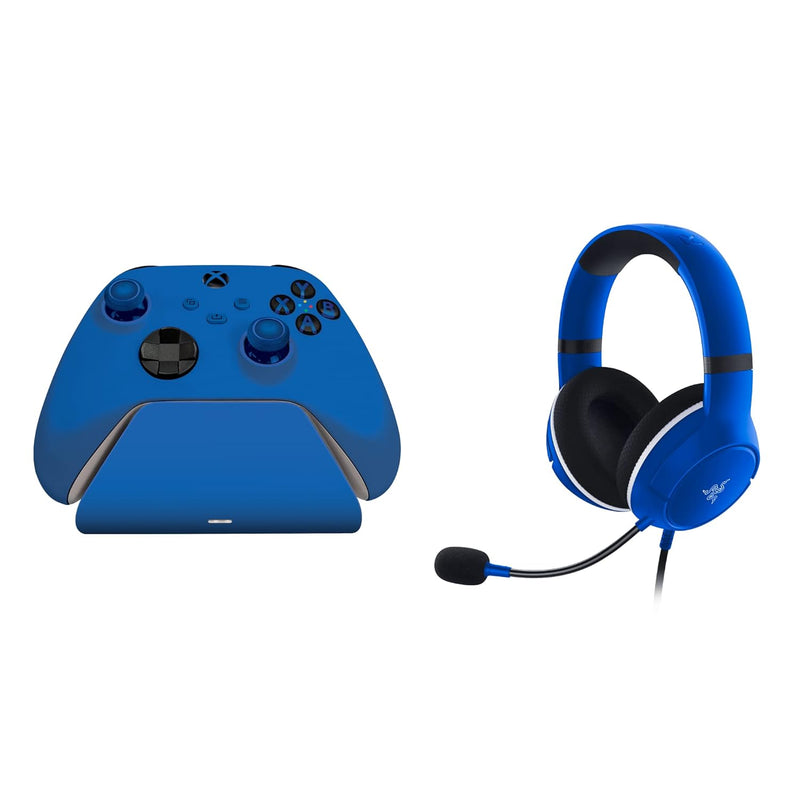
Razer RZ82-03970100-B3M1 Kaira X Headset Charging Stand Xbox Bundle
★★★★★
Elevate Your Xbox Gaming ExperienceThe Razer Essential Duo Bundle for Xbox combines the immersive audio of the Kaira X Wired Headset with the convenient charging of the Universal Quick Charging Stand. Designed to match official Xbox Series X
$89.99*
Check availability
*Price sourced from Amazon.com. Last updated:Jul 21, 2026.Price and availability are subject to change.
Affiliate Disclosure: Studio Supplies may earn a commission from qualifying purchases made through links on this page, at no additional cost to you. This helps support our editorial team.
Notice a mistake? Let Us Know
Overview
Elevate Your Xbox Gaming Experience
The Razer Essential Duo Bundle for Xbox combines the immersive audio of the Kaira X Wired Headset with the convenient charging of the Universal Quick Charging Stand. Designed to match official Xbox Series X
Key Features
MATCHES XBOX WIRELESS CONTROLLERS — To perfectly suit any setup, this charging stand and headset bundle shares the same striking colors as official Xbox Wireless controllers
UNIVERSAL COMPATIBILITY — Whether you’re on next-gen or staying old school, the Universal Quick Charging Stand for Xbox works with all Xbox Series X|S, Xbox One, and Elite Series 1 Wireless Controllers (Controller Sold Separately); the Kaira X headset’s 3.5mm jack enables cross-platform compatibility across Xbox Series X|S, Xbox One, PC, Mac & mobile devices
QUICK CHARGE — Able to fully charge controllers in under 3 hours, the Universal Quick Charging Stand is also designed with overcharge protection to prevent overheating and short circuiting
MAGNETIC CONTACT SYSTEM — Mount the controller easily and never worry about its charge being interrupted thanks to a magnetic design that secures the controller to the stand
RAZER TRIFORCE 50MM DRIVERS — The Razer Kaira X features cutting-edge drivers that can tune highs, mids, and lows separately—producing brighter, clearer sound with richer trebles and more powerful bass
FLOWKNIT MEMORY FOAM EAR CUSHIONS — Its breathable weave minimizes sweat and heat build-up, while the ultra-soft foam’s improved density greatly reduces the headset’s clamping force for snug support during gaming marathons
ON-HEADSET CONTROLS — Toggle settings easily for on-the-fly adjustments with a microphone mute button and volume slider located conveniently underneath the left earcup
Specifications
Product Type
Gaming Headset Charging Stand Bundle
Headset Connectivity
3.5mm Jack
Headset Compatibility
Xbox Series X|S, Xbox One, PC, Mac, Mobile Devices
Charging Stand Compatibility
All Xbox Series X|S, Xbox One, and Elite Series 1 Wireless Controllers
Charging Time
Under 3 hours for controllers
Charging System
Magnetic Contact System
Drivers
Razer TriForce 50mm Drivers
Ear Cushions
FlowKnit Memory Foam
On-Headset Controls
Microphone Mute Button, Volume Slider
Charging Stand Safety
Overcharge Protection
Frequently Asked Questions
Does this bundle include an Xbox Wireless Controller?
No, the bundle explicitly states that the Xbox Wireless Controller is sold separately and is not included.
Is the Razer Kaira X headset wireless?
No, the Razer Kaira X headset connects via a 3.5mm jack, meaning it is a wired headset.
How long does it take to charge an Xbox controller using the included stand?
The Universal Quick Charging Stand is designed to fully charge Xbox controllers in under 3 hours.
Can the headset be used with devices other than Xbox consoles?
Yes, the Kaira X headset's 3.5mm jack enables cross-platform compatibility with Xbox Series X|S, Xbox One, PC, Mac, and mobile devices.
What are Razer TriForce 50mm Drivers and how do they enhance audio?
Razer TriForce 50mm Drivers are cutting-edge audio drivers that can tune highs, mids, and lows separately, resulting in brighter, clearer sound with richer trebles and more powerful bass.
Do the ear cushions help with comfort during long gaming sessions?
Yes, the FlowKnit Memory Foam Ear Cushions feature a breathable weave to minimize sweat and heat buildup, and improved foam density to reduce clamping force, enhancing comfort during extended gaming.
Related Products


