Samsung

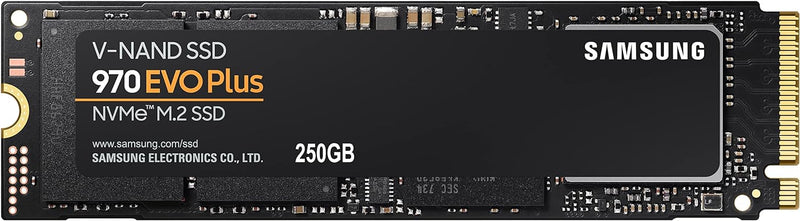
Samsung MZ-V7S250B/AM 970 EVO Plus 250GB NVMe SSD

4.8 (58742 reviews)
4K250GB NVMePCIe Gen 3

Unleash Unrivaled Speed and Performance Experience lightning-fast storage with the Samsung 970 EVO Plus 250GB NVMe M.2 SSD. Designed for gamers, tech enthusiasts, and professionals, this SSD delivers exceptional speed and reliability for demanding applications. Specifications * Brand: Samsung *...

$138.99*
In Stock on Amazon.com
View on Amazon

*Price sourced from Amazon.com. Last updated:May 31, 2026.Price and availability are subject to change.

Affiliate Disclosure: Studio Supplies may earn a commission from qualifying purchases made through links on this page, at no additional cost to you. This helps support our editorial team.

Notice a mistake? Let Us Know

Overview

Unleash Unrivaled Speed and Performance

Experience lightning-fast storage with the Samsung 970 EVO Plus 250GB NVMe M.2 SSD. Designed for gamers, tech enthusiasts, and professionals, this SSD delivers exceptional speed and reliability for demanding applications.

Specifications

* Brand: Samsung * Model: MZ-V7S250B/AM * Capacity: 250GB * Form Factor: M.2 2280 * Interface: NVMe PCIe Gen 3.0 x4 * Technology: Samsung V-NAND * Sequential Read Speed: Up to 3,500 MB/s * Sequential Write Speed: Up to 3,300 MB/s * Features: Dynamic Thermal Guard, Samsung Magician Software

Key Features

INNOVATIVE V-NAND TECHNOLOGY: Powered by Samsung V-NAND Technology, the 970 EVO Plus SSD’s NVMe interface (PCIe Gen 3.0 x4 NVMe 1.3) offers enhanced bandwidth, low latency, and power efficiency ideal for tech enthusiasts, high end gamers, and 4K & 3D content designers

BREAKTHROUGH READ WRITE SPEEDS: Sequential read and write performance levels of up to 3,500MB/s and 3,300MB/s, respectively; Random Read (4KB, QD32): Up to 600,000 IOPS Random Read

PERFORMANCE OPTIMIZATION AND DATA SECURITY: Seamless cloning and file transfers with Samsung Magician Software, the ideal SSD management solution for performance optimization and data security with automatic firmware updates

SUPERIOR HEAT DISSIPATION: Samsung’s Dynamic Thermal Guard automatically monitors and maintains optimal operating temperatures to minimize performance drops. WWN not supported

Specifications

Brand
Samsung
Model Name
970 EVO Plus
Capacity
250GB
Interface
NVMe (PCIe Gen 3.0 x4 NVMe 1.3)
Sequential Read Speed
Up to 3,500MB/s
Sequential Write Speed
Up to 3,300MB/s
Random Read (4KB, QD32)
Up to 600,000 IOPS
Technology
V-NAND Technology
Software Included
Samsung Magician Software
Thermal Management
Dynamic Thermal Guard
WWN Support
Not supported

Samsung 970 EVO Plus NVMe SSD (250GB-2TB) — Editorial Review & Use Cases

The Samsung 970 EVO Plus (MZ-V7S250B/AM, MZ-V7S500B, MZ-V7S1T0B, MZ-V7S2T0B) is Samsung's mid-to-upper-tier PCIe Gen3 NVMe SSD line — the workhorse SSD for content creators, gaming enthusiasts, and professional workstations needing reliable NVMe speeds without paying Gen4/5 premium. Per Samsung's official 970 EVO Plus product page, the SSD achieves 3,500 MB/s sequential read / 3,300 MB/s sequential write, 600K read / 550K write IOPS, AES-256 hardware encryption, and 5-year warranty with 600TBW endurance on 1TB capacity.

What the 970 EVO Plus Specifically Wins

  • Samsung's V-NAND TLC + dedicated DRAM cache — significantly better sustained-write performance vs DRAM-less SSDs (Crucial P3, Kingston A2000). For sustained-write workloads, the 970 EVO Plus maintains 1,500+ MB/s vs P3's ~80-150 MB/s
  • 3,500 MB/s sequential read at Gen3 ceiling — matches the theoretical PCIe Gen3 x4 maximum. On Gen3 motherboards, you cannot go faster
  • 600K read / 550K write IOPS — 1.5-2x typical mainstream NVMe at 4K random workload. Matters for database / VM / containerized workloads
  • AES-256 hardware encryption (OPAL 2.0 / TCG) — drive-level encryption for secure-erase and BitLocker/FileVault acceleration
  • 5-year warranty + 600TBW endurance (1TB) — Samsung's reliability commitment
  • Samsung Magician software — proprietary management software for firmware updates, performance benchmarking, secure-erase, over-provisioning, drive health monitoring
  • Wide PC + Mac compatibility — Windows 7/8/10/11, macOS via native NVMe driver (Mac Pro 2019, Hackintosh), Linux 4.0+, FreeBSD
  • Compact M.2 2280 form factor — fits virtually all M.2 NVMe slots on modern motherboards + laptops
  • Cool-running design — heatsink not required at typical workloads; sustained heavy workloads benefit from optional add-on heatsink

Where the 970 EVO Plus Specifically Fits

  • Gaming PC primary boot drive — instant boot + fast game load + low latency
  • Content creator workstations — Photoshop / Premiere Pro / DaVinci Resolve / After Effects scratch drive for active projects
  • Mac Pro 2019 (Intel) + Hackintosh — NVMe-supported macOS systems
  • Mid-range game development workstation — engine compile + asset cache performance
  • 3D modeling / CAD workstation — high-IOPS for asset-heavy applications
  • Server / NAS upgrade — replaces SATA SSDs in NVMe-supporting motherboards
  • VM / container hosting — 4K random IOPS supports multiple VM disks
  • Streaming PC encoder drive — OBS + game + recording archive
  • Production-quality external NVMe enclosure — paired with USB-C 10Gbps enclosure for 800-1000 MB/s portable workflow
  • Professional Lightroom / Photo cataloging with sustained read+write across large RAW libraries

Honest Limits Buyers Should Know

  • PCIe Gen3 only — Gen4/5 motherboards see no speed benefit. Modern Intel 12th-gen+ / AMD Ryzen 5000+ motherboards have Gen4/Gen5 NVMe slots. The 970 EVO Plus tops out at 3,500 MB/s regardless of slot generation. For full Gen4 speeds use Samsung 990 PRO, WD SN850X, or Crucial T705 (Gen5)
  • Newer 990 PRO supplanted at premium tier. Samsung's current premium NVMe is 990 PRO (Gen4, 7,450 MB/s) and 9100 PRO (Gen5, 14,800 MB/s). 970 EVO Plus is increasingly positioned as "mid-tier, still excellent value"
  • Heat under sustained heavy workloads. Without heatsink, sustained 30+ minute write workloads can hit 80°C+ and trigger thermal throttling. For continuous heavy workloads, add a $5-10 M.2 heatsink
  • Highest capacity is 2TB. Larger capacities (4TB, 8TB) only available in 990 PRO or 980 PRO families
  • No fixed-form-factor enterprise variant. For enterprise / 24/7 write-heavy workloads (datacenter / database servers), step to Samsung PM893 / PM1735 / PM9A3 (enterprise NVMe with U.2 form factor + better endurance)
  • Samsung Magician requires Windows. Mac / Linux users cannot use Samsung's management software; manual firmware updates via Windows VM or USB boot
  • 2280 form factor only. No 2230 variant for Steam Deck OLED; no 22110 enterprise variant. M.2 socket type-locked
  • Slight premium over Crucial P3 Plus. 970 EVO Plus 1TB ~$80; P3 Plus 1TB ~$60. Premium pays for sustained-write performance + TLC reliability + hardware encryption

Where Buyers Should Look Elsewhere

  • PCIe Gen4 motherboards + workloads sensitive to peak speed → Samsung 990 PRO (7,450 MB/s) / WD Black SN850X / Crucial T705
  • PCIe Gen5 (latest) → Samsung 9100 PRO / Crucial T700/T705 (14,000+ MB/s sequential)
  • Budget NVMe (sacrificing sustained write) → Crucial P3 / P3 Plus, Kingston KC3000
  • Mid-tier balance → WD Black SN770, Crucial P5 Plus, Kingston KC3000 (DRAM-less but better than P3)
  • Enterprise / datacenter → Samsung PM893 / PM1735 / PM9A3, Intel D7 / D5 datacenter SSDs
  • Larger capacities (4TB+) → Samsung 990 PRO 4TB, WD SN850X 8TB, Crucial T700 4TB
  • PS5 storage expansion → WD SN850P (PS5-certified), Samsung 990 PRO 1-2TB + heatsink
  • Steam Deck (2230 form factor) → WD SN770M, Sabrent Rocket 2230

Sources & Citations

  1. Samsung, "970 EVO Plus NVMe SSD product page," samsung.com (accessed 2026-05-18)
  2. Tom's Hardware, "Samsung 970 EVO Plus review and NVMe SSD comparison," tomshardware.com (accessed 2026-05-18)
  3. AnandTech, "Samsung 970 EVO Plus benchmark coverage," anandtech.com (accessed 2026-05-18)
  4. TechPowerUp, "Samsung 970 EVO Plus comprehensive review," techpowerup.com (accessed 2026-05-18)

Last verified: 2026-05-18
How to Install an NVMe SSD — Gen3 and Gen4 M.2 Guide

Installing an M.2 NVMe SSD is one of the cleanest hardware upgrades available for a desktop or laptop: no cables, a single retention screw, and the entire process takes under 20 minutes. The key preparation step is confirming the target M.2 slot's PCIe generation and key type before purchasing a drive. According to Tom's Hardware's SSD benchmark coverage, for general-purpose workloads (OS boot, application launches, file browsing) the practical improvement from any NVMe drive over a SATA SSD or HDD is substantial — and the Gen3 vs. Gen4 difference matters most in sustained sequential workloads like video editing or large file transfers, not everyday use.

Before You Begin: Slot Verification

Confirm three things from the motherboard manual before purchasing: (1) the slot supports M-key NVMe (not SATA-only M.2), (2) the PCIe generation the slot is wired to (Gen3 or Gen4 — primary slots on Intel 12th Gen+ and AMD Ryzen 5000+ support Gen4; secondary slots are often Gen3 through the chipset), and (3) whether the slot shares lanes with SATA ports that will be disabled when the M.2 slot is occupied. A Gen4 drive installed in a Gen3 slot operates at Gen3 speeds — no hardware harm, but not the rated peak performance.

Safety

Shut down fully, disconnect power (flip the PSU rocker switch on desktops), and discharge static by touching the bare metal chassis interior before handling the drive. On laptops, unplug the AC adapter and, for non-removable batteries, hold the power button five seconds after disconnecting. If the board has a built-in M.2 heatsink with a pre-applied thermal pad, peel the backing film from the pad before reinstalling the heatsink — a common oversight that leaves the drive thermally insulated by a plastic film.

Tools Needed

  • Phillips #0 or #1 screwdriver (for M.2 retention screw and desktop side panel)
  • M.2 retention screw + standoff (typically pre-installed; M2×3mm if missing)
  • Thermal pad (if board heatsink pad is damaged; usually comes pre-applied)

Quick Installation Summary

  1. Shut down, disconnect power, discharge static by touching the chassis interior.
  2. Remove any M.2 slot heatsink/shroud (typically 2–3 Phillips screws); peel thermal pad backing film if present.
  3. Remove the M.2 retention screw (and standoff if needed); confirm the standoff is at the 80mm (2280) position for standard drives.
  4. Hold the NVMe module at ~30 degrees; align the M-key notch with the slot's key ridge; slide the gold contacts fully in.
  5. Press the free end of the drive flat toward the motherboard — the drive lies at 0 degrees when correctly seated.
  6. Insert the retention screw and tighten finger-tight plus a quarter-turn. Do not overtighten.
  7. If using a board-integrated heatsink, lower it onto the drive (thermal pad contact side down) and reinstall the heatsink screws.
  8. Reassemble, reconnect power, and boot to BIOS to confirm the drive appears in the storage/boot device list.
  9. If it's a new secondary drive, initialize and format it in Disk Management (Windows) or Disk Utility (macOS) after booting to the OS.

Gen3 vs. Gen4: What Changes in Practice

PCIe Gen4 drives offer 2–2.5× higher peak sequential bandwidth than Gen3. AnandTech's Crucial P3 review and Samsung 970 EVO Plus review both document that random-access latency — which governs OS and application responsiveness — is broadly similar between Gen3 and Gen4 mid-range drives. The real-world gap widens with large sequential writes (4K+ video editing, game installs from local storage), narrows to near-zero for web browsing and productivity applications. A Gen4 drive in a Gen3 slot performs identically to a Gen3 drive in that slot; the extra headroom only matters when the slot itself is Gen4.

Troubleshooting in Brief

  • Drive not detected in BIOS: Reseat; check slot PCIe/SATA mode setting in BIOS (must be set to NVMe or Auto-NVMe); confirm slot-sharing with SATA is not disabling NVMe mode.
  • Drive detected at Gen3 speeds instead of Gen4: Check BIOS for slot PCIe gen setting; confirm the CPU supports Gen4 (Intel 11th Gen and earlier do not on consumer platforms).
  • Thermal throttling under load: Add or verify heatsink; Gen4 drives need thermal management for sustained write workloads.
  • Secondary slot slower than primary: Expected — secondary M.2 slots on most boards run through the chipset at Gen3, not direct CPU lanes at Gen4.

The full step-by-step guide with M-key vs. B-key identification, thermal pad handling, lane-sharing behavior, and extended troubleshooting is at studio-supplies.com/blogs/guides/nvme-ssd-install-gen3-gen4-guide.

Sources & Citations

  1. Crucial, "SSD Support Articles & FAQs," crucial.com (accessed 2026-05-31)
  2. Tom's Hardware, "Best SSDs for 2026," tomshardware.com (accessed 2026-05-31)
  3. AnandTech, "The Crucial P3 Review," anandtech.com (accessed 2026-05-31)
  4. AnandTech, "Samsung 970 EVO Plus SSD Review," anandtech.com (accessed 2026-05-31)
  5. Samsung, "Consumer Storage Support," semiconductor.samsung.com (accessed 2026-05-31)

Last verified: 2026-05-31

Now that you've seen the details — ready to take a closer look?

View on Amazon

Similar Products

Other products from the same family that visitors often consider:

Pros & Cons

👍 Pros

  • Features innovative V-NAND technology, offering enhanced bandwidth, low latency, and superior power efficiency.
  • Achieves breakthrough sequential read speeds up to 3,500MB/s and write speeds up to 3,300MB/s for rapid data access.
  • Provides random read performance of up to 600,000 IOPS (4KB, QD32), optimizing responsiveness for intensive tasks.
  • Includes Samsung Magician Software, providing seamless cloning, file transfers, and automatic firmware updates for data security.
  • Incorporates Dynamic Thermal Guard technology to automatically maintain optimal operating temperatures, preventing performance drops.

👎 Cons

  • The 250GB capacity might be restrictive for users with large game libraries or extensive media collections requiring more storage.
  • Lacks support for WWN (World Wide Name), which could be a consideration for specific enterprise or server environments.
  • The PCIe Gen 3.0 x4 NVMe 1.3 interface is not the latest generation, meaning it may not achieve the absolute fastest speeds available with PCIe Gen 4.0 or 5.0.
  • Full performance benefits are realized primarily in systems that can fully utilize NVMe PCIe Gen 3.0 x4, requiring compatible motherboard slots.
  • While excellent for many users, the price per gigabyte for this 250GB model might be higher than larger capacity drives in the same series.

Frequently Asked Questions

This SSD offers sequential read speeds of up to 3,500MB/s and sequential write speeds of up to 3,300MB/s. For random operations, it provides up to 600,000 IOPS for random reads (4KB, QD32).
Yes, powered by Samsung V-NAND Technology and featuring an NVMe interface, it offers enhanced bandwidth and low latency, making it ideal for tech enthusiasts, high-end gamers, and 4K & 3D content designers.
Yes, it includes Samsung Magician Software, which is an ideal SSD management solution for performance optimization, data security, and automatic firmware updates, facilitating seamless cloning and file transfers.
The 970 EVO Plus features Samsung's Dynamic Thermal Guard technology, which automatically monitors and maintains optimal operating temperatures to minimize any performance drops during intensive use.
The Samsung 970 EVO Plus is powered by innovative Samsung V-NAND Technology, which contributes to its enhanced bandwidth, low latency, and overall power efficiency.