



SanDisk
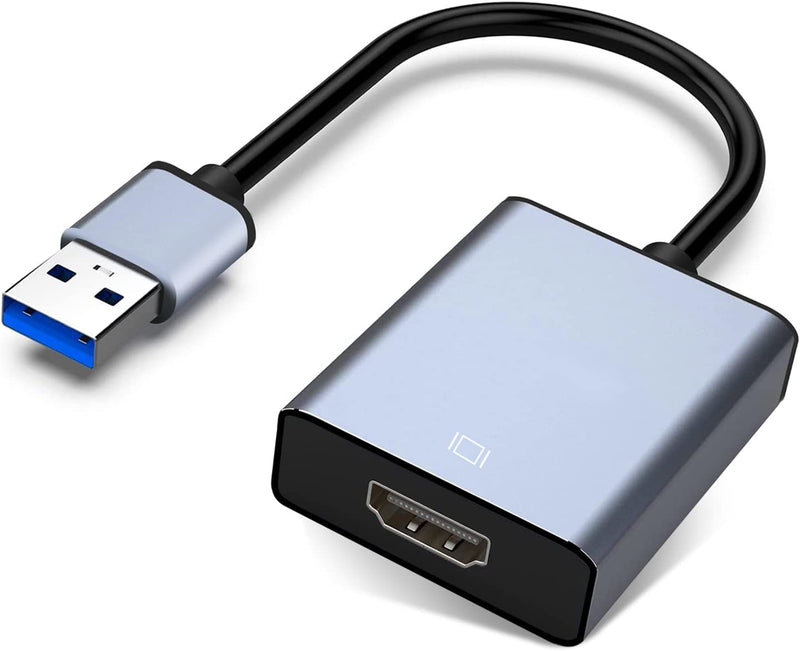
SanDisk USB to HDMI 1080P Adapter
★★★★★
1080PUSB 3.0
Expand Your Display with Seamless USB to HDMI Connectivity The USB to HDMI Adapter allows you to connect your computer to an HDMI-enabled display for an enhanced viewing experience. Supporting resolutions up to 1080P, this adapter is compatible with Windows XP/7/8/10/11. Whether you're extending...
$23.98*
Check availability
*Price sourced from Amazon.com. Last updated:Jul 14, 2026.Price and availability are subject to change.
Affiliate Disclosure: Studio Supplies may earn a commission from qualifying purchases made through links on this page, at no additional cost to you. This helps support our editorial team.
Notice a mistake? Let Us Know
Overview
Expand Your Display with Seamless USB to HDMI Connectivity
The USB to HDMI Adapter allows you to connect your computer to an HDMI-enabled display for an enhanced viewing experience. Supporting resolutions up to 1080P, this adapter is compatible with Windows XP/7/8/10/11. Whether you're extending your desktop for increased productivity or mirroring your screen for presentations, this adapter provides a reliable and convenient solution. Please note: This adapter supports Windows OS only; it doesn't support Mac, Chromebook, or Linux OS.
Specifications:
- Connector Type: USB 3.0/2.0 to HDMI
- Maximum Resolution: 1920*1080 (1080P)
- Compatibility: Windows XP/7/8/10/11
- Operating Modes: Extend Mode, Mirror Mode
- Color: Grey
Key Features
【USB to HDMI Adapter】Ultra Fast USB 3.0 portand built-in with premium quality chip for stable performance and long life.It connects your computer to an HDMI-capable HDTV, monitor or projector via a USB interface, giving you smoother HD video.
【Widely compatible】This USB to HDMI adapter support Windows 11,Windows 10, Windows 8.1, Windows 8, Windows 7, Windows XP.(Note: Linux/Vista/Chrome/Firestick are not supported)
【1080P High Resolution】The high speed USB 3.0 to HDMI adapter cable provides up to 1920*1080 resolution images to the display. (Note: If your USB is version 2.0 or your receiving display device cannot support 1920*1080 resolution, the output resolution can only reach 800*600.If your screen resolution setting is more than 1920*1080, please adjust the resolution to 1920*1080, otherwise it will not work.)
【wonderful details】This product have extend mode let your laptop for visibility of multiple tasks at the same time, Mirror mode gives your laptop to a large screen for a visual enjoyment.It is very suitable for use in other scenarios such as game entertainment, home theater, video conferencing, corporate training, etc. It's lightweight and portable enough to carry in your laptop bag when traveling.
【Installation Precautions】This USB to HDMI adapter cable must be installed as a driver before use. Install the driver does not require an optical drive, just connect the device to the computer, then open the removable drive, find the corresponding driver, click install and then restart the computer can be used. (Note: Please close the anti-virus software before installing the driver.)
Specifications
Adapter Type
USB to HDMI
USB Version
3.0
Max Resolution
1920x1080 (1080P)
Supported Operating Systems
Windows 11, Windows 10, Windows 8.1, Windows 8, Windows 7, Windows XP
Unsupported Operating Systems
Linux, Vista, Chrome, Firestick
Display Modes
Extend Mode, Mirror Mode
Installation
Driver required (driver included)
Pros & Cons
👍 Pros
- Connects computers to HDMI-capable displays via a USB interface, providing smoother HD video output.
- Features an Ultra Fast USB 3.0 port and a premium quality built-in chip for stable performance and extended durability.
- Supports a high resolution of up to 1920x1080 (1080P) for crisp and clear images on the display.
- Offers both extend mode for multitasking and mirror mode for visual enjoyment on a large screen.
- Widely compatible with Windows 11, 10, 8.1, 8, 7, and XP, ensuring broad usability across many systems.
👎 Cons
- Does not support Linux, Vista, Chrome, or Firestick operating systems, limiting its compatibility for certain users.
- If connected to a USB 2.0 port or a display that doesn't support 1920x1080, the output resolution will be limited to 800x600.
- Requires driver installation before use, which necessitates disabling anti-virus software temporarily during the process.
- The driver installation process, while straightforward, is an extra step that might be a minor inconvenience for some users.
- Specific details on audio passthrough capabilities alongside video are not explicitly mentioned in the provided features.
Frequently Asked Questions
What is the maximum resolution supported by this SanDisk USB to HDMI adapter?
This adapter supports a high resolution of up to 1920x1080 (1080P) for display output.
Which operating systems are compatible with this USB to HDMI adapter?
The adapter is widely compatible with Windows 11, Windows 10, Windows 8.1, Windows 8, Windows 7, and Windows XP.
Does this adapter require a driver installation?
Yes, a driver must be installed before use, and the driver is included and accessed by connecting the device to the computer.
Can this adapter be used for both extending and mirroring my display?
Yes, this product offers both extend mode for multiple tasks and mirror mode for a large-screen visual experience.
What happens if I connect the adapter to a USB 2.0 port?
If connected to a USB 2.0 port, or if your display cannot support 1920x1080, the output resolution will be limited to 800x600.
Are there any specific steps for installing the driver?
To install the driver, connect the device, open the removable drive, find and click the driver, then restart the computer. It is also advised to close anti-virus software during installation.
Related Products


