
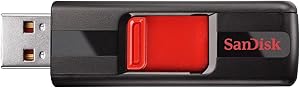
SanDisk SDCZ36-032G 32GB Cruzer USB 2.0 Flash Drive — Editorial Review & Use Cases
The SanDisk SDCZ36-032G (commonly the SanDisk Cruzer Blade family) is SanDisk's no-frills 32 GB USB 2.0 flash drive — designed for general file transfer, document storage, OS install media, and bootable utility drives. Per SanDisk's official Cruzer Blade product page, the drive supports USB 2.0 (480 Mbps theoretical, ~10-15 MB/s real-world read speeds on a typical system), works across Windows / macOS / Linux without drivers, and is widely deployed as the cheapest reliable name-brand USB stick for routine use.
What the SDCZ36-032G Specifically Wins
- SanDisk reliability at commodity pricing — vs no-name USB sticks (which routinely die or lose data), the SanDisk Cruzer line carries SanDisk's manufacturing controls + warranty. The price premium over generic Chinese drives is modest; the failure-rate reduction is meaningful
- Universal driver-less compatibility — Windows 7+ / macOS / Linux / Chrome OS / Android (with USB-OTG) all mount the drive instantly via mass-storage class
- Compact form factor — small enough to leave permanently in a laptop / Surface / Macbook USB-A port (when the device has USB-A)
- Suitable for bootable utility purposes — works with Rufus / balenaEtcher / Mac's createinstallmedia for OS install media; works for memtest / SystemRescueCd / Hiren's BootCD purposes
- 5-year warranty per SanDisk's warranty page
- Reusable / rewritable thousands of times — Cruzer flash is rated for typical TLC NAND wear cycles, far exceeding most user-write volumes
Where the SDCZ36-032G Specifically Fits
- Bootable Windows / Linux / macOS install media for OS deployment / recovery
- Document storage for student / classroom use where files move between school + home
- Backup of important documents / photos as an auxiliary store alongside cloud sync
- Software / driver portable storage for IT / repair workflows (carrying utilities across machines)
- BIOS / firmware update media — many motherboards require flashing from USB 2.0 sticks
- Sneakernet file sharing in environments without reliable cloud (job sites, photographers in the field, etc.)
- Memory card alternative for older devices that read USB but not SD
- Audio / podcast file delivery to clients on locked-down corporate networks
Honest Limits Buyers Should Know
- USB 2.0 only — slow vs USB 3 / 3.1 / 3.2 alternatives. Real-world read speeds top out around 10-15 MB/s. Reading or writing larger files (video, full backups) is markedly slow vs USB 3 drives (~100 MB/s reads). For video / photo / large-file work, step up to a USB 3.x drive (SanDisk Ultra Fit USB 3.1, Kingston DataTraveler 3.2, etc.)
- Slow write speeds (~5-8 MB/s typical). Filling a 32 GB drive can take 1-2 hours. For frequent-write workflows, USB 3 is markedly faster
- 32 GB capacity is small for modern workloads. Single-file high-resolution video can exceed 32 GB. For backups / archive, larger capacities (64 GB / 128 GB / 256 GB) work better
- No encryption out of the box. Sensitive data needs BitLocker (Windows) / FileVault (Mac) / VeraCrypt (cross-platform) container on top of the drive. Hardware-encrypted USB drives are separate SKUs (SanDisk Ultra Backup AES, Kingston IronKey)
- Not waterproof / drop-rated. Standard plastic body — survive light incidental drops + dust but isn't shock-rated. For rugged use, step to LaCie Rugged USB or SanDisk Extreme PRO USB-C SSD
- USB-A connector — modern USB-C-only laptops need an adapter. Verify host laptop port type before buying; USB-A-to-USB-C dongles add ~$5 and bag-clutter
- Reaching speed-cap on USB 2.0 host. Plugging the drive into a USB 3 port on the host won't make it faster — the drive is the limit, not the bus
Where Buyers Should Look Elsewhere
- Video / photo / large-file workflows → SanDisk Ultra Fit USB 3.1 (compact), SanDisk Extreme Pro USB 3.2, Kingston DataTraveler USB 3.2 — 5-10× faster real-world speeds
- USB-C laptops / iPad workflows → SanDisk Ultra USB Type-C, Samsung BAR Plus Type-C, or USB-C-native drives
- High-capacity / 1 TB+ portable storage → portable SSD (SanDisk Extreme Portable SSD, Samsung T7) or external HDD (Seagate / WD Passport) instead of flash drive
- Encrypted / secure storage → Kingston IronKey, Apricorn Aegis, SanDisk Ultra Backup AES
- Rugged / waterproof drives → LaCie Rugged USB, Samsung T7 Shield
- Bootable media that's faster to write → USB 3 drive, eliminating the multi-hour Linux ISO write time
Sources & Citations
- Western Digital (SanDisk), "SanDisk Cruzer Blade USB 2.0 product page," westerndigital.com (accessed 2026-05-18)
- Tom's Hardware, "USB flash drive coverage and benchmarks," tomshardware.com (accessed 2026-05-18)
- AnandTech, "USB drive performance + flash storage coverage," anandtech.com (accessed 2026-05-18)
Last verified: 2026-05-18

