
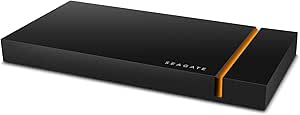
Seagate FireCuda Gaming SSD USB-C (500GB / 1TB / 2TB) — Editorial Review & Use Cases
The Seagate FireCuda Gaming SSD family (STJP500400 / STJP1000400 / STJP2000400) is Seagate's external NVMe-based USB 3.2 Gen2 portable SSD line — RGB-lit aluminum chassis with built-in NVMe SSD, USB-C connection, and ~1,050 MB/s sustained throughput. Per Seagate's official FireCuda Gaming SSD product page, the line is positioned for PC + console gaming external storage where speed + capacity + RGB aesthetics meet — explicitly compatible with PS5 (via Game Boost rules + verification) and Xbox Series X/S as expanded storage, plus PC + Mac general-purpose use.
What the FireCuda Gaming SSD Specifically Wins
- USB 3.2 Gen2 (10 Gbps) — 1,050 MB/s real-world sustained throughput — significantly faster than typical USB 3.0 (5 Gbps / 500 MB/s) external HDDs. Game load times match internal NVMe on supported consoles + PCs
- NVMe-class internal SSD in a portable enclosure — no SATA bottleneck; the FireCuda's internal SSD uses NVMe protocol throughout
- RGB lighting (PRISM Smart Lighting) controlled via Seagate Toolkit — customizable colors, patterns, and sync to Razer Chroma / Seagate brand lighting ecosystem
- Compact aluminum chassis — fits in a pocket; sturdy enough for travel use
- USB-C connection — modern standard; works with Mac M1/M2/M3/M4 + Windows + PC + Steam Deck + iPad Pro / Air USB-C + iPhone 15+
- Console-friendly — Xbox Series X/S supports for expanded game storage; PS5 supports for compatible game install + load (verify PS5 Game Boost compatibility on Seagate's PS5 compatibility page)
- Bundled software — Seagate Toolkit for drive management, Lyve Cloud trial for cloud backup
- 3-year limited warranty + 3-year Rescue data recovery service
- Drop / shock resistance per IK04 rating — survives typical travel + transport
Where the FireCuda Gaming SSD Specifically Fits
- Console gamers expanding storage — PS5 / Xbox Series X / S users needing more game install space
- Portable gaming library — bring 500GB / 1TB / 2TB of games between home + LAN parties + travel
- RGB-themed gaming PC builds — matches aesthetic with PRISM controlled lighting
- Twitch / YouTube streamers needing fast external storage for clip + replay archive
- Steam Deck owners — external SSD for expanded game library (slower than internal but faster than microSD)
- Travel gaming on laptop / handheld with USB-C support
- iPad Pro M4 / iPad Air M2/M3 USB-C external storage for photo/video work
- Mac M1/M2/M3/M4 external NVMe storage for video editing scratch / Lightroom catalog
- Multi-device file transfer — fast USB-C compatible with most modern devices
- 4K video file ingest from cameras with USB-C for in-field offload
Honest Limits Buyers Should Know
- USB 3.2 Gen2 10 Gbps ceiling — not Thunderbolt 4 / USB4 40 Gbps. ~1,050 MB/s sustained is the practical limit. For Thunderbolt 4 / USB4 speeds (~3,000 MB/s) use Sony SF-G Pro Blade, ProGrade USB4, or external Thunderbolt 4 NVMe enclosures
- PS5 verification required for full Game Boost. Seagate publishes a PS5 compatibility list; not every game runs PS5-native-speed from external. Most games run from internal-only requirement; the FireCuda works for compatible games + storage
- Game install location matters. Xbox Series X/S install games from FireCuda as expanded storage (works fine); PS5 install + run compatible games (works fine for most older PS4-era + many PS5 games)
- RGB requires Seagate Toolkit software. No standalone RGB controls — needs USB connection + Windows/Mac software for full RGB customization. Some users prefer plain enclosures
- Limited internal-SSD upgrade path. The internal NVMe is not user-replaceable. If the SSD fails, the whole enclosure is replaced (not just the SSD)
- 3-year warranty shorter than some alternatives. SanDisk Extreme Portable / Samsung T7 carry 5-year warranties. FireCuda's 3-year is industry-mid-tier
- Aluminum chassis runs warm under sustained heavy use. Long video edits or sustained writes can heat the chassis to 50-60°C. Heat dissipates well; performance throttling unusual
- RGB doesn't work in console UI. RGB lights remain whatever-last-set when connected to PS5/Xbox; can't be reconfigured from the console
- Storage capacity costs slightly more vs commodity portable SSDs. Premium pays for RGB + Seagate brand + console certification
Where Buyers Should Look Elsewhere
- Thunderbolt 4 / USB4 for 3,000+ MB/s → Sony Tough SF-G Pro Blade, ProGrade USB4, Akitio Thunder3 + custom NVMe
- SanDisk Extreme Portable SSD → 5-year warranty, similar speeds, no RGB (cheaper)
- Samsung T7 / T9 → 5-year warranty, optional fingerprint security (T7 Shield), no RGB
- WD My Passport SSD → mid-tier portable SSD with WD ecosystem integration
- Steam Deck internal expansion (2230 form factor) → WD SN770M / Sabrent Rocket 2230 (internal install, fastest option)
- Pure budget portable SSD → SanDisk Extreme Portable v1 (older generation, lower speed, cheaper)
- Mac Time Machine target → desktop USB drive (HDD or SSD) for backup over Wi-Fi or USB
- Rugged / waterproof portable → SanDisk Extreme PRO Portable SSD V2, LaCie Rugged SSD Pro
Sources & Citations
- Seagate, "FireCuda Gaming SSD product page," seagate.com (accessed 2026-05-18)
- Tom's Hardware, "Seagate FireCuda Gaming SSD review," tomshardware.com (accessed 2026-05-18)
- AnandTech, "External NVMe SSD comparison and coverage," anandtech.com (accessed 2026-05-18)
- TechPowerUp, "FireCuda Gaming SSD reviews and PS5 compatibility coverage," techpowerup.com (accessed 2026-05-18)
Last verified: 2026-05-18

