

Sony
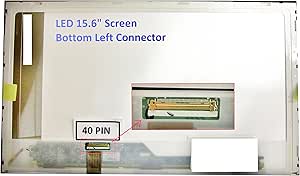
Sony SONY VAIO VPCEE41FX 15.6" Laptop Screen
Direct-fit 15.6" LED replacement screen restores WXGA HD visuals to your Sony VAIO VPCEE41FX laptop.
View price on Amazon
Affiliate Disclosure: Studio Supplies may earn a commission from qualifying purchases made through links on this page, at no additional cost to you. This helps support our editorial team.
Notice a mistake? Let Us Know
Overview
Breathe New Life into Your Laptop Screen
Revitalize your SONY VAIO VPCEE41FX laptop with this replacement LED screen. Enjoy crisp visuals on a 15.6-inch display designed to bring your content to life.
Key Features:
- Designed specifically for the SONY VAIO VPCEE41FX model.
- 15.6-inch LED screen for vibrant display quality.
- The LED connector is positioned on the bottom left (when viewing the back).
Specifications:
- Compatibility: SONY VAIO VPCEE41FX
- Screen Size: 15.6 inches
- Connector Placement: Bottom Left (rear view)
- Type: LED
- Resolution: WXGA HD
Pros & Cons
👍 Pros
- Designed as an exact-fit replacement for the VPCEE41FX, eliminating guesswork on compatibility.
- LED backlighting provides even illumination while consuming less power than CCFL alternatives.
- Standard bottom-left connector placement matches the original panel for straightforward cable connection.
- 15.6-inch WXGA HD resolution maintains the laptop's native display quality.
👎 Cons
- Only compatible with the Sony VAIO VPCEE41FX, limiting reuse if you change laptops.
- WXGA HD resolution is lower than Full HD, so the replacement does not offer a resolution upgrade.
- Installation requires disassembly of the laptop bezel and careful handling of the ribbon cable.
- No installation hardware or tools are included with the screen.
Frequently Asked Questions
Is this screen compatible with other Sony VAIO models besides the VPCEE41FX?
This screen is designed specifically for the Sony VAIO VPCEE41FX. Other VAIO models may use different connectors or mounting configurations, so compatibility is not guaranteed.
Where is the LED connector located on this replacement screen?
The LED connector is positioned on the bottom left when viewing the back of the screen, matching the VPCEE41FX's original cable routing.
What resolution does this replacement screen support?
It supports WXGA HD resolution, which is the native resolution of the original VPCEE41FX display.
Does this screen come with installation tools or instructions?
The listing includes the replacement screen panel itself. You will typically need a small Phillips screwdriver and a plastic pry tool to remove the bezel and swap the panel.
Is this an LED-backlit or CCFL-backlit screen?
This is an LED-backlit screen, which is thinner, more energy-efficient, and produces less heat than older CCFL panels.
Related Products


