



Sony
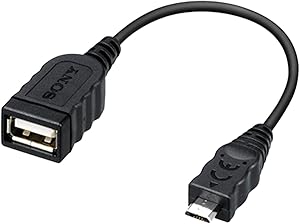
Sony VMCUAM2 USB Adapter Cable - Multi Terminal Connection
★★★★★
Connect your Sony camcorder's Multi Terminal port to any standard USB device for quick, cable-free file transfers.
Check availability
Affiliate Disclosure: Studio Supplies may earn a commission from qualifying purchases made through links on this page, at no additional cost to you. This helps support our editorial team.
Notice a mistake? Let Us Know
Overview
Key Features
Sony VMC-UAM2 USB Adapter Cable
Specifications
Type
USB Adapter Cable
Connector 1
USB Multi Terminal
Connector 2
USB Type-A Plug
Function
Direct Copy from Camcorder to PC or Hard Drive
Color
Black
Frequently Asked Questions
Which Sony camcorders are compatible with the VMCUAM2 adapter cable?
It is compatible with Sony camcorders that feature a USB Multi Terminal port. Check your camcorder's specifications or manual to confirm it uses a Multi Terminal connection rather than a standard USB or micro-USB port.
Can I use this cable to connect my camcorder directly to an external hard drive?
Yes, the VMCUAM2 supports Sony's Direct Copy function, which allows you to transfer video files from a compatible camcorder directly to a USB hard drive without needing a computer.
Does this cable support charging the camcorder?
No, this is a data adapter cable designed for file transfer via the Direct Copy feature. It does not provide power or charging functionality.
What type of USB connector is on the non-camcorder end?
The other end features a standard USB Type-A plug, which connects to PCs, external hard drives, and other devices with a USB-A port.
How long is this adapter cable?
Sony does not list a specific length in the product description. The VMCUAM2 is a short adapter cable designed for direct device-to-device connection rather than extended reach.
Related Products


