



Thermaltake
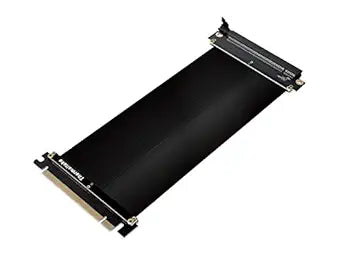
Thermaltake AC-053-CN1OTN-C1 PCI-E 3.0 Riser Cable
This 200mm PCI-E 3.0 x16 riser cable relocates your GPU with full-bandwidth signaling and EMI shielding intact.
View price on Amazon
Affiliate Disclosure: As an Amazon Associate, Studio Supplies earns from qualifying purchases made through links on this page, at no additional cost to you. This helps support our editorial team.
Notice a mistake? Let Us Know
Overview
Key Features
Compatible with most GPU/motherboard components
Redesigned for improved compatibility
PCI E x16 3.0 compatible with 200 millimeter cable length
EMI shielded design reduces interference.Avoid using unofficial software
Specifications
PCI-E Version
3.0
Cable Length
200 millimeter
Compatibility
Most GPU/motherboard components
Features
EMI shielded design
Frequently Asked Questions
Does a 200mm PCIe 3.0 x16 riser cable introduce measurable latency or bandwidth loss compared to a direct slot connection?
In practice, no. PCIe 3.0 x16 provides 16GB/s of bidirectional bandwidth. At 200mm cable length, signal integrity is maintained within PCIe 3.0 spec for x16 electrical connections, and no benchmark-measurable throughput degradation has been documented at this length in standard riser configurations. Signal quality degrades at longer runs (typically 300mm+) without active signal conditioning.
Does this cable maintain full PCI-E 3.0 x16 bandwidth, or does it introduce latency or speed loss?
Yes, it maintains full PCI-E 3.0 x16 bandwidth. The 200mm cable length is short enough to preserve signal integrity at Gen 3 speeds, avoiding the degradation that longer, lower-quality risers can introduce.
Will the EMI shielding on this cable actually make a measurable difference inside my case?
It depends on your build density. The shielded design reduces radiated interference from adjacent components — relevant if you have multiple GPUs, NVMe drives, or high-frequency components in close proximity.
Is this riser cable compatible with PCIe 4.0 GPUs?
PCIe is backward compatible — a PCIe 4.0 GPU will physically seat and operate in a PCIe 3.0 x16 riser, but the connection will negotiate down to PCIe 3.0 speeds (16GB/s). For most current consumer GPUs, PCIe 3.0 x16 bandwidth is not a meaningful bottleneck in gaming workloads.
What does EMI shielding on this riser cable actually protect against?
The EMI shielding — a conductive braid or foil layer around the cable — attenuates electromagnetic interference emitted by the cable and reduces susceptibility to interference from nearby components (power supplies, fan motors). Without shielding, a riser cable running near a high-current PSU cable can introduce noise on the PCIe signal lines, which can manifest as stability issues or device recognition failures.
Is 200mm long enough for most open-frame or vertical GPU mount scenarios?
For most ATX vertical GPU bracket kits, 200mm is the standard sweet spot. It provides enough reach for mid-tower vertical mounts without the excessive cable sag or bend stress that longer risers suffer from.
Does this cable support SLI or Crossfire multi-GPU configurations?
Yes, Thermaltake designed this cable explicitly for SLI/Crossfire setups, meaning it's been validated for the signal demands of paired GPU configurations, not just single-card installations.
What case form factors and GPU configurations is this riser designed for?
The Thermaltake riser is designed primarily for ATX cases where a GPU is being vertically mounted or repositioned for aesthetic or airflow reasons, and for SLI/Crossfire dual-GPU configurations where physical spacing requires a flexible cable path. The 200mm length suits mid-tower vertical mount applications — larger cases with more distance between the motherboard slot and the GPU bracket may require a longer cable.
Does this riser cable require any special BIOS settings or driver configuration?
No. PCIe riser cables are electrically transparent — the GPU appears to the system identically to a direct slot installation. No BIOS changes, driver updates, or software configuration are required. Some UEFI implementations have a PCIe slot speed setting (Auto/Gen1/Gen2/Gen3) that may need to be set to Gen3 or Auto if the system defaults to a lower generation.
What motherboard and GPU compatibility does this riser support?
The cable supports AMD and Intel motherboards with a standard PCI-E x16 slot. The x16 connector fits any full-size discrete GPU — NVIDIA or AMD — using a standard PCIe edge connector.
Related Products

