

Toshiba
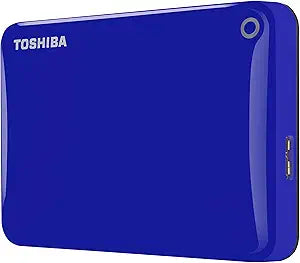
Toshiba HDTC805EL3AA Canvio Connect II 500GB USB 3.0 Drive
★★★★★
USB 3.0USB 2.0
Stay Connected On-the-Go with Portable Storage Introducing the Toshiba Canvio Connect II 500GB Portable External Hard Drive. Access your files from anywhere with this smart storage solution. It not only provides ample portable storage but also turns your PC into a personal cloud server for easy ...
Check availability
Affiliate Disclosure: Studio Supplies may earn a commission from qualifying purchases made through links on this page, at no additional cost to you. This helps support our editorial team.
Notice a mistake? Let Us Know
Overview
Stay Connected On-the-Go with Portable Storage
Introducing the Toshiba Canvio Connect II 500GB Portable External Hard Drive. Access your files from anywhere with this smart storage solution. It not only provides ample portable storage but also turns your PC into a personal cloud server for easy remote access.
Specifications:- Brand: Toshiba
- Model: HDTC805EL3AA
- Storage Capacity: 500GB
- Interface: USB 3.0
- Form Factor: 2.5 Inch
- Color: Blue
Key Features
Portable external hard drive with 500GB capacity
Ultra fast transfer speeds with USB 3.0 (USB 2.0 compatible)
Auto-backup software
NTFS driver for Mac included
Specifications
Brand
Toshiba
Model
HDTC805EL3AA
Product Name
Canvio Connect II
Capacity
500GB
Interface
USB 3.0
Backward Compatibility
USB 2.0 compatible
Included Software
Auto-backup software
Mac Compatibility
NTFS driver for Mac included
Form Factor
Portable external hard drive
Pros & Cons
👍 Pros
- Offers a 500GB capacity, providing sufficient space for backing up important documents, photos, and media files.
- Features ultra-fast transfer speeds with USB 3.0 connectivity, significantly reducing the time needed to move large files.
- Backward compatible with USB 2.0, ensuring it can connect to a wider range of older computers and devices.
- Includes auto-backup software, simplifying the process of regularly securing your data without manual intervention.
- Comes with an NTFS driver for Mac, allowing seamless plug-and-play functionality and read/write access for Mac users without reformatting.
👎 Cons
- The 500GB capacity might be considered small for users requiring extensive storage for large media libraries or numerous game installations.
- As a portable hard drive, it may not offer the same level of ruggedness or shock protection as purpose-built external drives designed for extreme conditions.
- Specific performance metrics like RPM or cache size are not provided, which could influence its speed beyond the USB 3.0 interface.
- The auto-backup software, while convenient, might have limitations or compatibility issues with certain operating systems or user preferences.
- Being a hard disk drive (HDD), it will generally be slower and more susceptible to physical shock compared to solid-state drives (SSDs).
Frequently Asked Questions
What is the storage capacity of the Toshiba Canvio Connect II drive?
The Toshiba Canvio Connect II offers a storage capacity of 500GB, suitable for various data backup needs.
What type of USB connection does this external hard drive use?
This drive features a USB 3.0 interface for ultra-fast transfer speeds and is also backward compatible with USB 2.0 ports.
Does the Toshiba Canvio Connect II include any backup software?
Yes, it comes with auto-backup software to help users easily secure their data.
Can this hard drive be used with Mac computers?
Yes, an NTFS driver for Mac is included, allowing Mac users to seamlessly use the drive without needing to reformat it.
Is this a solid-state drive (SSD) or a traditional hard disk drive (HDD)?
The Toshiba Canvio Connect II is a portable external hard drive, typically implying an HDD, though specific internal technology isn't detailed.
How portable is this external hard drive?
It is described as a portable external hard drive, suggesting a compact design for easy transport.
What does "USB 2.0 compatible" mean for this drive?
"USB 2.0 compatible" means the drive will function with older USB 2.0 ports, albeit at slower transfer speeds than with USB 3.0.
Related Products


