

Toshiba
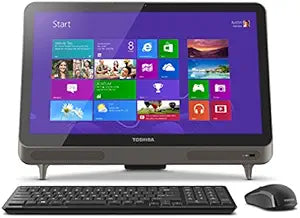
Toshiba PQQ19U-009004 LX835 All-in-One 23-Inch Desktop
★★★★★
i7-3630QM
Experience All-in-One Convenience with the Toshiba LX835-D3380 Desktop The Toshiba LX835-D3380 is a stylish and space-saving all-in-one desktop computer. Combining a vibrant 23-inch display with integrated components, this desktop offers a clean and clutter-free computing experience. Perfect for ...
Check availability
Affiliate Disclosure: Studio Supplies may earn a commission from qualifying purchases made through links on this page, at no additional cost to you. This helps support our editorial team.
Notice a mistake? Let Us Know
Overview
Experience All-in-One Convenience with the Toshiba LX835-D3380 Desktop
The Toshiba LX835-D3380 is a stylish and space-saving all-in-one desktop computer. Combining a vibrant 23-inch display with integrated components, this desktop offers a clean and clutter-free computing experience. Perfect for home or office use, the LX835 provides reliable performance for everyday tasks.
Specifications:
- Type: All-in-One Desktop
- Display Size: 23-Inch
- Color: Silver/Black
Key Features
Intel Core i7-3630QM 2.40 GHz
8 GB DDR3
2000 GB 5400 rpm Hard Drive
23.0-Inch Screen, NVIDIA GeForce GT 630M, featuring 2GB of DDR3 discrete graphics memory
Windows 8
Specifications
Brand
Toshiba
Model Name
LX835
Processor
Intel Core i7-3630QM
Processor Speed
2.40 GHz
RAM
8 GB DDR3
Storage
2000 GB 5400 rpm Hard Drive
Screen Size
23.0-Inch
Graphics Card
NVIDIA GeForce GT 630M
Graphics Memory
2GB DDR3
Operating System
Windows 8
Frequently Asked Questions
What processor is in the Toshiba LX835 All-in-One Desktop?
The Toshiba LX835 All-in-One Desktop is powered by an Intel Core i7-3630QM processor running at 2.40 GHz.
How much RAM does this Toshiba desktop have?
This Toshiba desktop comes with 8 GB of DDR3 RAM, providing ample memory for multitasking.
What is the storage capacity and type for this computer?
The Toshiba LX835 includes a 2000 GB 5400 rpm Hard Drive for storage.
What graphics card is featured in this desktop?
This desktop is equipped with an NVIDIA GeForce GT 630M graphics card, which has 2GB of DDR3 discrete graphics memory.
What operating system is pre-installed on the Toshiba LX835?
The Toshiba PQQ19U-009004 LX835 All-in-One Desktop comes with Windows 8 pre-installed.
What is the screen size of the Toshiba LX835?
The Toshiba LX835 All-in-One Desktop features a 23.0-inch screen.
Related Products


