



TP-Link
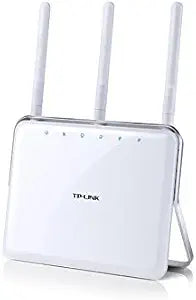
TP-Link Archer C8 AC1750 Dual Band Gigabit Router
Deliver combined Wi-Fi speeds up to 1.75 Gbps across dual bands with TP-Link's beamforming-equipped Archer C8 gigabit router.
View price on Amazon
Affiliate Disclosure: As an Amazon Associate, Studio Supplies earns from qualifying purchases made through links on this page, at no additional cost to you. This helps support our editorial team.
Notice a mistake? Let Us Know
Overview
Key Features
AC1750 DUAL BAND GIGABIT ROUTER IN
Specifications
Wi-Fi Speed
AC1750 (up to 1.75 Gbps combined)
Wireless Standard
802.11ac/a/b/g/n
Frequency Bands
2.4 GHz and 5 GHz
Antennas
3 Dual Band Detachable
Ethernet Ports
4 Gigabit
USB Ports
2
Features
Beamforming, Guest Network, IPv6 Support, WPS Button
Frequently Asked Questions
What wireless speeds does the Archer C8 provide on each band?
The Archer C8 delivers up to 450 Mbps on the 2.4 GHz band and up to 1300 Mbps on the 5 GHz band, for a combined throughput of 1.75 Gbps.
Can I connect USB storage devices to the Archer C8 for network file sharing?
Yes, the router has two USB ports that let you plug in external hard drives or flash drives and share files across your network or access them remotely.
Are the antennas on the Archer C8 removable?
Yes, all three dual-band antennas are detachable, which makes the router easier to store or transport and allows for antenna upgrades if desired.
Does the Archer C8 support a guest network?
Yes, you can set up a separate guest network so visitors get internet access without being able to see your main network's shared files and devices.
What is beamforming and how does the Archer C8 use it?
Beamforming focuses the Wi-Fi signal toward connected devices rather than broadcasting equally in all directions, improving range and connection stability for the Archer C8's clients.
Related Products


