



TP-Link
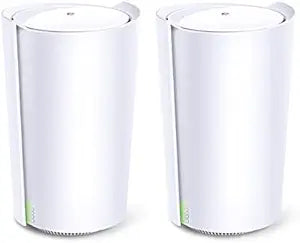
TP-Link AX5700 Deco Tri-Band Mesh WiFi 6 System
★★★★★
WiFi 6
Whole-home tri-band mesh WiFi 6 system with AI-driven optimization and support for up to 200 connected devices.
$249.99*$275.95Save 9%
Check availability
*Price sourced from Amazon.com. Last updated:Jun 04, 2026.Price and availability are subject to change.
Affiliate Disclosure: Studio Supplies may earn a commission from qualifying purchases made through links on this page, at no additional cost to you. This helps support our editorial team.
Notice a mistake? Let Us Know
Overview
Key Features
AX5700 Tri-Band WiFi: Boosts overall speeds up to an incredible 5700 Mbps
AI-Driven Mesh: Intelligently learns the network environment to provide ideal WiFi unique to your home
Smart Antennas: Establish a stronger backhaul to boost coverage and improve wireless connections
Connect More Devices: Connect up to 200 devices without dragging down performance
Specifications
Brand
TP-Link
Model
AX5700 (Deco)
WiFi Standard
WiFi 6 (802.11ax)
Band Configuration
Tri-Band
Maximum Speed
Up to 5700 Mbps (aggregate)
Mesh Technology
AI-Driven Mesh
Antenna Type
Smart Antennas
Device Capacity
Up to 200 devices
Security
TP-Link HomeShield
Setup
Deco App
Pros & Cons
👍 Pros
- Tri-band design with a dedicated wireless backhaul keeps device traffic and mesh communication on separate bands
- Tri-band architecture dedicates one band to backhaul, preserving full speeds for connected devices.
- AI-driven mesh continuously adapts to your home's layout and usage patterns for optimized coverage.
- AI-Driven Mesh intelligently adapts to your home environment for optimized coverage and performance
- Supports up to 200 connected devices, accommodating large smart-home setups
- Supports up to 200 simultaneous device connections without performance degradation.
- Smart antennas strengthen the wireless backhaul link between mesh nodes for more reliable coverage in distant rooms.
- Smart antennas strengthen mesh node connections to extend reliable coverage throughout the home
- Simple app-based setup and management through the Deco app
- Simple setup through the Deco app with guided step-by-step instructions.
👎 Cons
- Combined speeds of 5700 Mbps are theoretical maximums shared across all three bands, not available to a single device
- Requires the Deco smartphone app for initial setup with no web-based admin interface available.
- Advanced HomeShield security features require a paid subscription beyond the basic free tier.
- Tri-band mesh units tend to be more expensive than dual-band alternatives
- Requires multiple units for full whole-home coverage, and additional units are sold separately depending on the pack purchased
- Tri-band performance benefits are most noticeable in multi-unit setups, making a single unit less cost-effective.
- Large physical footprint compared to compact single-unit routers.
- The Deco app is required for most configuration tasks, limiting management options without a smartphone
Frequently Asked Questions
What does tri-band mean on the Deco AX5700?
Tri-band means the system operates on three separate wireless bands simultaneously — one 2.4 GHz band and two 5 GHz bands. The dedicated third band serves as a wireless backhaul between Deco units, keeping your device connections fast and uncongested.
How many Deco AX5700 units come in the system?
The Deco AX5700 is sold as a multi-pack mesh system. Check the specific listing to confirm whether it includes a 2-pack or 3-pack, as coverage area varies accordingly.
What does the tri-band design do compared to dual-band mesh systems?
The third band acts as a dedicated wireless backhaul between Deco units, so your devices get the full speed of the remaining two bands without sacrificing throughput for inter-node communication.
How many devices can the TP-Link Deco AX5700 support?
The Deco AX5700 system supports up to 200 connected devices without significant performance degradation, making it well-suited for households with many smart home gadgets, phones, tablets, and computers.
What is the AI-Driven Mesh feature on the Deco AX5700?
The AI-Driven Mesh technology continuously learns your network environment and usage patterns, then automatically optimizes routing, band selection, and connections to deliver the best possible WiFi performance for your specific home layout.
Does the Deco AX5700 require a separate router or modem?
You still need a modem from your internet provider, but the Deco AX5700 replaces your existing router entirely. It functions as both router and access point.
What is TP-Link HomeShield?
HomeShield is TP-Link's built-in network security suite that provides real-time threat protection, parental controls, and network usage reports. A basic tier is included free, with a premium subscription available for advanced features.
How do you set up the TP-Link Deco AX5700?
Setup is handled through the free Deco app, which walks you through the process step by step. You connect the first unit to your modem, follow the app instructions, and then add additional units to extend coverage.
Does the Deco AX5700 include security features?
Yes, the system includes TP-Link HomeShield, which provides network security features to help protect connected devices from online threats.
Can I manage the Deco AX5700 without the app?
Initial setup requires the Deco smartphone app. Ongoing management can also be done through the app, which provides network status, device lists, and parental controls. There is no traditional web-based admin panel.
Related Products


