



TP-Link
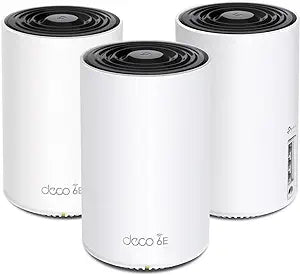
TP-Link Deco XE75 AXE5400 Tri-Band WiFi 6E Mesh System
WiFi 6E's uncrowded 6 GHz band eliminates wireless congestion for up to 200 devices across 7,200 square feet of whole-home mesh coverage.
$199.95*$229.99Save 13%
View on Amazon
✓ In Stock on Amazon.com
*Price sourced from Amazon.com. Last updated:Oct 23, 2026.Price and availability are subject to change — details.
Affiliate Disclosure: As an Amazon Associate, Studio Supplies earns from qualifying purchases made through links on this page, at no additional cost to you. This helps support our editorial team.
Notice a mistake? Let Us Know
Overview
Specifications
Model
Deco XE75
WiFi Standard
WiFi 6E (802.11ax)
Band Configuration
Tri-Band (2.4 GHz + 5 GHz + 6 GHz)
Maximum Aggregate Speed
AXE5400
Coverage Area
Up to 7,200 sq ft
Maximum Connected Devices
Up to 200
Mesh Technology
AI-Driven Mesh
Security
TP-Link Home Shield
6 GHz Band
Yes
Frequently Asked Questions
What does WiFi 6E actually add over WiFi 6, and will my existing devices use it?
WiFi 6E adds access to the 6 GHz band — a spectrum range that current WiFi 6 and older devices cannot use. This matters because the 6 GHz band is essentially uncrowded: there are no legacy devices competing for it, which translates to lower interference and more consistent latency. However, only WiFi 6E-capable devices (released 2021 and later) can connect to the 6 GHz band; all your existing WiFi 5 and WiFi 6 devices continue to work on the 2.4 GHz and 5 GHz bands as before.
How does the AXE5400 tri-band speed rating break down across the three bands?
The AXE5400 designation refers to the combined theoretical throughput across all three bands. In practice, the 6 GHz band delivers the highest single-band speeds for capable client devices, while the 2.4 GHz band provides range and compatibility for IoT and smart home devices. The 5 GHz band handles the bulk of mid-tier client traffic. One of the three bands is often dedicated to mesh backhaul between nodes — maintaining fast inter-node communication that doesn't steal bandwidth from client devices.
How many nodes come in this system, and how should they be placed for 7,200 sq ft coverage?
The Deco XE75 is sold in packs (typically 2-node or 3-node configurations). A 3-node system is recommended for the stated 7,200 sq ft coverage figure. Placement matters: nodes should be positioned to overlap coverage zones rather than placed at maximum separation, with at least one node wired via Ethernet to your modem for best backhaul performance.
Does the Deco XE75 support wired Ethernet backhaul between nodes?
Yes — connecting nodes via Ethernet backhaul is supported and strongly recommended for maximum performance. Wired backhaul eliminates the bandwidth penalty of wireless inter-node communication and results in notably lower latency and higher throughput to client devices compared to wireless-only mesh deployment. Each node has Ethernet ports that support this configuration.
What parental controls and security features does TP-Link Home Shield provide?
TP-Link Home Shield provides network-level content filtering, device time scheduling, and real-time threat protection (malware, phishing, and intrusion detection) managed through the Deco app. The base tier of Home Shield is free; advanced features require a subscription. The system also supports VLAN segmentation for isolating IoT devices from trusted devices on the same network.
Related Products


